前回作成したOCI環境にDRGを追加し、オンプレとBGPで経路交換を行います。
Azure、AWSと同じ条件で接続してみましたが、OCIはIPSecを無料で使えますが、経路制御は難易度が高い感じがしました。

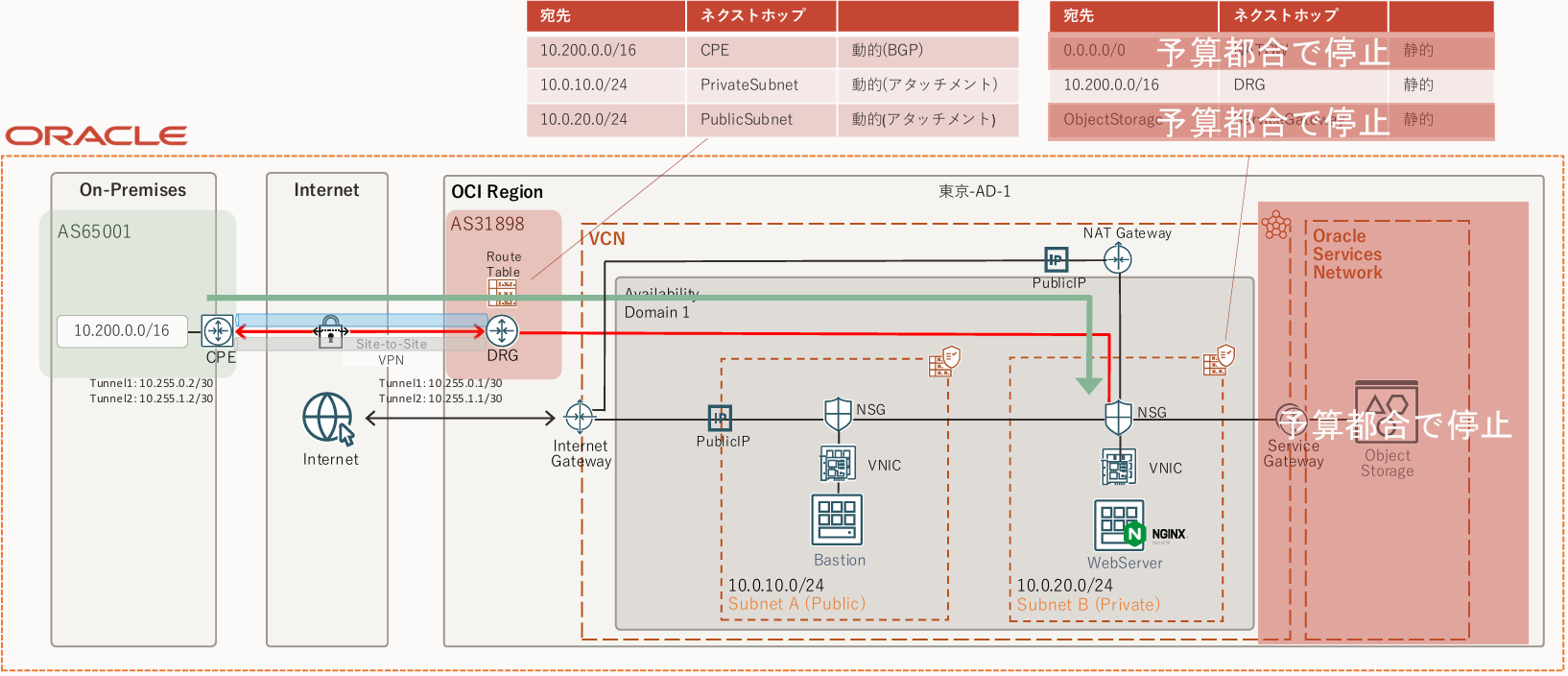
NW構成図
Azure、AWSの時同様、オンプレ側でVPN接続する機器は家で眠っていたFortigate 50EをVPN接続専用機として利用しました。
検証費用を抑えるため、Object StorageとNAT Gatewayは停止してます。
IPSecでトンネルを2本接続しBGPで経路交換を行い、NAT Gatewayで受信した経路はPrivate Subnetに再配布します。
OCI側はデフォルト値のプライベートAS「31898」を設定しています。
ファイル追加
TFファイル
VCN上はBGPが使えないため、静的経路を追加します。
NAT Gatewayを止めた場合、外部に出る方法がないのでDRGにDFRを向けてオンプレ経由でインターネットに出てもいいです。
~~~省略~~~

############################
# Route Table
############################
resource "oci_core_route_table" "private_rt" {
  compartment_id = var.compartment_ocid
  vcn_id         = oci_core_vcn.main.id
  display_name   = "private_rt"

  # DRG(BGP経路を設定)
  route_rules {
    destination       = var.onprem_cidr
    destination_type  = "CIDR_BLOCK"
    network_entity_id = oci_core_drg.drg.id
  }
}DRGを作成し、オンプレとIPSecでトンネルを2本作成します。
Fortigateで実績のあるフェーズ1、フェーズ2の暗号化アルゴリズム、ハッシュ関数、鍵長を指定しています。
########################
# DRG
########################
resource "oci_core_drg" "drg" {
  compartment_id = var.compartment_ocid
  display_name   = "main-drg"
}
resource "oci_core_drg_attachment" "vcn_attach" {
  drg_id = oci_core_drg.drg.id
  vcn_id = oci_core_vcn.main.id
}
data "oci_core_drg_route_distributions" "drg_route_distributions" {
  drg_id = oci_core_drg.drg.id
}

########################
# CPE(Fortigate側)
########################
# OCI側ASNは自動(デフォルト 31898)
resource "oci_core_cpe" "cpe" {
  compartment_id = var.compartment_ocid
  ip_address     = var.onprem_public_ip
  display_name   = "onprem-cpe"
}

########################
# IPSec冗長トンネル(2本)
########################
resource "oci_core_ipsec" "ipsec" {
  compartment_id = var.compartment_ocid
  cpe_id         = oci_core_cpe.cpe.id
  drg_id         = oci_core_drg.drg.id
  display_name   = "onprem-ipsec"

  static_routes = [var.onprem_cidr]
}

data "oci_core_ipsec_connection_tunnels" "tunnels" {
  ipsec_id = oci_core_ipsec.ipsec.id
}

resource "oci_core_ipsec_connection_tunnel_management" "tunnel1" {
  ipsec_id  = oci_core_ipsec.ipsec.id
  tunnel_id =  data.oci_core_ipsec_connection_tunnels.tunnels.ip_sec_connection_tunnels[0].id
  display_name = "ipsectunnel-1"

  shared_secret = var.pre_shared_secret
  ike_version   = "V2"

  routing = "BGP"

  bgp_session_info {
    customer_bgp_asn      = "65001"
    customer_interface_ip = "10.255.0.2/30"
    oracle_interface_ip   = "10.255.0.1/30"
  }

  phase_one_details {
    custom_authentication_algorithm = "SHA2_256"
    custom_encryption_algorithm  = "AES_256_CBC"
    custom_dh_group             = "GROUP14"
  }

  phase_two_details {
    custom_authentication_algorithm = "HMAC_SHA2_256_128"
    custom_encryption_algorithm  = "AES_256_CBC"
    dh_group         = "GROUP14"
  }
}

resource "oci_core_ipsec_connection_tunnel_management" "tunnel2" {
  ipsec_id  = oci_core_ipsec.ipsec.id
  tunnel_id =  data.oci_core_ipsec_connection_tunnels.tunnels.ip_sec_connection_tunnels[1].id
  display_name = "ipsectunnel-2"

  shared_secret = var.pre_shared_secret
  ike_version   = "V2"

  routing = "BGP"

  bgp_session_info {
    customer_bgp_asn      = "65001"
    customer_interface_ip = "10.255.1.2/30"
    oracle_interface_ip   = "10.255.1.1/30"
  }
  phase_one_details {
    custom_authentication_algorithm = "SHA2_256"
    custom_encryption_algorithm  = "AES_256_CBC"
    custom_dh_group             = "GROUP14"
  }

  phase_two_details {
    custom_authentication_algorithm = "HMAC_SHA2_256_128"
    custom_encryption_algorithm  = "AES_256_CBC"
    dh_group         = "GROUP14"
  }
}

output "tunnel_data" {
  value = data.oci_core_ipsec_connection_tunnels.tunnels
}
output "tunnels" {
  value = data.oci_core_ipsec_connection_tunnels.tunnels.ip_sec_connection_tunnels[1]
}
output "drg_dists_debug" {
  value = data.oci_core_drg_route_distributions.drg_route_distributions
}NSGにオンプレとWebserver間の通信を許可出します。
~~~省略~~~

variable "ingress_rules_private" {
  description = "Ingress rules"
  type = map(object({
    from_port   = number
    to_port     = number
    protocol    = string
    cidr_blocks = list(string)
    description = string
  }))
  default = {}
}
variable "egress_rules_private" {
  description = "Egress rules"
  type = map(object({
    from_port   = number
    to_port     = number
    protocol    = string
    cidr_blocks = list(string)
    description = string
  }))
  default = {}
}NSGにオンプレセグメントとの許可設定を追加します。
~~~省略~~~

# DRG接続用
onprem_public_ip = "xxx.xxx.xxx.xxx"
onprem_cidr     = "10.200.0.0/16"
pre_shared_secret   = "OCIForti_DRG" #適当

web_ingress_rules = [
  {
    protocol    = "6"
    source_type = "CIDR_BLOCK"
    source      = "10.200.0.0/16"
    min         = 80
    max         = 80
  },
  {
    protocol    = "1"
    source_type = "CIDR_BLOCK"
    source      = "10.200.0.0/16"
    min = 8 #type
    max = 0 #code
  }
]

web_egress_rules = [
  {
    protocol    = "1"
    destination_type = "CIDR_BLOCK"
    destination = "0.0.0.0/0"
    min = 8 #type
    max = 0 #code
  }
]変数定義を追加します。
# DRG接続用
variable "onprem_public_ip" {}
variable "onprem_cidr" {}
variable "pre_shared_secret" {}DRGリソースを管理できるようにInstance Principalにポリシーを追加します。
############################
# DRGを利用するためInstance Principalの認証設定(IAMポリシー作成)
############################
resource "oci_identity_policy" "drg_policy" {
  compartment_id = var.tenancy_ocid
  name           = "drg-policy"
  description    = "Allow webserver to access DRG"

  statements = [
    "Allow dynamic-group webserver-dg to manage drgs in compartment id ${var.compartment_ocid}",
    "Allow dynamic-group webserver-dg to manage vcns in compartment id ${var.compartment_ocid}",
    "Allow dynamic-group webserver-dg to manage virtual-network-family in compartment id ${var.compartment_ocid}",
    "Allow dynamic-group webserver-dg to manage ipsec-connections in compartment id ${var.compartment_ocid}",
    "Allow dynamic-group webserver-dg to manage cpes in compartment id ${var.compartment_ocid}",
    "Allow dynamic-group webserver-dg to manage all-resources in compartment id ${var.compartment_ocid}",
  ]
}Fortigate
トンネル、IPSec、BGP、ポリシーを追加します。
ここで注意しなければいけないのが、通信が発生しないとIPSecを張らないことです。
LAN側からトンネル内を通過する通信を発生させるためにポリシーで許可することで、BGPネイバーの確立ができるようになります。
config vpn ipsec phase1-interface
  edit oci-vpn-1
    set interface wan
    set ike-version 2
    set peertype any
    set proposal aes256-sha256
    set dhgrp 14
    set remote-gw xxx.xxx.xxx.xxx #OCI側IPアドレス1
    set psksecret OCIForti_DRG
  next
  edit oci-vpn-2
    set interface wan
    set ike-version 2
    set peertype any
    set proposal aes256-sha256
    set dhgrp 14
    set remote-gw xxx.xxx.xxx.xxx #OCI側IPアドレス2
    set psksecret OCIForti_DRG
  next
end

config vpn ipsec phase2-interface
  edit oci-vpn-p2-1
    set phase1name oci-vpn-1
    set proposal aes256-sha256
    set dhgrp 2 14
    set src-subnet 0.0.0.0 0.0.0.0
    set dst-subnet 0.0.0.0 0.0.0.0
  next
  edit oci-vpn-p2-2
    set phase1name oci-vpn-2
    set proposal aes256-sha256
    set dhgrp 2 14
    set src-subnet 0.0.0.0 0.0.0.0
    set dst-subnet 0.0.0.0 0.0.0.0
  next
end

config system interface
  edit "oci-vpn-1"
    set ip 10.255.0.2 255.255.255.255
    set allowaccess ping
    set type tunnel
    set remote-ip 10.255.0.1 255.255.255.252
  next
  edit "oci-vpn-2"
    set ip 10.255.1.2 255.255.255.255
    set allowaccess ping
    set type tunnel
    set remote-ip 10.255.1.1 255.255.255.252
  next
end

config router bgp
  set as 65001
  set router-id 10.201.0.1
  config neighbor
    edit 10.255.0.1
      set remote-as 31898
      set update-source "oci-vpn-1"
    next
    edit 10.255.1.1
      set remote-as 31898
      set update-source "oci-vpn-2"
    next
  end
end
config firewall address
  edit "onprem-real"
    set subnet 10.200.0.0 255.255.0.0
  next
  edit "oci-vpc"
   set subnet 10.0.20.0 255.255.255.0
  next
end

config firewall policy
    edit 1
        set name "lan-to-oci-1"
        set srcintf "lan"
        set dstintf "oci-vpn-1"
        set srcaddr "onprem-real"
        set dstaddr "oci-vpc"
        set action accept
        set schedule "always"
        set service "ALL"
    next
    edit 2
        set name "lan-to-oci-2"
        set srcintf "lan"
        set dstintf "oci-vpn-2"
        set srcaddr "onprem-real"
        set dstaddr "oci-vpc"
        set action accept
        set schedule "always"
        set service "ALL"
    next
end接続確認
Fortigate確認
IKE SA確認
Tunnel×2本接続するため、SAが2つ作成されていれば問題ありません。
# diagnose vpn ike gateway list

vd: root/0
name: oci-vpn-1
version: 2
interface: ppp1 42
addr: x.x.x.x:500 -> y.y.y.y:500
virtual-interface-addr: 10.255.0.2 -> 10.255.0.1
created: 546s ago
PPK: no
IKE SA: created 1/1  established 1/1  time 50/50/50 ms
IPsec SA: created 1/1  established 1/1  time 50/50/50 ms

  id/spi: 133401 xxxxxxxxxxxxxx/xxxxxxxxxxxxxx
  direction: initiator
  status: established 546-546s ago = 50ms
  proposal: aes256-sha256
  child: no
  SK_ei: xxxxxxxxxxxxxxxx-xxxxxxxxxxxxxxxx-xxxxxxxxxxxxxxxx-xxxxxxxxxxxxxxxx
  SK_er: xxxxxxxxxxxxxxxx-xxxxxxxxxxxxxxxx-xxxxxxxxxxxxxxxx-xxxxxxxxxxxxxxxx
  SK_ai: xxxxxxxxxxxxxxxx-xxxxxxxxxxxxxxxx-xxxxxxxxxxxxxxxx-xxxxxxxxxxxxxxxx
  SK_ar: xxxxxxxxxxxxxxxx-xxxxxxxxxxxxxxxx-xxxxxxxxxxxxxxxx-xxxxxxxxxxxxxxxx
  PPK: no
  message-id sent/recv: 2/19
  lifetime/rekey: 86400/85553
  DPD sent/recv: 00000000/00000000

vd: root/0
name: oci-vpn-2
version: 2
interface: ppp1 42
addr: x.x.x.x:500 -> z.z.z.z:500
virtual-interface-addr: 10.255.1.2 -> 10.255.1.1
created: 546s ago
PPK: no
IKE SA: created 1/1  established 1/1  time 50/50/50 ms
IPsec SA: created 1/1  established 1/1  time 50/50/50 ms

  id/spi: 133402 xxxxxxxxxxxxx/xxxxxxxxxxxxx
  direction: initiator
  status: established 546-546s ago = 50ms
  proposal: aes256-sha256
  child: no
  SK_ei: xxxxxxxxxxxxxxxx-xxxxxxxxxxxxxxxx-xxxxxxxxxxxxxxxx-xxxxxxxxxxxxxxxx
  SK_er: xxxxxxxxxxxxxxxx-xxxxxxxxxxxxxxxx-xxxxxxxxxxxxxxxx-xxxxxxxxxxxxxxxx
  SK_ai: xxxxxxxxxxxxxxxx-xxxxxxxxxxxxxxxx-xxxxxxxxxxxxxxxx-xxxxxxxxxxxxxxxx
  SK_ar: xxxxxxxxxxxxxxxx-xxxxxxxxxxxxxxxx-xxxxxxxxxxxxxxxx-xxxxxxxxxxxxxxxx
  PPK: no
  message-id sent/recv: 2/22
  lifetime/rekey: 86400/85553
DPD sent/recv: 00000000/00000000IPSec SA確認
トンネル×2本のため、2つSAが作成されていれば問題ありません。
# diagnose vpn tunnel list
list all ipsec tunnel in vd 0
------------------------------------------------------
name=oci-vpn-1 ver=2 serial=9 x.x.x.x:0->y.y.y.y:0 dst_mtu=1454
bound_if=42 lgwy=static/1 tun=intf/0 mode=auto/1 encap=none/512 options[0200]=frag-rfc  run_state=0 accept_traffic=1 overlay_id=0

proxyid_num=1 child_num=0 refcnt=14 ilast=0 olast=0 ad=/0
stat: rxp=122 txp=124 rxb=16136 txb=7811
dpd: mode=on-demand on=1 idle=20000ms retry=3 count=0 seqno=0
natt: mode=none draft=0 interval=0 remote_port=0
proxyid=oci-vpn-p2-1 proto=0 sa=1 ref=2 serial=1
  src: 0:0.0.0.0/0.0.0.0:0
  dst: 0:0.0.0.0/0.0.0.0:0
  SA:  ref=3 options=10202 type=00 soft=0 mtu=1390 expire=42352/0B replaywin=1024
       seqno=7d esn=0 replaywin_lastseq=0000007a itn=0 qat=0 hash_search_len=1
  life: type=01 bytes=0/0 timeout=42899/43200
  dec: spi=1f962ce7 esp=aes key=32 xxxxxxxxxxxxxxxxxxxxxxxxxxxxxxxxxxxxxxxxxxxxxxxxxxx
       ah=sha256 key=32 xxxxxxxxxxxxxxxxxxxxxxxxxxxxxxxxxxxxxxxxxxxxxxxxxxx
  enc: spi=8a2cade8 esp=aes key=32 xxxxxxxxxxxxxxxxxxxxxxxxxxxxxxxxxxxxxxxxxxxxxxxxxxx
       ah=sha256 key=32 xxxxxxxxxxxxxxxxxxxxxxxxxxxxxxxxxxxxxxxxxxxxxxxxxxx
  dec:pkts/bytes=122/7525, enc:pkts/bytes=124/16544
run_tally=1
------------------------------------------------------
name=oci-vpn-2 ver=2 serial=a x.x.x.x:0->z.z.z.z:0 dst_mtu=1454
bound_if=42 lgwy=static/1 tun=intf/0 mode=auto/1 encap=none/512 options[0200]=frag-rfc  run_state=0 accept_traffic=1 overlay_id=0

proxyid_num=1 child_num=0 refcnt=15 ilast=3 olast=3 ad=/0
stat: rxp=122 txp=124 rxb=16136 txb=7760
dpd: mode=on-demand on=1 idle=20000ms retry=3 count=0 seqno=0
natt: mode=none draft=0 interval=0 remote_port=0
proxyid=oci-vpn-p2-2 proto=0 sa=1 ref=2 serial=1
  src: 0:0.0.0.0/0.0.0.0:0
  dst: 0:0.0.0.0/0.0.0.0:0
  SA:  ref=3 options=10202 type=00 soft=0 mtu=1390 expire=42354/0B replaywin=1024
       seqno=7d esn=0 replaywin_lastseq=0000007a itn=0 qat=0 hash_search_len=1
  life: type=01 bytes=0/0 timeout=42901/43200
  dec: spi=1f962ce8 esp=aes key=32 xxxxxxxxxxxxxxxxxxxxxxxxxxxxxxxxxxxxxxxxxxxxxxxxxxx
       ah=sha256 key=32 xxxxxxxxxxxxxxxxxxxxxxxxxxxxxxxxxxxxxxxxxxxxxxxxxxx
  enc: spi=96dc664d esp=aes key=32 xxxxxxxxxxxxxxxxxxxxxxxxxxxxxxxxxxxxxxxxxxxxxxxxxxx
       ah=sha256 key=32 xxxxxxxxxxxxxxxxxxxxxxxxxxxxxxxxxxxxxxxxxxxxxxxxxxx
  dec:pkts/bytes=122/7526, enc:pkts/bytes=124/16496
run_tally=1
BGP受信ルート確認
トンネル経由のネットワークが2経路見えていればOKです。
Private SubnetもPublic SubnetもDRGでアタッチメントされているため経路が広告されてきています。
メトリックもASPathもついていないのでECMP設定を入れてもいいですね。
# get router info bgp network
BGP table version is 6, local router ID is 10.201.0.1
Status codes: s suppressed, d damped, h history, * valid, > best, i - internal,
              S Stale
Origin codes: i - IGP, e - EGP, ? - incomplete

   Network          Next Hop            Metric LocPrf Weight RouteTag Path
*  10.0.10.0/24     10.255.0.1               0             0        0 31898 i <-/->
*>                  10.255.1.1               0             0        0 31898 i <-/1>
*  10.0.20.0/24     10.255.0.1               0             0        0 31898 i <-/->
*>                  10.255.1.1               0             0        0 31898 i <-/1>
*> 10.200.0.0/16    0.0.0.0                       100  32768        0 i <-/1>

Total number of prefixes 3OCI確認
GUI上の接続状態を確認します。
AWSやAzureよりも確認できる項目が多い印象です。
IPSec接続状況
サイト間VPNでIPSec及びBGPステータスが稼働中であれば正常です。
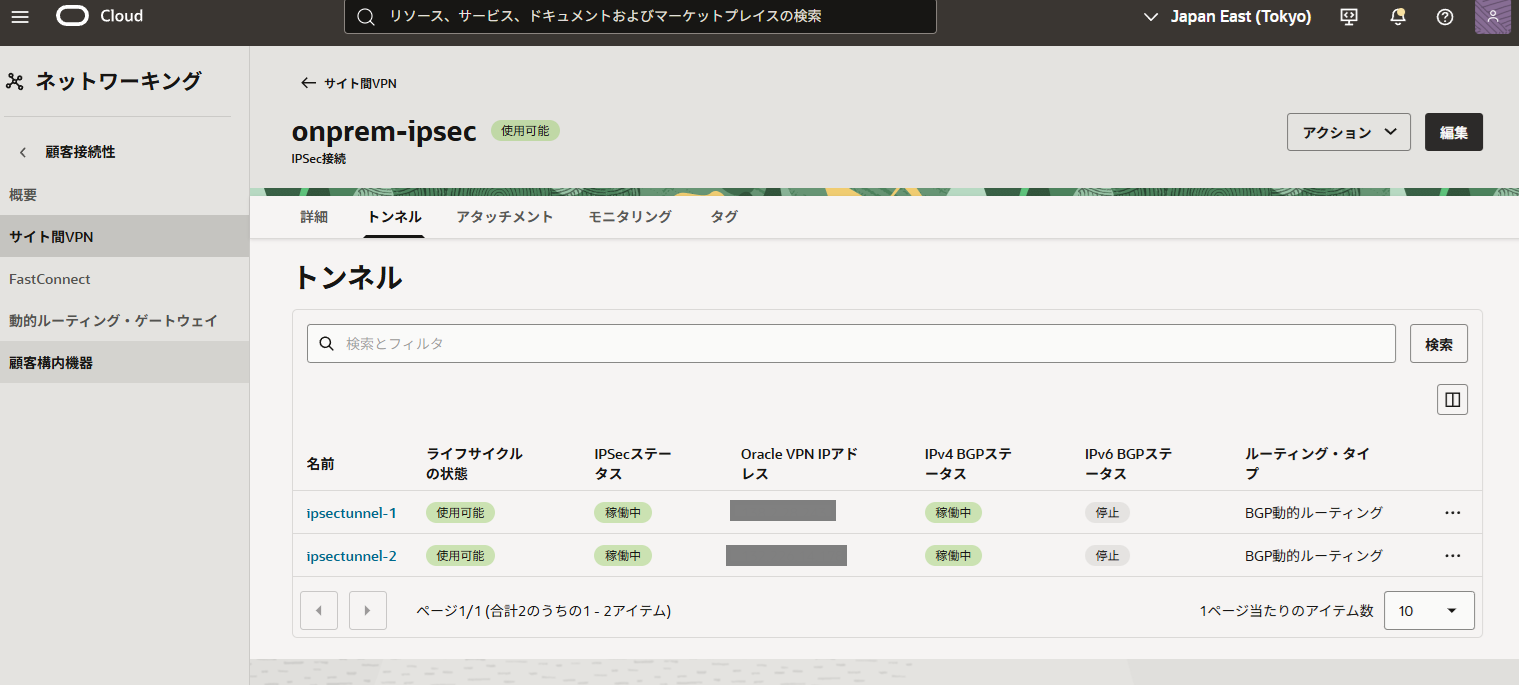
トンネルの名前をクリックすることでステータス詳細を見ることができます。
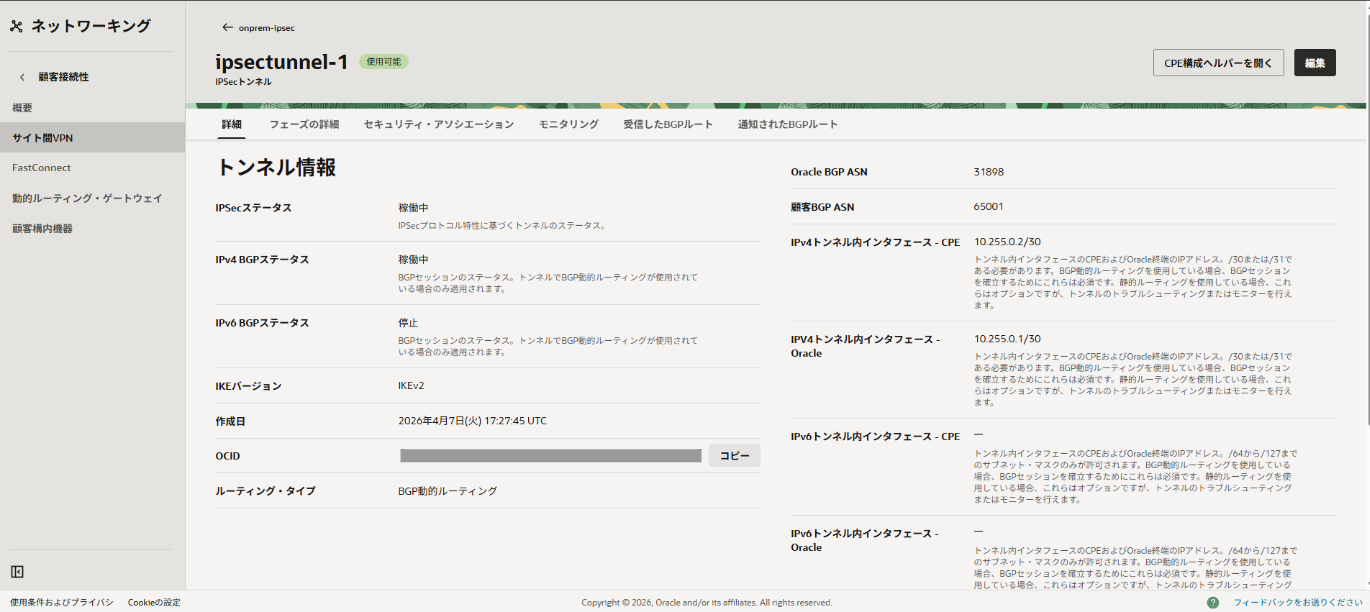
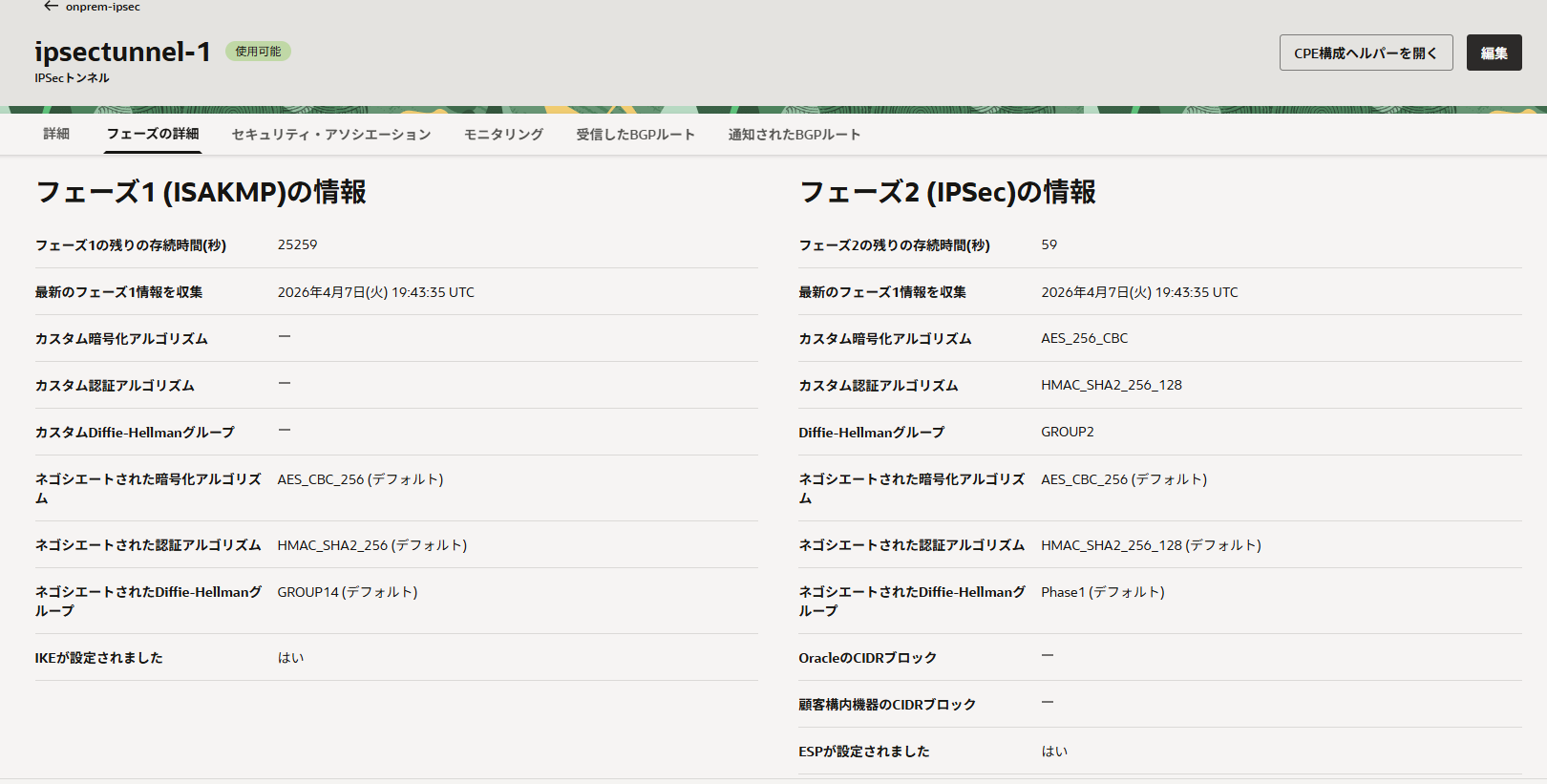
フェーズ詳細タブからフェーズ1、フェーズ2の詳細を確認できます。
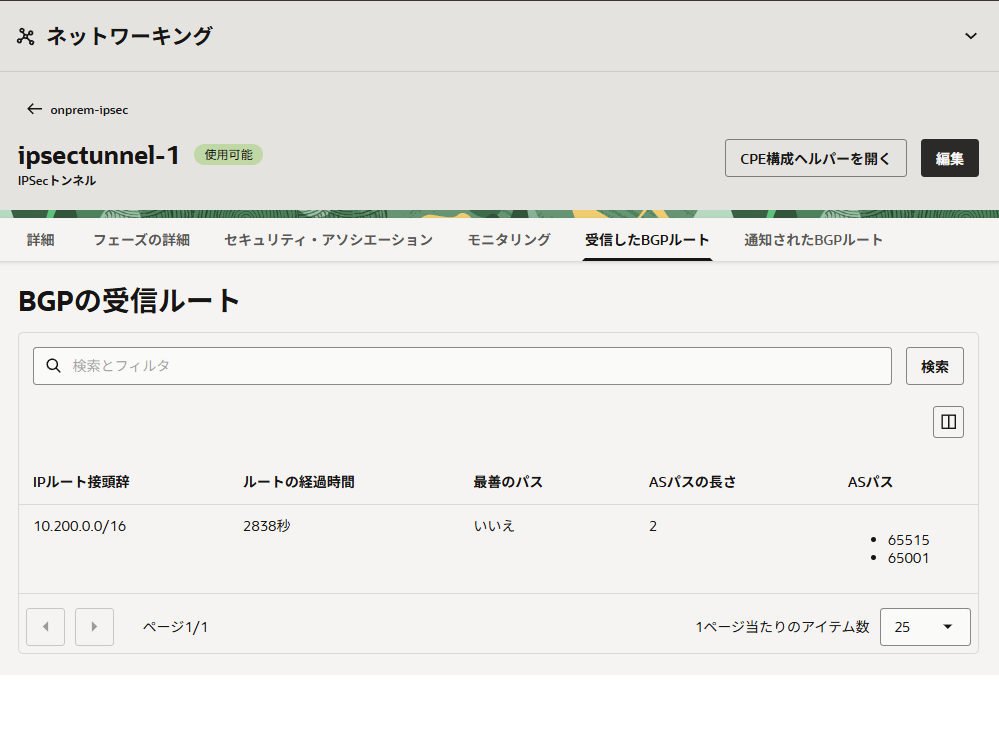
受信したBGPルートタブはオンプレ環境から受信したルートを確認できます。
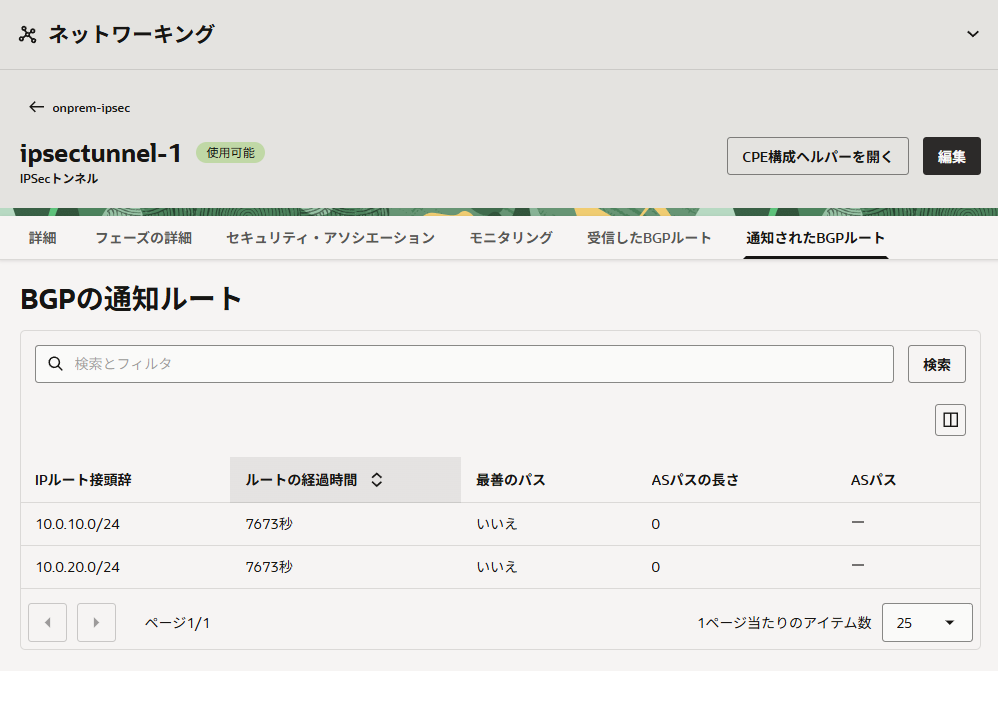
通知されたBGPルートタブではアタッチメントされたVCN側のルートを確認できます。
オンプレから接続確認
VCNでインターネット宛の経路を設定しておらず、Webサーバ機能をインストールしていないためICMPで疎通確認を行います。
tracerouteを確認しましたが、OCI内の応答がかけてしまいました
>ping 10.0.20.228

10.0.20.228 に ping を送信しています 32 バイトのデータ:
10.0.20.228 からの応答: バイト数 =32 時間 =10ms TTL=60
10.0.20.228 からの応答: バイト数 =32 時間 =12ms TTL=60
10.0.20.228 からの応答: バイト数 =32 時間 =11ms TTL=60
10.0.20.228 からの応答: バイト数 =32 時間 =10ms TTL=60

10.0.20.228 の ping 統計:
    パケット数: 送信 = 4、受信 = 4、損失 = 0 (0% の損失)、
ラウンド トリップの概算時間 (ミリ秒):
    最小 = 10ms、最大 = 12ms、平均 = 10ms

>tracert -d 10.0.20.228

10.0.20.228 へのルートをトレースしています。経由するホップ数は最大 30 です

  1     4 ms     2 ms     2 ms  10.200.0.254
  2     *        *        *     要求がタイムアウトしました。
  3     *        *        *     要求がタイムアウトしました。
  4    11 ms    10 ms     9 ms  10.0.20.228

トレースを完了しました。最後に
OCIのVPN接続はAlways Freeリソースに含まれているため気軽に検証ができます。
AWSやAzureと比較すると、経路の再配布ができないことと設定項目の複雑さに目をつぶれば個人利用もできそうな感じがしました。
OCIからの経路はMED値が付与されていないためオンプレ側で簡単に制御できるのもいいですね。
それとGUIは確認できるステータスも多く切り分けもやりやすかったです。