
前回AWS上のTerrafrom実行環境を作成しましたので、その実行環境を利用してOCIにVMをプロビジョニングします。
OCIはAlwaysFreeの範囲が広いため、検証期間をあまり気にしなくていいのがポイント高いですよね。
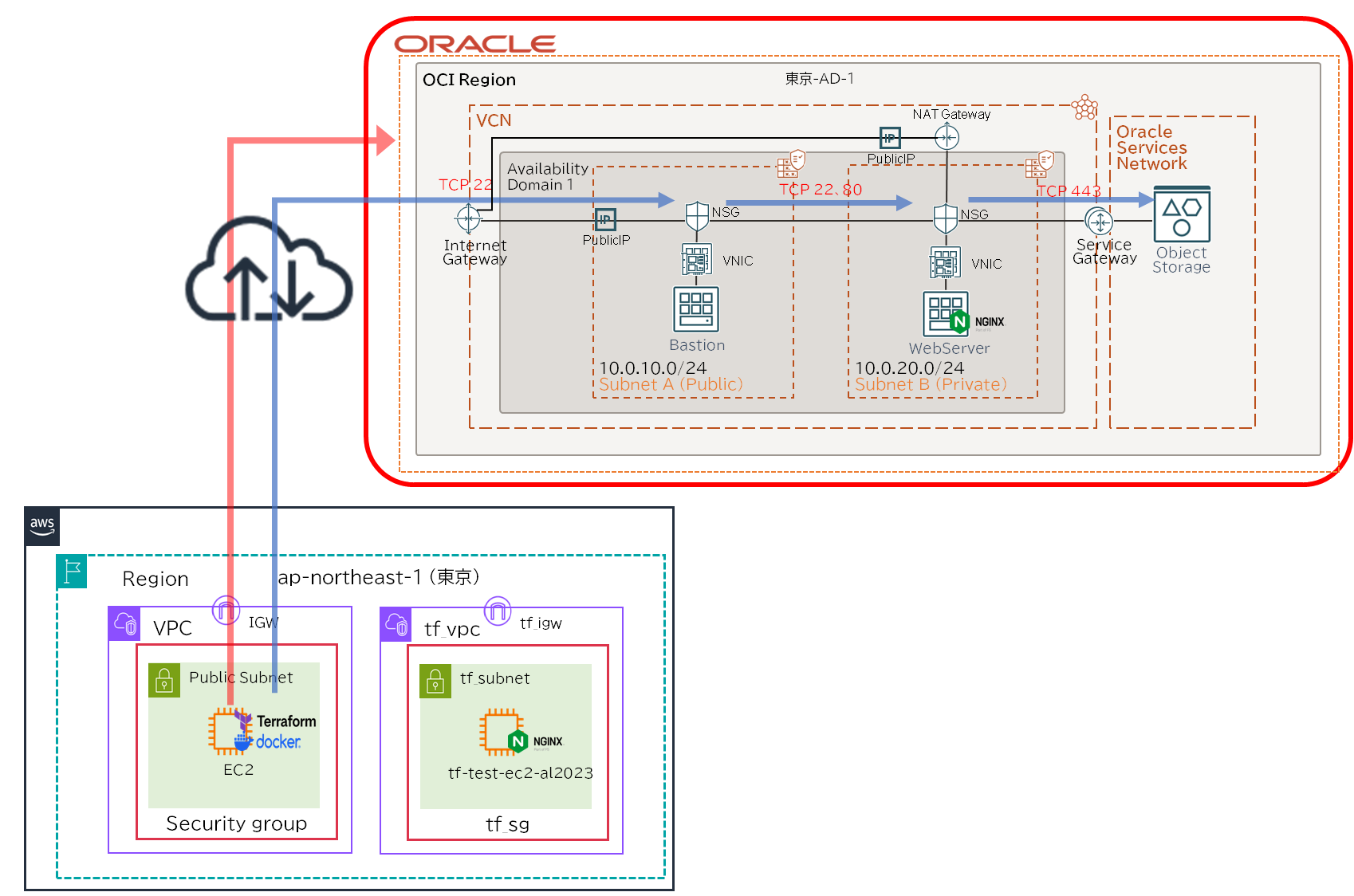
NW構成
OCIのSubnetを2つに分けて公開範囲を絞り、NSGで通信制御します。
ついでにObjectStrageを作成します。
またPublic SubnetにComputeインスタンスでBastionを作成しますが、OCIにはBastion(要塞)サービスがあり最大3時間セッションを維持できるようですので、本番環境ではOCI Bastionを利用する方がセキュリティは高くなります。
フォルダ構成
├── .env
├── .gitignore
├── .oci
│   └── oci_api_key.pem
├── .ssh
│   ├── id_ed25519
│   └── id_ed25519.pub
├── cloud-init-oci-cli.yaml
├── compute.tf
├── docker-compose.yml
├── instance_principal.tf
├── network.tf
├── nsg.tf
├── objectstorage.tf
├── outputs.tf
├── provider.tf
├── sample.txt
├── terraform.tfvars
└── variables.tfSSH認証鍵作成、OSアップロード用ファイル作成
Bastion、Webserverに接続するための認証鍵を作成します。
検証目的で面倒なのでBastionとWebserverどちらも同じ秘密鍵を使います。
sh-5.2$ mkdir .ssh
sh-5.2$ sudo ssh-keygen -t ed25519 -f ./.ssh/id_ed25519API認証でObjectStorageにアップロードする用に sample.txt を作成します。
sh-5.2$ echo "AWS→ObjectStorage" | sudo tee sample.txtAPIキー作成&接続情報入手
APIキー入手
API接続するために最低限必要となる情報は下記5つになります。
- Tenancy OCID
- User OCID
- FingerPrint
- API接続用の秘密鍵の場所
- Regin
この5つの情報はAPIキーを作成することで入手することができます。
・ユーザー設定 >トークン及びキー >APIキーの追加
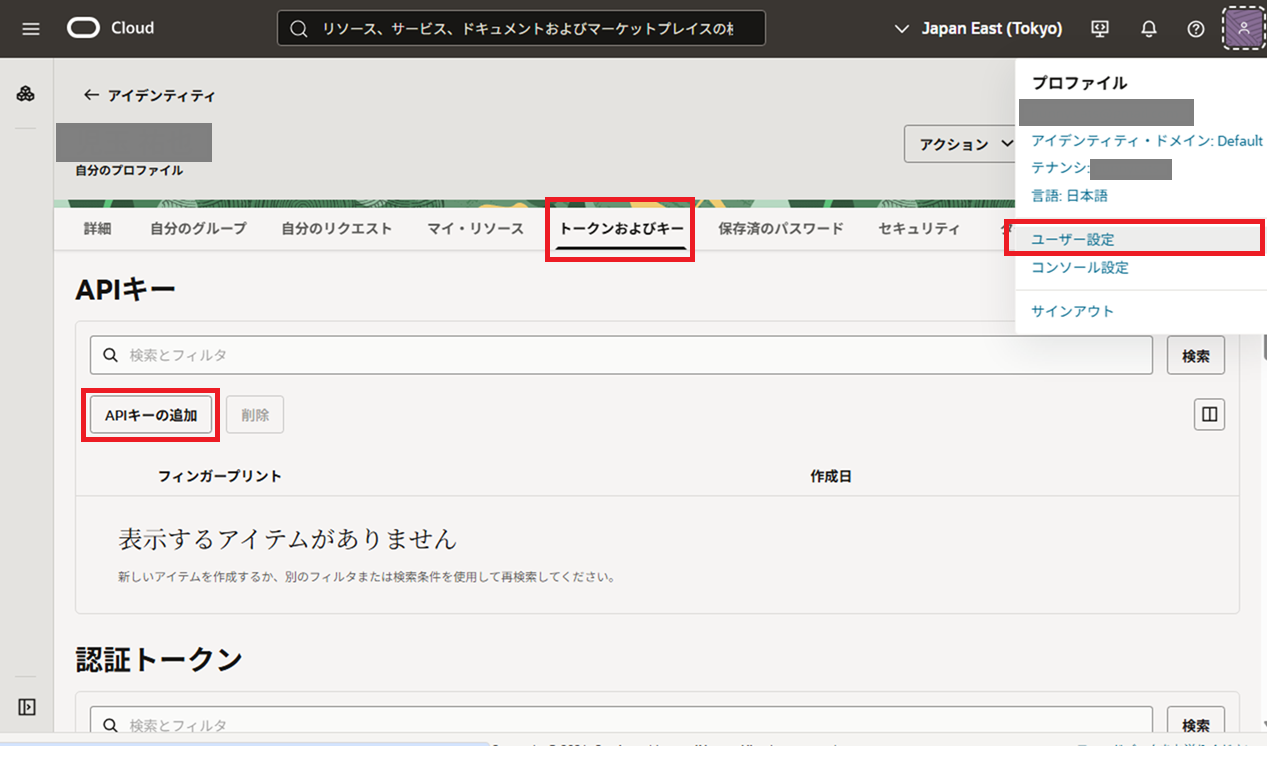
OpenSSHなどで作成してアップロードしてもいいですが、今回はGUIで鍵を作成します。
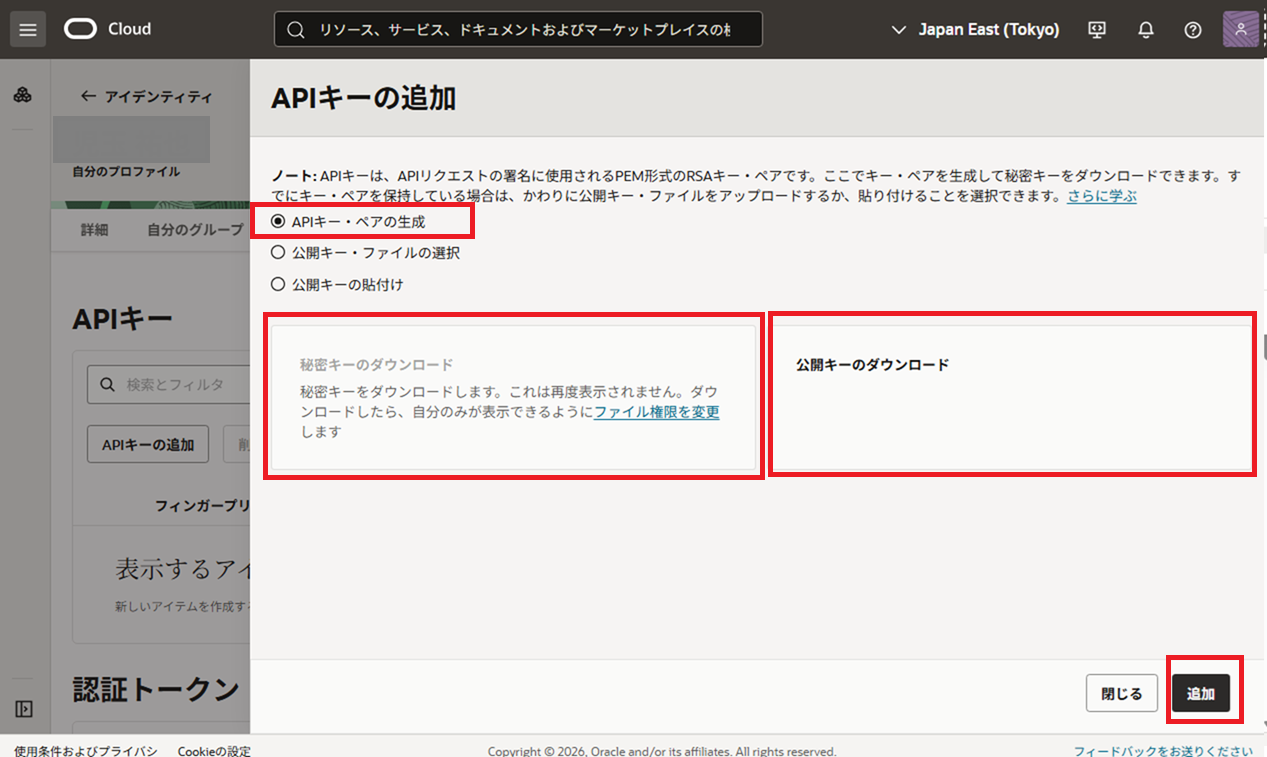
秘密キーのダウンロード、公開キーのダウンロードのそれぞれのボタンを押すことで鍵をダウンロードできます。
・APIキー・ペアの作成 >秘密キーのダウンロード >公開キーのダウンロード >追加
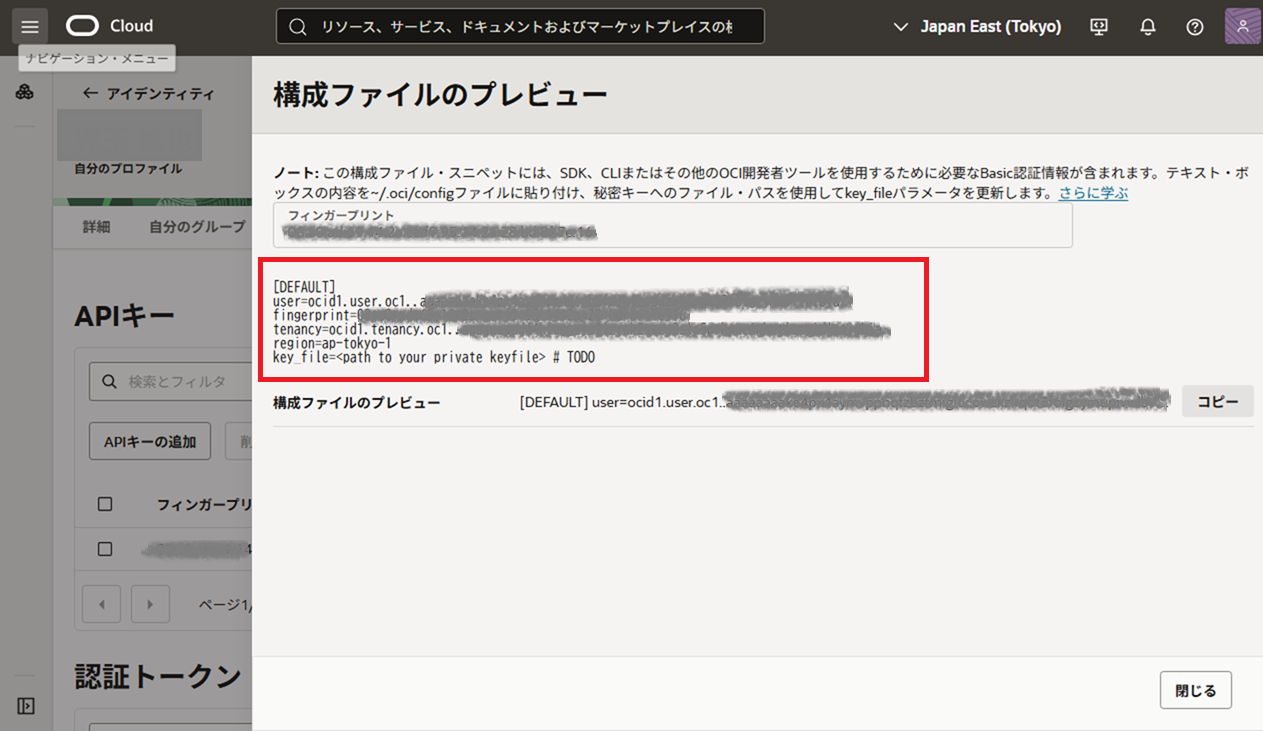
プレビュー画面に表示される情報を利用してアクセスを行います。
メモ帳などにコピーしておきましょう。
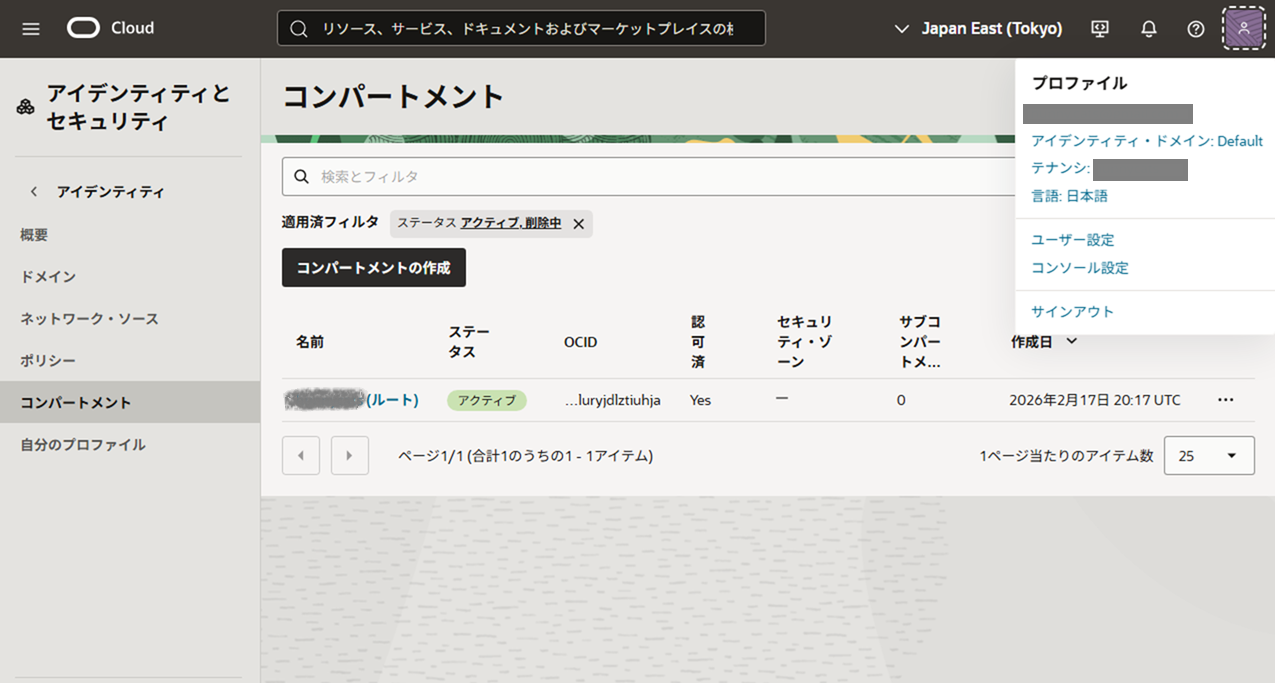
コンパートメント作成(任意)
コンパートメントを分割することでリソースやコスト分析ができるようです。
ただし契約単位はテナンシになるので、コンパートメントごとに請求書分離はできず、内部請求を可視化することができるだけのようです。Azureのリソースグループが限りなく近いようですね。
リソースやコスト分析用なので検証用であれば作成しなくても問題ありません。
・アイデンティティ・ドメイン >コンパートメント >コンパートメントの作成
AD Name &オブジェクト・ストレージ・ネームスペース取得
GUIで探すとOCI内部でしか保持していない情報など表示できないものがありますので基本的にOCI CLIで取得したほうが早いです。
oci iam availability-domain list --compartment-id [テナンシID]
oci os ns get 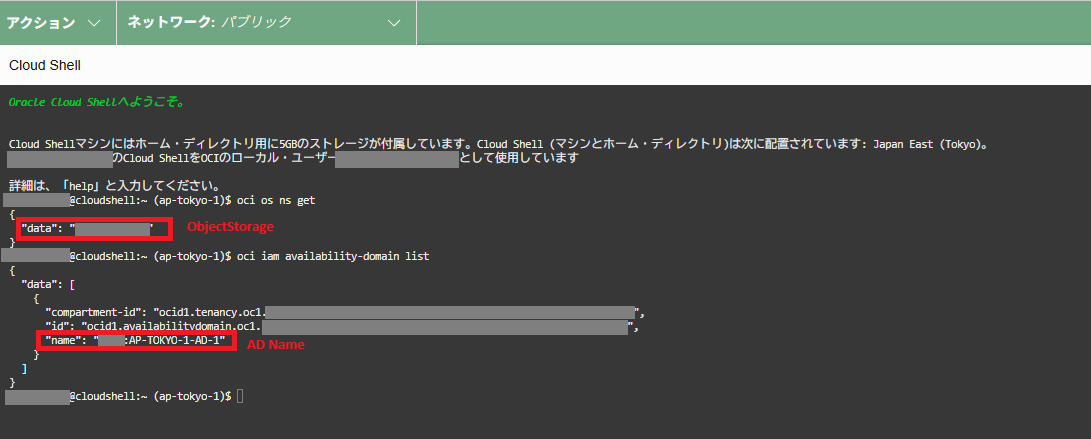
ファイル作成
環境変数定義ファイル
APIキーやAD Nameなどを環境変数で渡すために定義します。
コンパートメントを作成していない場合はcompartmentにtenancyIDを入れることになります。
TF_VAR_tenancy_ocid=ocid1.tenancy.oc1.xxxxxxxxxxxxxxxxxxxxxxxxxxxxxxxxxxxxxxxxxxxxxxxxxxxxxxxxxx
TF_VAR_user_ocid=ocid1.user.oc1.xxxxxxxxxxxxxxxxxxxxxxxxxxxxxxxxxxxxxxxxxxxxxxxxxxxxxxxxx
TF_VAR_fingerprint=xx:xx:xx:xx:xx:xx:xx:xx:xx:xx:xx
TF_VAR_private_key_path=/root/.oci/oci_api_key.pem
TF_VAR_ssh_public_key_path=/workspace/.ssh/id_ed25519.pub
TF_VAR_compartment_ocid=ocid1.compartment.oc1.xxxxxxxxxxxxxxxxxxxxxxxxxxxxxxxxxxxxxxxxxxxxxxxxxxxxxxxxxxxxxxxxx
TF_VAR_ad_name=XXXX:AP-TOKYO-1-AD-1
TF_VAR_objectstorage_namespace=xxxxxxxxxxxxxdocker定義ファイル作成
version: "3.9"

services:
  terraform:
    image: hashicorp/terraform:1.14
    container_name: terraform
    volumes:
      - .:/workspace
      - ./.oci:/root/.oci:ro
    working_dir: /workspace
    env_file:
      - .env
tty: true.env
.terraform/
.oci/
.ssh/
terraform.tfstate*TFファイル作成
NSGはIngress、Egressに分割し、変数化しているため少しコード量が多くなっています。
WebserverからObject Storageにアクセスするための仕込みを入れているので複雑な構成になってしまいました。
############################
# Provider
############################
terraform {
  required_providers {
    oci = {
      source = "oracle/oci"
    }

    time = {
      source = "hashicorp/time"
    }
  }
}

provider "oci" {
  tenancy_ocid     = var.tenancy_ocid
  user_ocid        = var.user_ocid
  fingerprint      = var.fingerprint
  private_key_path = var.private_key_path
  region           = "ap-tokyo-1"
}Instance Principalを定義します。
動的グループとIAMポリシーの作成を優先して、Webserver起動を遅らせます。
############################
# ObjectStorageアップロード用Instance Principalの認証設定(Dynamic Group作成)
############################
resource "oci_identity_dynamic_group" "web_dg" {
  name           = "webserver-dg"
  description    = "Dynamic group for webserver instance"
  compartment_id = var.tenancy_ocid

  matching_rule = "ALL {instance.compartment.id = '${var.compartment_ocid}'}"
}


############################
# ObjectStorageアップロード用Instance Principalの認証設定(IAMポリシー作成)
############################
resource "oci_identity_policy" "web_policy" {
  compartment_id = var.tenancy_ocid
  name           = "webserver-objectstorage-policy"
  description    = "Allow webserver to access Object Storage"

  statements = [
    "Allow dynamic-group webserver-dg to read buckets in compartment id ${var.compartment_ocid}",
    "Allow dynamic-group webserver-dg to manage objects in compartment id ${var.compartment_ocid}",
  ]
}

############################
# 起動後直後はバケットと接続ができないのでwebserver作成を少し遅延
############################
resource "time_sleep" "wait_iam" {
  depends_on = [
    oci_identity_dynamic_group.web_dg,
    oci_identity_policy.web_policy
  ]

  create_duration = "60s"
}BastionとWebServerのComputeを定義します。
Webserverに仕込みを入れる関係でE2.1.Microを入れようとしましたが、スペックが足りずフリーズやdnfのkillが頻発したのでE3.Flexに変更しました。
(OCIのリソース枯渇でA1.FrexやE4.Flexはプロビジョニングできませんでした)
############################
# Compute Image
############################
data "oci_core_images" "oracle_linux" {
  compartment_id           = var.compartment_ocid
  operating_system         = "Oracle Linux"
  operating_system_version = "10"
  shape                    = "VM.Standard.E2.1.Micro"

  sort_by    = "TIMECREATED"
  sort_order = "DESC"
}

data "oci_core_images" "oracle_linux_full" {
  compartment_id             = var.compartment_ocid
  operating_system           = "Oracle Linux"
  operating_system_version   = "10"
  shape                      = "VM.Standard.E3.Flex"

  sort_by    = "TIMECREATED"
  sort_order = "DESC"
}

locals {
  selected_image_id = length(data.oci_core_images.oracle_linux_full.images) > 0 ? data.oci_core_images.oracle_linux_full.images[0].id : null
}
############################
# Compute Instance(Bastion)
############################
resource "oci_core_instance" "bastion" {
  availability_domain = var.ad_name
  compartment_id      = var.compartment_ocid
  shape               = "VM.Standard.E2.1.Micro"
  display_name        = "bastion"

  create_vnic_details {
    subnet_id        = oci_core_subnet.public.id
    assign_public_ip = true
    nsg_ids          = [oci_core_network_security_group.bastion.id]
  }

  metadata = {
    ssh_authorized_keys = file(var.ssh_public_key_path)
    user_data = base64encode(<<-EOF
      #cloud-config
      package_update: false

      bootcmd:
        - fallocate -l 2G /swapfile
        - chmod 600 /swapfile
        - mkswap /swapfile
        - swapon /swapfile
    EOF
    )
  }

  source_details {
    source_type = "image"
    source_id   = data.oci_core_images.oracle_linux.images[0].id
    boot_volume_size_in_gbs = 50
  }
}


############################
# Compute Instance(WebServer)
############################
resource "oci_core_instance" "webserver" {
  availability_domain = var.ad_name
  compartment_id      = var.compartment_ocid
  #shape               = "VM.Standard.E2.1.Micro" #Free
  #shape               = "VM.Standard.A1.Flex"    #Free
  shape                    = "VM.Standard.E3.Flex"  #有料
  #shape               = "VM.Standard.E4.Flex"     #有料

  # Instance Principal接続で動的グループ、ポリシー作成直後だと紐づくのに数十分かかるので動的グループ、ポリシーを先に作成して60s遅延を入れる
  depends_on = [
    time_sleep.wait_iam
  ]

  # E3.Flex用
  shape_config {
    ocpus         = 1
    memory_in_gbs = 4
  }

  instance_options {
    are_legacy_imds_endpoints_disabled = false
  }

  create_vnic_details {
    subnet_id = oci_core_subnet.private.id
    assign_public_ip = false
    nsg_ids   = [oci_core_network_security_group.web.id]
  }

  metadata = {
    ssh_authorized_keys = file(var.ssh_public_key_path)
    user_data = filebase64("cloud-init-oci-cli.yaml")
  }

  source_details {
    source_type = "image"
    source_id   = local.selected_image_id
    boot_volume_size_in_gbs = 50 # E3.Flex用
  }

  display_name = "webserver"

  freeform_tags = {
    role = "webserver"
  }
}VCN、IGW、NATGW、SGW、RouteTable、Subnetを定義します。
############################
# VCN
############################
resource "oci_core_vcn" "main" {
  cidr_block     = var.vcn_cidr
  compartment_id = var.compartment_ocid
  display_name   = "prod_vcn"
}

############################
# Subnet
############################
resource "oci_core_subnet" "public" {
  cidr_block                 = var.public_subnet_cidr
  vcn_id                     = oci_core_vcn.main.id
  compartment_id             = var.compartment_ocid
  route_table_id             = oci_core_route_table.public_rt.id
  prohibit_public_ip_on_vnic = false
  display_name               = "public_subnet"
}

resource "oci_core_subnet" "private" {
  cidr_block                 = var.private_subnet_cidr
  vcn_id                     = oci_core_vcn.main.id
  compartment_id             = var.compartment_ocid
  route_table_id             = oci_core_route_table.private_rt.id
  prohibit_public_ip_on_vnic = true
  display_name               = "private_subnet"
}

############################
# IGW
############################
resource "oci_core_internet_gateway" "igw" {
  compartment_id = var.compartment_ocid
  vcn_id         = oci_core_vcn.main.id
  display_name   = "igw"
}


############################
# NAT GW
############################
resource "oci_core_nat_gateway" "nat" {
  compartment_id = var.compartment_ocid
  vcn_id         = oci_core_vcn.main.id
}

############################
# SGW (Object Storage用)
############################
data "oci_core_services" "all" {}

locals {
  object_storage_service_id = one([
    for s in data.oci_core_services.all.services :
    s.id
    if strcontains(s.cidr_block, "objectstorage")
  ])
}

resource "oci_core_service_gateway" "sgw" {
  compartment_id = var.compartment_ocid
  vcn_id         = oci_core_vcn.main.id
  display_name   = "sgw"

  services {
    service_id = local.object_storage_service_id
  }
}


############################
# Route Table
############################
resource "oci_core_route_table" "public_rt" {
  compartment_id = var.compartment_ocid
  vcn_id         = oci_core_vcn.main.id
  display_name   = "public_rt"

  route_rules {
    destination       = "0.0.0.0/0"
    destination_type  = "CIDR_BLOCK"
    network_entity_id = oci_core_internet_gateway.igw.id
  }
}

locals {
  object_storage = one([
    for s in data.oci_core_services.all.services :
    s
    if strcontains(s.cidr_block, "objectstorage")
  ])
}

resource "oci_core_route_table" "private_rt" {
  compartment_id = var.compartment_ocid
  vcn_id         = oci_core_vcn.main.id
  display_name   = "private_rt"

  route_rules {
    destination       = local.object_storage.cidr_block
    destination_type  = "SERVICE_CIDR_BLOCK"
    network_entity_id = oci_core_service_gateway.sgw.id
  }
  route_rules {
    destination       = "0.0.0.0/0"
    destination_type  = "CIDR_BLOCK"
    network_entity_id = oci_core_nat_gateway.nat.id
  }
}NSGを定義します。
NSGはBastionとWebserverでそれぞれIngress/Egressを分離し、変数(variables.tf)で値を管理します。
############################
# NSG(Bastion)
############################
resource "oci_core_network_security_group" "bastion" {
  compartment_id = var.compartment_ocid
  vcn_id         = oci_core_vcn.main.id
  display_name   = "bastion_nsg"
}

resource "oci_core_network_security_group_security_rule" "bastion_ingress" {
  for_each = {
    for rule in var.bastion_ingress_rules :
    sha1(jsonencode(rule)) => rule
  }

  network_security_group_id = oci_core_network_security_group.bastion.id
  direction                 = "INGRESS"
  protocol                  = each.value.protocol
  source_type               = "CIDR_BLOCK"  # 固定
  source                    = each.value.source

  # TCP
  dynamic "tcp_options" {
    for_each = each.value.protocol == "6" && try(each.value.min, null) != null ? [1] : []
    content {
      destination_port_range {
        min = each.value.min
        max = each.value.max
      }
    }
  }

  # UDP
  dynamic "udp_options" {
    for_each = each.value.protocol == "17" && try(each.value.min, null) != null ? [1] : []
    content {
      destination_port_range {
        min = each.value.min
        max = each.value.max
      }
    }
  }

  # ICMP
  dynamic "icmp_options" {
    for_each = each.value.protocol == "1" ? [1] : []
    content {
      type = try(each.value.min, 8)
      code = try(each.value.max, 0)
    }
  }
}

resource "oci_core_network_security_group_security_rule" "bastion_egress" {
  for_each = {
    for rule in var.bastion_egress_rules :
    sha1(jsonencode(rule)) => rule
  }

  network_security_group_id = oci_core_network_security_group.bastion.id
  direction                 = "EGRESS"
  protocol                  = each.value.protocol
  destination               = each.value.destination
  destination_type          = "CIDR_BLOCK"  # 固定

  # TCP
  dynamic "tcp_options" {
    for_each = each.value.protocol == "6" && try(each.value.min, null) != null ? [1] : []
    content {
      destination_port_range {
        min = each.value.min
        max = each.value.max
      }
    }
  }

  # UDP
  dynamic "udp_options" {
    for_each = each.value.protocol == "17" && try(each.value.min, null) != null ? [1] : []
    content {
      destination_port_range {
        min = each.value.min
        max = each.value.max
      }
    }
  }

  # ICMP
  dynamic "icmp_options" {
    for_each = each.value.protocol == "1" ? [1] : []
    content {
      type = try(each.value.min, 8)
      code = try(each.value.max, 0)
    }
  }
}

############################
# NSG(WebServer)
############################
resource "oci_core_network_security_group" "web" {
  compartment_id = var.compartment_ocid
  vcn_id         = oci_core_vcn.main.id
  display_name   = "web_nsg"
}

locals {
  bastion_nsg_id = oci_core_network_security_group.bastion.id
}

resource "oci_core_network_security_group_security_rule" "web_ingress" {
  for_each = {
    for rule in var.web_ingress_rules :
    sha1(jsonencode(rule)) => rule
  }

  network_security_group_id = oci_core_network_security_group.web.id
  direction                 = "INGRESS"
  protocol                  = each.value.protocol
  source_type               = each.value.source_type
  source                    = each.value.source == "bastion" ? local.bastion_nsg_id : each.value.source

  # TCP
  dynamic "tcp_options" {
    for_each = each.value.protocol == "6" && try(each.value.min, null) != null ? [1] : []
    content {
      destination_port_range {
        min = each.value.min
        max = each.value.max
      }
    }
  }

  # UDP
  dynamic "udp_options" {
    for_each = each.value.protocol == "17" && try(each.value.min, null) != null ? [1] : []
    content {
      destination_port_range {
        min = each.value.min
        max = each.value.max
      }
    }
  }

  # ICMP
  dynamic "icmp_options" {
    for_each = each.value.protocol == "1" ? [1] : []
    content {
      type = try(each.value.min, 8)
      code = try(each.value.max, 0)
    }
  }
}

resource "oci_core_network_security_group_security_rule" "web_egress" {
  for_each = {
    for rule in var.web_egress_rules :
    sha1(jsonencode(rule)) => rule
  }

  network_security_group_id = oci_core_network_security_group.web.id
  direction        = "EGRESS"
  protocol         = each.value.protocol
  destination      = each.value.destination
  destination_type = "CIDR_BLOCK"

  # TCP
  dynamic "tcp_options" {
    for_each = each.value.protocol == "6" && try(each.value.min, null) != null ? [1] : []
    content {
      destination_port_range {
        min = each.value.min
        max = each.value.max
      }
    }
  }

  # UDP
  dynamic "udp_options" {
    for_each = each.value.protocol == "17" && try(each.value.min, null) != null ? [1] : []
    content {
      destination_port_range {
        min = each.value.min
        max = each.value.max
      }
    }
  }

  # ICMP
  dynamic "icmp_options" {
    for_each = each.value.protocol == "1" ? [1] : []
    content {
      type = try(each.value.min, 8)
      code = try(each.value.max, 0)
    }
  }
}Object Storageを定義します。
API認証でバケットにputします。
実運用で使う場合は sample.txt などの固有名詞は変数化したほうが管理しやすそうですね。
############################
# Object Storage
############################
resource "oci_objectstorage_bucket" "prod_bucket" {
  compartment_id = var.compartment_ocid
  namespace      = var.objectstorage_namespace
  name           = "prod-private-bucket"
  access_type    = "NoPublicAccess"
}

resource "oci_objectstorage_object" "prod_upload" {
  namespace = var.objectstorage_namespace
  bucket    = oci_objectstorage_bucket.prod_bucket.name
  object    = "sample.txt"
  source = "sample.txt" # ローカルファイルパス
}変数を宣言します。
ここで変数を宣言しておけば環境変数は自動変換されます。
############################
# 変数定義
############################
# API接続
variable "tenancy_ocid" {}
variable "user_ocid" {}
variable "fingerprint" {}
variable "private_key_path" {}
variable "compartment_ocid" {}
variable "ad_name" {}
variable "objectstorage_namespace" {}
variable "ssh_public_key_path" {}

# OCI NW
variable "vcn_cidr" {}
variable "public_subnet_cidr" {}
variable "private_subnet_cidr" {}

# NSGルール
variable "bastion_ingress_rules" {
  type = list(object({
    protocol = string
    source   = string
    min      = number
    max      = number
  }))
}

variable "bastion_egress_rules" {
  type = list(object({
    protocol    = string
    destination = string
    min         = number
    max         = number
  }))
}

variable "web_ingress_rules" {
  type = list(object({
    protocol    = string
    source_type = string
    source      = string
    min         = number
    max         = number
  }))
}

variable "web_egress_rules" {
  type = list(object({
    protocol    = string
    destination = string
    min         = number
    max         = number
  }))
}変数の実値を入れます。
############################
# 変数設定
############################
# OCI NW
vcn_cidr = "10.0.0.0/16"
public_subnet_cidr = "10.0.10.0/24"
private_subnet_cidr = "10.0.20.0/24"

# NSGルール
bastion_ingress_rules = [
  {
    protocol    = "6"
    source_type = "CIDR_BLOCK"
    source      = "0.0.0.0/0"
    min         = 22
    max         = 22
  }
]

bastion_egress_rules = [
  {
    protocol         = "6"
    destination_type = "CIDR_BLOCK"
    destination      = "10.0.20.0/24"
    min              = 22
    max              = 22
  }
]

web_ingress_rules = [
  {
    protocol    = "6"
    source_type = "NETWORK_SECURITY_GROUP"
    source      = "bastion"
    min         = 22
    max         = 22
  },
  {
    protocol    = "6"
    source_type = "CIDR_BLOCK"
    source      = "10.0.10.0/24"
    min         = 80
    max         = 80
  }
]

web_egress_rules = [
  {
    protocol         = "6"
    destination_type = "CIDR_BLOCK"
    destination      = "0.0.0.0/0"
    min              = 443
    max              = 443
  },
  {
    protocol         = "6"
    destination_type = "CIDR_BLOCK"
    destination      = "0.0.0.0/0"
    min              = 80
    max              = 80
  },
  {
    protocol    = "17" # UDP
    destination_type = "CIDR_BLOCK"
    destination = "0.0.0.0/0"
    min = 53
    max = 53
  }
]動的に作成されるIPアドレスをCLIで表示します。
############################
# Output(コンソールにIPを表示)
############################
output "bastion_public_ip" {
  value = oci_core_instance.bastion.public_ip
}

output "web_private_ip" {
  value = oci_core_instance.webserver.private_ip
}Webserverで実行させるCloud-init設定になります。
WebserverからObjectStorageにOCI CLIを使ってファイルをputします。
#cloud-config
package_update: false
package_upgrade: false
packages:
  - python3
  - python3-pip
  - unzip
  - curl
  - nginx

bootcmd:
  - fallocate -l 2G /swapfile
  - chmod 600 /swapfile
  - mkswap /swapfile
  - swapon /swapfile

runcmd:
  - |
    cat <<'EOF' > /home/opc/setup_oci.sh
    #!/bin/bash
    # OCI CLIインストール
    curl -L https://raw.githubusercontent.com/oracle/oci-cli/master/scripts/install/install.sh -o /tmp/oci_install.sh
    bash /tmp/oci_install.sh --accept-all-defaults --install-dir /home/opc/oci

    # OCI CLIインストール確認
    /home/opc/oci/bin/oci --version

    # OCI CLI永続化
    export PATH=$PATH:/home/opc/oci/bin;
    echo export PATH=\$PATH:/home/opc/oci/bin >> /home/opc/.bashrc

    # Instance Principal 確認
    NAMESPACE=$(/home/opc/oci/bin/oci os ns get --auth instance_principal | jq -r '.data')
    echo "Namespace: $NAMESPACE"

    # UPLOAD用フォルダ作成
    mkdir -p /home/opc/upload

    # アップロード
    BUCKET_NAME=prod-private-bucket
    LOCAL_FILE="/home/opc/upload/sample_private_subnet.txt"
    OBJECT_NAME="sample_private_subnet.txt"
    echo "PrivateCloud->Objectstorage" > $LOCAL_FILE
    chown -R opc:opc /home/opc/upload
    /home/opc/oci/bin/oci os object put --namespace $NAMESPACE --bucket-name $BUCKET_NAME --name $OBJECT_NAME --file $LOCAL_FILE --auth instance_principal
    EOF

  # 実行権限を付与
  - chmod +x /home/opc/setup_oci.sh
  # スクリプト実行
  - /home/opc/setup_oci.sh

  # Nginxインストール
  - dnf module enable -y nginx:1.20
  - dnf install -y nginx
  - systemctl enable nginx
  - systemctl start nginx
  - firewall-cmd --add-service http
- firewall-cmd --add-service http --permanentTerraform実行
Terraformの実行コマンドはaws-vaultを挟まないので、AWSの時とは少し違いますがdocker composeで動作するため出力結果や確認方法は同じです。
sh-5.2$ # Terraform初期化
sh-5.2$ docker compose run --rm terraform init
sh-5.2$ # 現在の管理状態と実際のクラウド環境の差分比較
sh-5.2$ docker compose run --rm terraform plan
sh-5.2$ # 設定差分を反映
sh-5.2$ docker compose run --rm terraform apply -auto-approve
sh-5.2$ # 管理しているリソース一覧を表示
sh-5.2$ docker compose run --rm terraform state listリソースの再作成や削除をする場合は下記コマンドになります。
sh-5.2$ # compute instanceの一部再作成
sh-5.2$ docker compose run --rm terraform apply -auto-approve -replace=oci_core_instance.[instance名]
sh-5.2$ # 管理しているリソースの一部削除
sh-5.2$ docker compose run --rm terraform destroy -auto-approve -target=oci_core_instance.[instance名]
sh-5.2$ # 管理しているリソースを全削除
sh-5.2$ docker compose run --rm terraform destroy -auto-approve接続確認
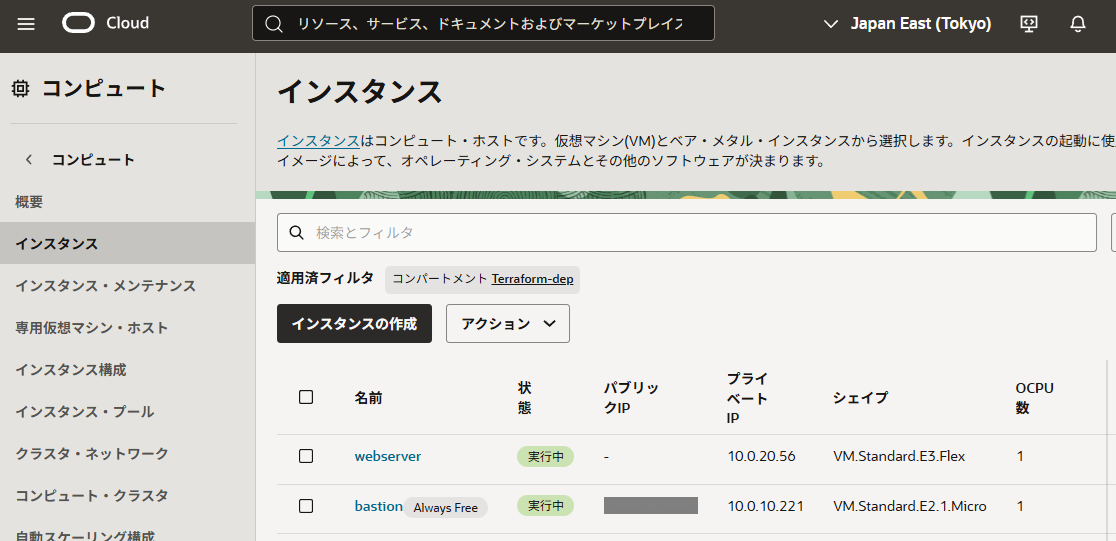
GUI確認
・Computeインスタンス
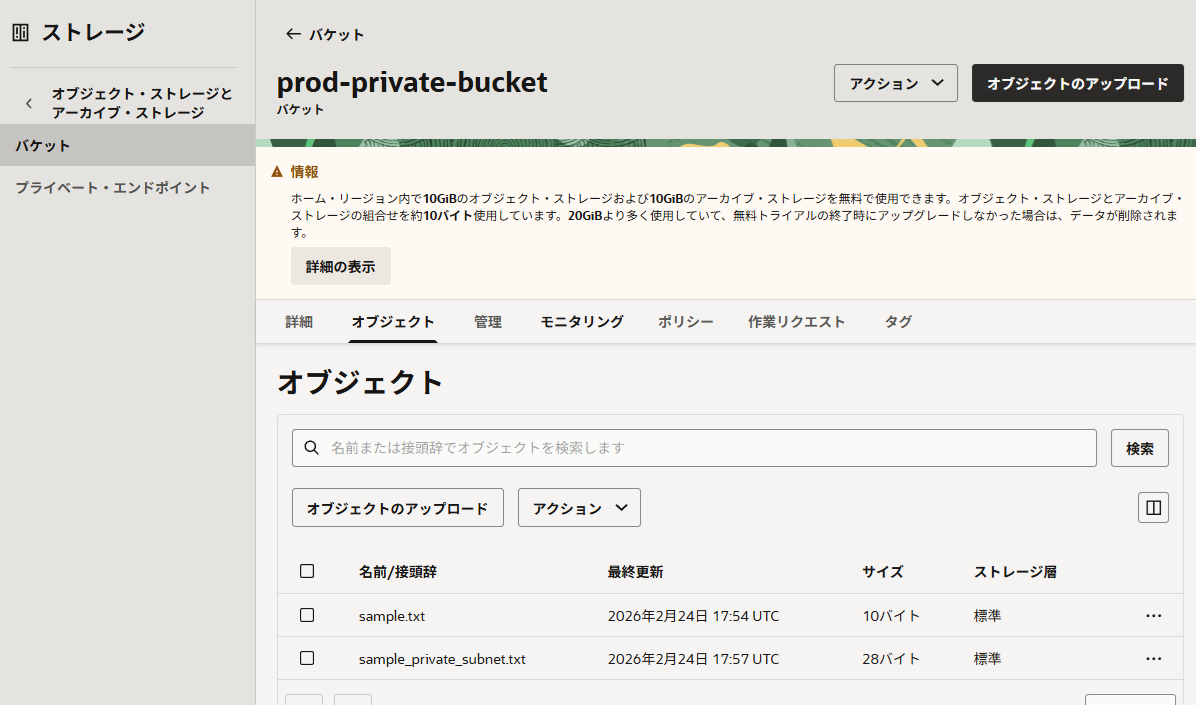
・ObjectStorage
sample.txt・・・AWS端末からAPIキー経由でアップロード
sample_private_subnet.txt・・・Private Subnet内のComputeからInstance Principal経由でアップロード
通信確認
SSH接続(AWS → Bastion → Webserver)
同じ秘密鍵を利用するので鍵をコピーします。
sh-5.2$ sudo cat .ssh/id_ed25519
-----BEGIN OPENSSH PRIVATE KEY-----
b3BlbnNzaC1xxxxxxxxxxxxxxxxxxxxxxxxxxxxxxxxxxxxxxxxxxxxxxxxxxxxxxxxxxxxxxxxxxxxxxxxxxxxxxxxxxxxxxxxxxxxxxxxxxxxxxxxxxxxxxxxxxxxxxxxxxxxxxxxxxxxxxxxxxxxxxxxxxxxxxxxxxxxxxxxxx
-----END OPENSSH PRIVATE KEY-----
sh-5.2$
sh-5.2$ sudo ssh -i .ssh/id_ed25519 opc@xxx.xxx.xxx.xxx
The authenticity of host 'xxx.xxx.xxx.xxx (xxx.xxx.xxx.xxx)' can't be established.
ED25519 key fingerprint is SHA256:G/pM0M82cxCS6kfzQfUxKhyRk30O0o5ZvSAT+D791Tk.
This key is not known by any other names
Are you sure you want to continue connecting (yes/no/[fingerprint])? yes
Warning: Permanently added 'xxx.xxx.xxx.xxx' (ED25519) to the list of known hosts.
[opc@bastion ~]$
[opc@bastion ~]$ #秘密鍵を貼り付け、権限変更
[opc@bastion ~]$ sudo vi id_ed25519
[opc@bastion ~]$ sudo chmod 600 id_ed25519
[opc@bastion ~]$
[opc@bastion ~]$ sudo ssh -i id_ed25519 opc@10.0.20.188
The authenticity of host '10.0.20.188 (10.0.20.188)' can't be established.
ED25519 key fingerprint is SHA256:XKLGvvPfGO9HhGc7V4WQl/TcU0ztNJ2tmtcw1b3wPCk.
This key is not known by any other names.
Are you sure you want to continue connecting (yes/no/[fingerprint])? yes
Warning: Permanently added '10.0.20.188' (ED25519) to the list of known hosts.
[opc@webserver ~]$HTTP確認
Nginxがインストール出来ていればNAT Gatewayは問題ありません。
[opc@bastion ~]$ curl -XGET http://10.0.20.188
<!DOCTYPE html PUBLIC "-//W3C//DTD XHTML 1.1//EN" "http://www.w3.org/TR/xhtml11/DTD/xhtml11.dtd">

<html xmlns="http://www.w3.org/1999/xhtml" xml:lang="en">
        <head>
                <title>Test Page for the HTTP Server on Oracle Linux</title>
                <meta http-equiv="Content-Type" content="text/html; charset=UTF-8" />
                <style type="text/css">
                        /*<![CDATA[*/
                        body {
                                background-color: #fff;
                                color: #000;
                                font-size: 0.9em;
                                font-family: sans-serif,helvetica;
                                margin: 0;
                                padding: 0;
                        }
                        ~~省略~~
[opc@bastion ~]$SSH接続できない時
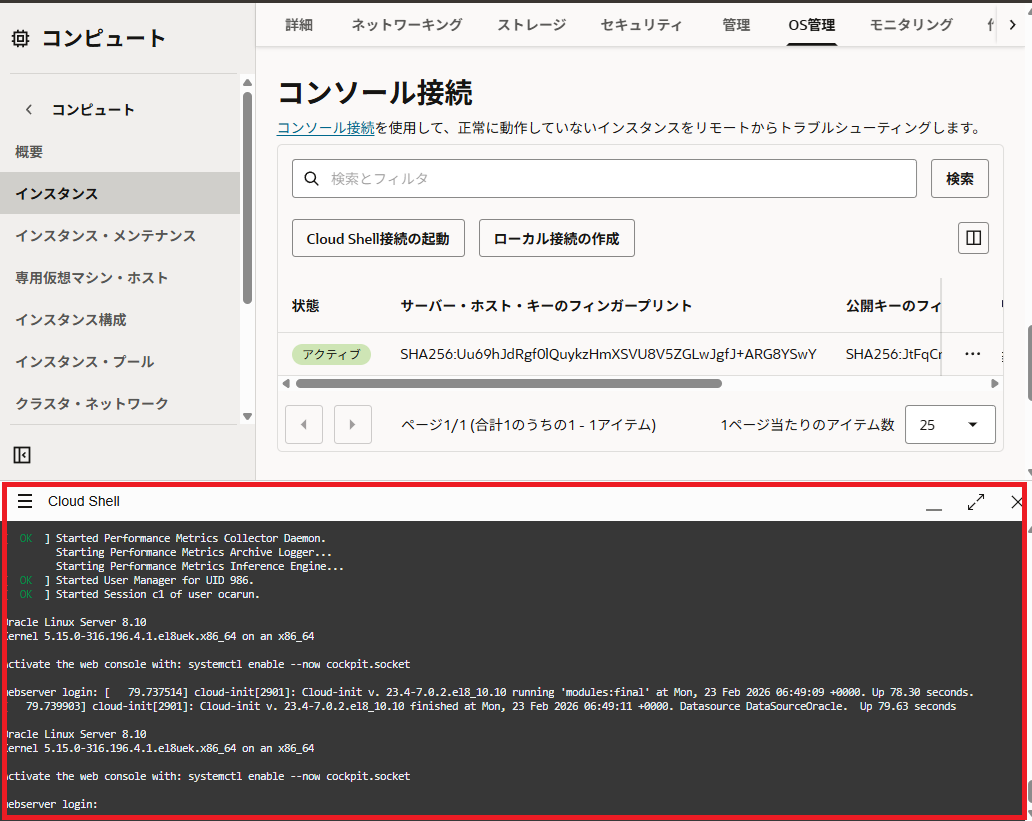
・インスタンス >OS管理 >Cloud Shell接続の起動
コンソール接続した時と同じ情報が表示できるので接続できないときはコンソールから確認しましょう。
VM.Standard.E2.1.Microの場合、スペックが低いためSSH接続できるようになるまで30分くらいかかります。
最後に
Instance PrincipalでのObjectStorageへのアクセス部分で沼にはまり、1週間程切り分けをしていました。
宣言型で実行順番を気にしない特徴のTerraformですが、クラウド仕様によっては実行順番を制御しなくてはいけないと勉強になりました。
AWSやAzureの表面上しか触っていないので何とも言えないですが、OCIはAPIキーの情報が多かったり、OCIDでアクセスしたりとTerraformで管理するのは初心者では厳しいなと感じました。