最近テラリウムを作成し、苔の成長を楽しんでいます。
そして前から気になっていたテラフォームも愛でていきたい気持ちが出てきたので少しかじってみました。
クラウドは個人検証用でしか利用したことがないため、金銭面で冷や汗をかきながら検証してます(^^;)
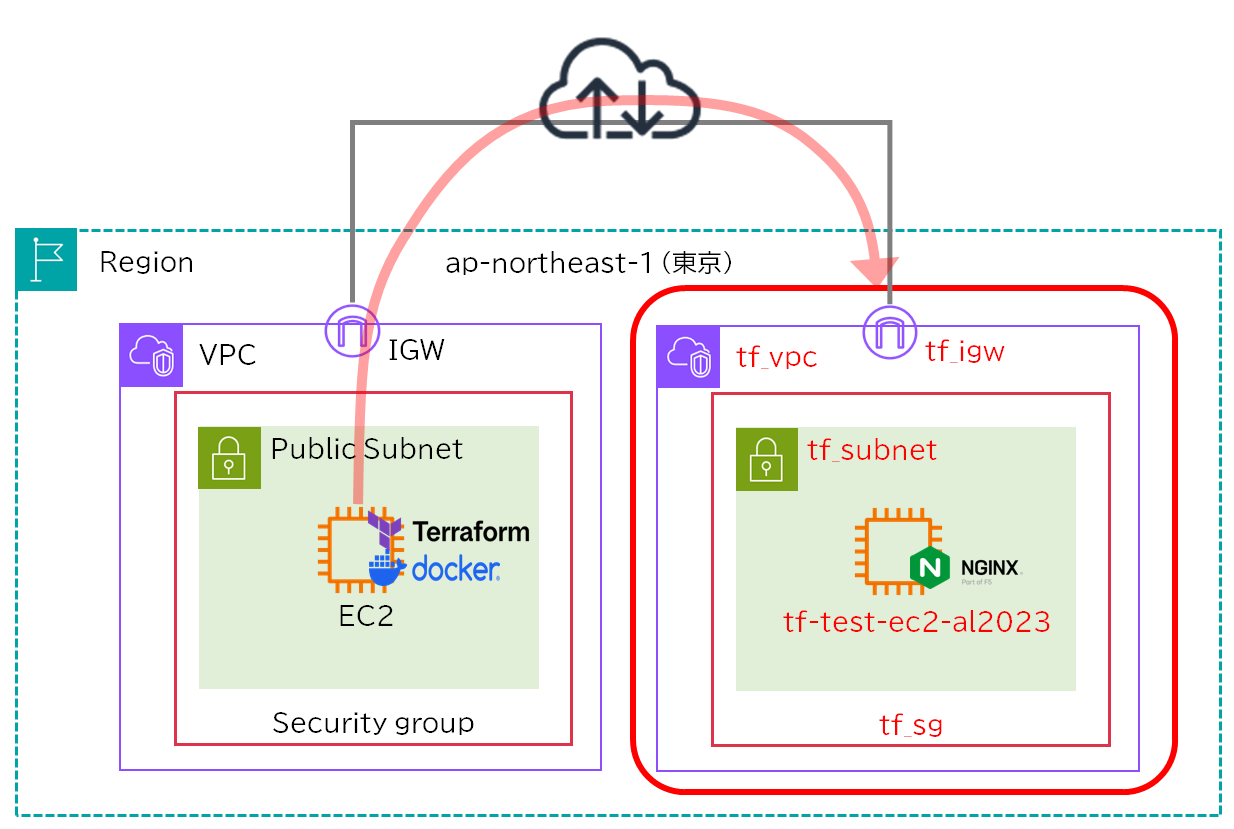
NW構成
Terraform実行環境はAWS(Amazon Linux 2023)で構築しました。
来月AWSの試用期間が終了し維持費用が掛かるため、Terraform実行環境をKubernetesに移行する想定でDocker-Composeを利用し検証しました。
新規構築したEC2インスタンスでは確認用にNginxを入れておきます。
AWSのアクセスキーはIAMから発行できますので事前に用意しておきましょう。
フォルダ構成
├── .gitignore
├── .ssh
│   ├── id_rsa
│   └── id_rsa.pub
├── aws_ec2.tf
├── aws_public_key.tf
├── aws_vpc.tf
├── docker-compose.yaml
├── provider.tf
├── terraform.tfvars
└── variables.tfAWS実行環境構築
バージョンやコマンド等を実行環境に依存したくないので、dockerをインストールします。
sh-5.2$ sudo yum install -y docker
sh-5.2$ docker compose version
Docker Compose version v5.0.2
sh-5.2$ sudo service docker start
sh-5.2$ sudo docker pull hashicorp/terraform:1.14
sh-5.2$ sudo docker images
REPOSITORY            TAG       IMAGE ID       CREATED        SIZE
hashicorp/terraform 1.14 3f5fd350366c 37 hours ago 130MBRedirecting to /bin/systemctl start docker.service
sh-5.2$ sudo usermod -aG docker ssm-user
sh-5.2$ exit
sh-5.2$ groups
ssm-user dockerAWS-Vaultインストール
無料でクライアントに保存しているAWS認証情報を暗号化できるため、平文の認証情報をGitでプッシュしてしまうリスクがなくなり安心です。
導入方法や利用手順は下記リンクに記載されています。
AWS-Vault追加
sh-5.2$ sudo curl -L -o aws-vault \
  https://github.com/99designs/aws-vault/releases/latest/download/aws-vault-linux-amd64
  % Total    % Received % Xferd  Average Speed   Time    Time     Time  Current
                                 Dload  Upload   Total   Spent    Left  Speed
  0     0    0     0    0     0      0      0 --:--:-- --:--:-- --:--:--     0
  0     0    0     0    0     0      0      0 --:--:-- --:--:-- --:--:--     0
100 13.9M  100 13.9M    0     0  22.4M      0 --:--:-- --:--:-- --:--:-- 27.4M
sh-5.2$
sh-5.2$ sudo chmod +x aws-vault
sh-5.2$ sudo mv aws-vault /usr/local/bin/
sh-5.2$ sudo aws-vault --version
v7.2.0
sh-5.2$
sh-5.2$ export AWS_VAULT_BACKEND=file
sh-5.2$ aws-vault add myprofile
Enter Access Key ID: xxxxxxxxxxxxxxxxxxxxxxxxxx
Enter Secret Access Key: ****************************************
Enter passphrase to unlock "/home/ssm-user/.awsvault/keys/":
Added credentials to profile "myprofile" in vault
sh-5.2$
sh-5.2$
sh-5.2$ mkdir -p ~/.awsAWS接続確認
sh-5.2$ aws-vault exec myprofile -- aws sts get-caller-identity
Enter passphrase to unlock "/home/ssm-user/.awsvault/keys/":
Enter passphrase to unlock "/home/ssm-user/.awsvault/keys/":
{
    "UserId": "xxxxxxxxxxxxx",
    "Account": "xxxxxxxxxxxxx",
    "Arn": "arn:aws:iam::xxxxxxxxxxxxx:root"
}
sh-5.2$ SSH認証鍵作成
インターネット経由でEC2インスタンスに乗り込めるようにSSH用の公開鍵を作成しておきます。
最近はED25519が主流となっているため、RSAでは接続できないシステムが増えています。
楕円曲線暗号アルゴリズムを使っているらしく、ED25519の128bitでRSAの3000bitと同等のセキュリティレベルらしいです。
・RSA
sh-5.2$ mkdir .ssh
sh-5.2$ sudo ssh-keygen -t rsa -b 4096 -m PEM -f ./.ssh/id_rsa・ED25519
sh-5.2$ mkdir .ssh
sh-5.2$ sudo ssh-keygen -t ed25519 -f ./.ssh/id_ed25519ファイル作成
docker定義ファイル作成
version: "3.9"

services:
  terraform:
    image: hashicorp/terraform:1.14
    working_dir: /workspace
    volumes:
      - .:/workspace
      - ~/.aws:/root/.aws:ro
    environment:
      - AWS_ACCESS_KEY_ID
      - AWS_SECRET_ACCESS_KEY
      - AWS_SESSION_TOKEN
      - AWS_REGION
      - AWS_DEFAULT_REGION
- AWS_PROFILE.env
.terraform/
terraform.tfstate*TFファイル作成
TFファイルでリソースを定義していきます。
TFファイルはHCL (HashiCorp Configuration Language)で記述するHashiCorp社独自のプログラミング言語です。aws_public_key.tfのpublic_keyにはid_rsa.pubの文字列を貼り付けます。
###################################
# SSH用公開鍵
###################################
resource "aws_key_pair" "sshpub_key" {
  key_name   = "sshpub-key"
  public_key = "ssh-rsa AAAAB3NzaC1yc2---omit---XXX" #作成した公開鍵で置き換える
}
###################################
# プロパイダ設定
###################################
provider "aws" {
region = "ap-northeast-1"
}###################################
# EC2
###################################
data "aws_ssm_parameter" "al2023_ami" {
name = "/aws/service/ami-amazon-linux-latest/al2023-ami-kernel-default-x86_64"
}
resource "aws_instance" "ec2_al2023" {
ami = data.aws_ssm_parameter.al2023_ami.value
instance_type = "t2.micro"
key_name = aws_key_pair.sshpub_key.key_name
vpc_security_group_ids = [aws_security_group.tf_sg.id]
subnet_id = aws_subnet.tf_subnet.id
tags = {
Name = "tf-test-ec2-al2023"
}
user_data = <<-EOF
#!/bin/bash
dnf install -y nginx
systemctl start nginx
systemctl enable nginx
EOF
}###################################
# VPC
###################################
resource "aws_vpc" "tf_vpc" {
cidr_block = "172.31.0.0/16"
enable_dns_hostnames = true
tags = {
Name = "tf_vpc"
}
}
###################################
# Public Subnet
###################################
resource "aws_subnet" "tf_subnet" {
vpc_id = aws_vpc.tf_vpc.id
cidr_block = "172.31.100.0/24"
availability_zone = "ap-northeast-1a"
map_public_ip_on_launch = true
tags = {
Name = "tf_subnet"
}
}
###################################
# IGW
###################################
resource "aws_internet_gateway" "tf_igw" {
vpc_id = aws_vpc.tf_vpc.id
tags = {
Name = "tf_igw"
}
}
###################################
# Route Table
###################################
resource "aws_route_table" "tf_rtb" {
vpc_id = aws_vpc.tf_vpc.id
route {
cidr_block = "0.0.0.0/0"
gateway_id = aws_internet_gateway.tf_igw.id
}
tags = {
Name = "tf_rtb"
}
}
###################################
# Public Subnet + Route Table
###################################
resource "aws_route_table_association" "tf_rt_association" {
subnet_id = aws_subnet.tf_subnet.id
route_table_id = aws_route_table.tf_rtb.id
}
###################################
# Security Group
###################################
# SG Main (ルール詳細は terraform.tfvars に記載)
resource "aws_security_group" "tf_sg" {
name = "tf_sg"
description = "Managed by Terraform"
vpc_id = aws_vpc.tf_vpc.id
tags = {
Name = "tf_sg"
}
}
# SG ingress
resource "aws_security_group_rule" "ingress" {
for_each = var.ingress_rules
type = "ingress"
from_port = each.value.from_port
to_port = each.value.to_port
protocol = each.value.protocol
cidr_blocks = each.value.cidr_blocks
description = each.value.description
security_group_id = aws_security_group.tf_sg.id
}
# SG egress
resource "aws_security_group_rule" "egress" {
for_each = var.egress_rules
type = "egress"
from_port = each.value.from_port
to_port = each.value.to_port
protocol = each.value.protocol
cidr_blocks = each.value.cidr_blocks
description = each.value.description
security_group_id = aws_security_group.tf_sg.id
}###################################
# 変数定義
###################################
variable "ingress_rules" {
description = "Ingress rules"
type = map(object({
from_port = number
to_port = number
protocol = string
cidr_blocks = list(string)
description = string
}))
default = {}
}
variable "egress_rules" {
description = "Egress rules"
type = map(object({
from_port = number
to_port = number
protocol = string
cidr_blocks = list(string)
description = string
}))
default = {}
}
###################################
# 変数設定
###################################
ingress_rules = {
  http = {
    from_port   = 80
    to_port     = 80
    protocol    = "tcp"
    cidr_blocks = ["0.0.0.0/0"]
    description = "HTTP"
  }

  ssh_internal = {
    from_port   = 22
    to_port     = 22
    protocol    = "tcp"
    cidr_blocks = ["172.16.100.0/24"]
    description = "SSH from internal network"
  }
}

egress_rules = {
  all = {
    from_port   = 0
    to_port     = 0
    protocol    = "-1"
    cidr_blocks = ["0.0.0.0/0"]
    description = "Allow all outbound"
  }
}Terraform実行
Terraformの実行コマンドになります。
大雑把に説明するとinitは初期化、planは差分比較、applyは設定反映、state listは一覧表示、destroyは削除になります。
sh-5.2$ # Terraform初期化
sh-5.2$ aws-vault exec --backend=file myprofile --no-session -- bash -c "docker compose run --rm terraform init"
sh-5.2$ # 現在の管理状態と実際のクラウド環境の差分比較
sh-5.2$ aws-vault exec --backend=file myprofile --no-session -- bash -c "docker compose run --rm terraform plan"
sh-5.2$ # 設定差分を反映
sh-5.2$ aws-vault exec --backend=file myprofile --no-session -- bash -c "docker compose run --rm terraform apply -auto-approve"
sh-5.2$ # 管理しているリソース一覧を表示
sh-5.2$ aws-vault exec --backend=file myprofile --no-session -- bash -c "docker compose run --rm terraform state list"
sh-5.2$ # 管理しているリソースを削除
sh-5.2$ aws-vault exec --backend=file myprofile --no-session -- bash -c "docker compose run --rm terraform destroy -auto-approve"initで初期化します。
sh-5.2$ aws-vault exec --backend=file myprofile --no-session -- bash -c "docker compose run --rm terraform init"
Enter passphrase to unlock "/home/ssm-user/.awsvault/keys/":
WARN[0000] /home/ssm-user/terraform-dep/docker-compose.yml: the attribute `version` is obsolete, it will be ignored, please remove it to avoid potential confusion
Container terraform-dep-terraform-run-ddcfa0a2e524 Creating
Container terraform-dep-terraform-run-ddcfa0a2e524 Created
Initializing the backend...
Initializing provider plugins...
- Reusing previous version of hashicorp/aws from the dependency lock file
- Using previously-installed hashicorp/aws v6.32.1

Terraform has been successfully initialized!

You may now begin working with Terraform. Try running "terraform plan" to see
any changes that are required for your infrastructure. All Terraform commands
should now work.

If you ever set or change modules or backend configuration for Terraform,
rerun this command to reinitialize your working directory. If you forget, other
commands will detect it and remind you to do so if necessary.planで設定差分を確認します。
設定ファイルと現在の稼働状況とクラウド上の設定を比較し差分を表示してくれます。
sh-5.2$ aws-vault exec --backend=file myprofile --no-session -- bash -c "docker compose run --rm terraform plan"
Enter passphrase to unlock "/home/ssm-user/.awsvault/keys/":
WARN[0000] /home/ssm-user/terraform-dep/docker-compose.yml: the attribute `version` is obsolete, it will be ignored, please remove it to avoid potential confusion
Container terraform-dep-terraform-run-9e8e9096c34d Creating
Container terraform-dep-terraform-run-9e8e9096c34d Created

~~~省略~~~

Plan: 11 to add, 0 to change, 0 to destroy.

───────────────────────────────────────────────────────────────────────────────────────────────────────────────────────────────────────────────────────────────────────────────────────

Note: You didn't use the -out option to save this plan, so Terraform can't guarantee to take exactly these actions if you run "terraform apply" now.
sh-5.2$applyで設定差分を反映します。
sh-5.2$ aws-vault exec --backend=file myprofile --no-session -- bash -c "docker compose run --rm terraform apply -auto-approve"
Enter passphrase to unlock "/home/ssm-user/.awsvault/keys/":
WARN[0000] /home/ssm-user/terraform-dep/docker-compose.yaml: the attribute `version` is obsolete, it will be ignored, please remove it to avoid potential confusion
Container terraform-dep-terraform-run-4df992a804d7 Creating
Container terraform-dep-terraform-run-4df992a804d7 Created

~~~省略~~~

Apply complete! Resources: 11 added, 0 changed, 0 destroyed.state listで管理しているリソース一覧を表示でき、プロビジョニングされたことが確認できます。
sh-5.2$ docker compose run --rm terraform state list
WARN[0000] /home/ssm-user/terraform-dep/docker-compose.yml: the attribute `version` is obsolete, it will be ignored, please remove it to avoid potential confusion
Container terraform-dep-terraform-run-782a5d122631 Creating
Container terraform-dep-terraform-run-782a5d122631 Created
data.aws_ssm_parameter.al2023_ami
aws_instance.ec2_al2023
aws_internet_gateway.tf_igw
aws_key_pair.sshpub_key
aws_route_table.tf_rtb
aws_route_table_association.tf_rt_association
aws_security_group.tf_sg
aws_security_group_rule.egress["all"]
aws_security_group_rule.ingress["http"]
aws_security_group_rule.ingress["ssh_internal"]
aws_subnet.tf_subnet
aws_vpc.tf_vpc
sh-5.2$GUI確認
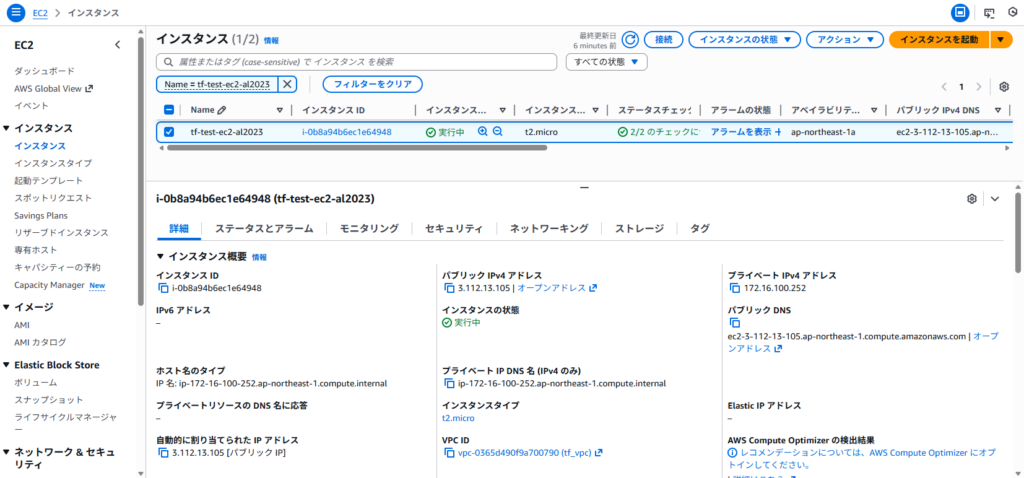
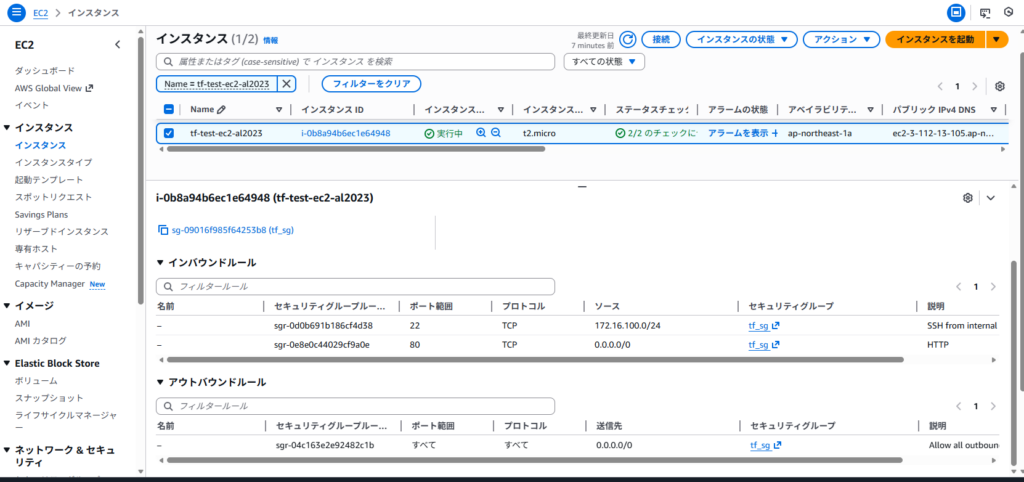
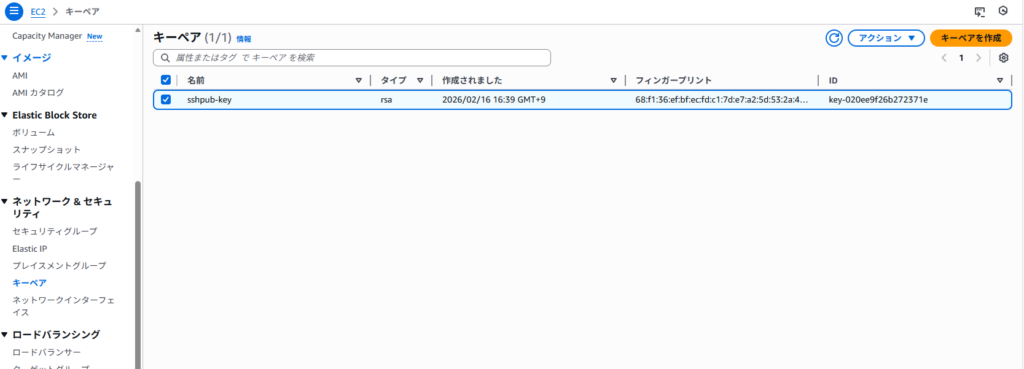
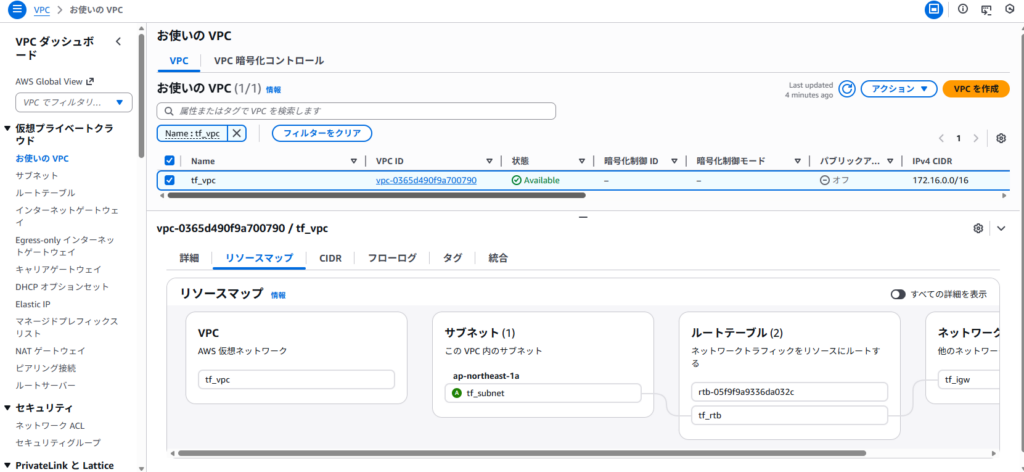
実際にGUIを確認してみて、AWSリソースが作成されていることを確認できました。
・EC2インスタンス
・セキュリティグループ
・キーペア(シークレットアクセスキー)
・VCPリソース
通信確認
外部からSSH接続する場合は、SGのinboundで”172.16.0.0/16″のフィルタリングしているため、設定を変更する必要があります。
SSH確認
sh-5.2$ sudo ssh -i ./id_rsa ec2-user@x.x.x.x
The authenticity of host 'x.x.x.x (x.x.x.x)' can't be established.
ED25519 key fingerprint is SHA256:CkaaiNFzkSZf4aaidgTAIq44h2ZhqsvqfpZfbe1NXjg.
This key is not known by any other names
Are you sure you want to continue connecting (yes/no/[fingerprint])? yes
Warning: Permanently added 'x.x.x.x' (ED25519) to the list of known hosts.
   ,     #_
   ~\_  ####_        Amazon Linux 2023
  ~~  \_#####\
  ~~     \###|
  ~~       \#/ ___   https://aws.amazon.com/linux/amazon-linux-2023
   ~~       V~' '->
    ~~~         /
      ~~._.   _/
         _/ _/
       _/m/'
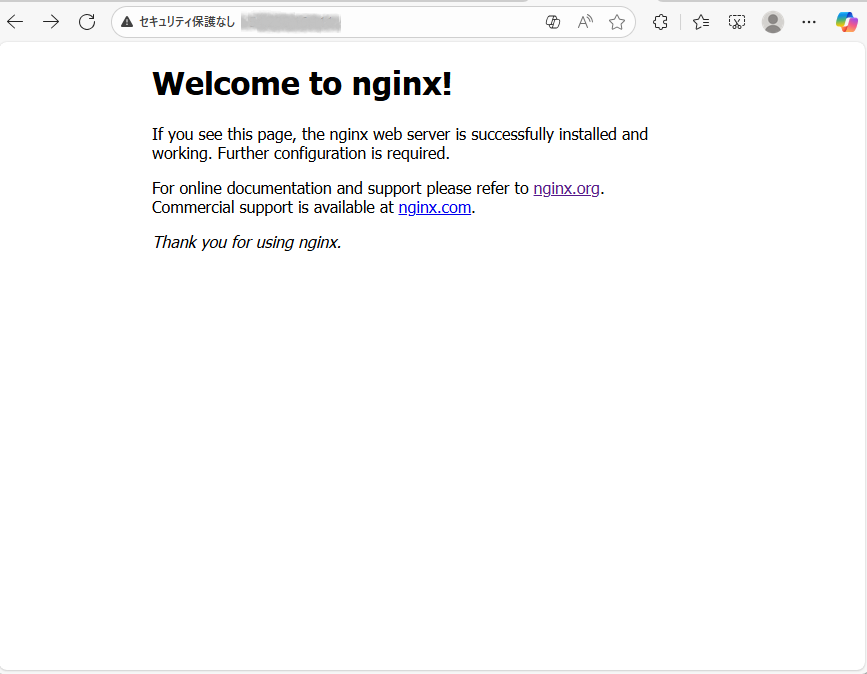
[ec2-user@ip-172-16-100-252 ~]$HTTP確認
AWSリソース削除
検証用のためため、AWSリソースを削除します。
sh-5.2$ aws-vault exec --backend=file myprofile --no-session -- bash -c "docker compose run --rm terraform destroy -auto-approve"
Enter passphrase to unlock "/home/ssm-user/.awsvault/keys/":
WARN[0000] /home/ssm-user/terraform-dep/docker-compose.yml: the attribute `version` is obsolete, it will be ignored, please remove it to avoid potential confusion
Container terraform-dep-terraform-run-144ffcd25f05 Creating
Container terraform-dep-terraform-run-144ffcd25f05 Created

~~~省略~~~

Destroy complete! Resources: 11 destroyed.最後に
1度コードを書いてしまえば初期構築の横展開は楽になりそうだなと感じた反面、運用設計はまた別で考える必要があるため初期導入コストは高そうだなとも思いました。
運用設計はAnsibleでできそうな気がしますが触ったことがないので近いうちにAnsibleの構築を実施してみたいです。