AWSにVPN Gatewayを作成し、オンプレミス環境と接続をしてみました。
前回Terraformで作成した環境を拡張して接続を行います。

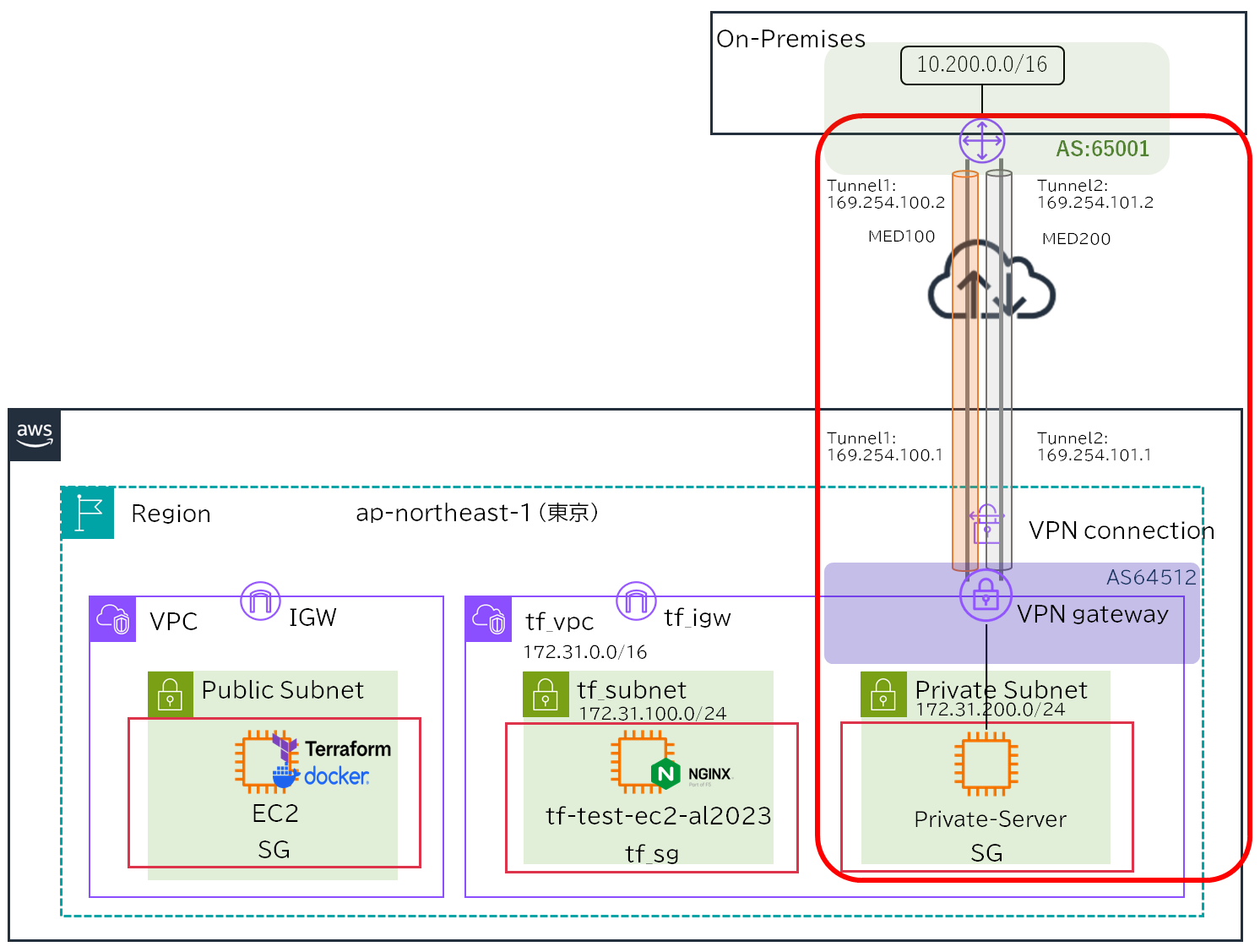
NW構成図
自宅検証用の固定IPを利用して接続を行いました。
Azureの時と同様、オンプレ側でVPN接続する機器は家で眠っていたFortigate 50EをVPN接続専用機として利用しました。
AWS環境にPrivate Subnetを作成していなったため、新たに追加しVPN Gatewayをアタッチします。
IPSecでトンネルを2本接続しBGPで経路交換を行い、VPN Gatewayで受信した経路はPrivate Subnetに再配布します。
VPN GatewayはデフォルトでMED属性が付与されているのでActive-Standby構成になります。
AWS側のプライベートAS「64512」はデフォルト設定のため変更可能です。
ファイル追加
TFファイル
プライベートサブネットを作成し、ルートテーブル、SGを作成します。
ルートテーブルはBGPで運用するので経路設定はしません。
~~~省略~~~

# プライベートサブネット追加
resource "aws_subnet" "tf_subnet_private" {
  vpc_id                  = aws_vpc.tf_vpc.id
  cidr_block              = "172.31.200.0/24"
  availability_zone       = "ap-northeast-1a"
  map_public_ip_on_launch = false
  tags = {
    Name = "tf_subnet_private"
  }
}
# Private用ルートテーブル
resource "aws_route_table" "private" {
  vpc_id = aws_vpc.tf_vpc.id
}
# サブネットとルートテーブルの紐づけ
resource "aws_route_table_association" "tf_rt_private" {
  subnet_id      = aws_subnet.tf_subnet_private.id
  route_table_id = aws_route_table.private.id
}
# PrivateSG作成
resource "aws_security_group" "tf_sg_private" {
  name        = "tf_sg_private"
  description = "PrivateSG Managed by Terraform"
  vpc_id      = aws_vpc.tf_vpc.id

  tags = {
    Name = "tf_sg_private"
  }
}
# Ingress、Egressルールを追加
resource "aws_security_group_rule" "ingress_private" {
  for_each = var.ingress_rules_private

  type              = "ingress"
  from_port         = each.value.from_port
  to_port           = each.value.to_port
  protocol          = each.value.protocol
  cidr_blocks       = each.value.cidr_blocks
  description       = each.value.description
  security_group_id = aws_security_group.tf_sg_private.id
}
resource "aws_security_group_rule" "egress_private" {
  for_each = var.egress_rules_private

  type              = "egress"
  from_port         = each.value.from_port
  to_port           = each.value.to_port
  protocol          = each.value.protocol
  cidr_blocks       = each.value.cidr_blocks
  description       = each.value.description
  security_group_id = aws_security_group.tf_sg_private.id
}EC2にPrivate Instanceを作成します。
SSH認証鍵は構築時の鍵を使いまわします。
~~~省略~~~

# EC2インスタンス作成
resource "aws_instance" "private_server" {
  ami           = data.aws_ssm_parameter.al2023_ami.value
  instance_type = "t2.micro"
  key_name      = aws_key_pair.sshpub_key.key_name
  vpc_security_group_ids = [aws_security_group.tf_sg_private.id]
  subnet_id              = aws_subnet.tf_subnet_private.id

  tags = {
    Name = "private_server"
  }
}VPN Gateway、VPN Connectionを作成します。
FortigateとAzure間の接続で実績があるフェーズ1、フェーズ2の暗号化アルゴリズム、ハッシュ関数、鍵長はAzure接続時に合わせました。
#########################
# VGW
#########################
resource "aws_vpn_gateway" "vgw" {
  vpc_id          = aws_vpc.tf_vpc.id
  amazon_side_asn = 64512  #AWSデフォルト

  tags = {
    Name = "tf_vgw"
  }
}

resource "aws_customer_gateway" "fortigate" {
  bgp_asn    = 65001
  ip_address = "x.x.x.x" #オンプレグローバルIP
  type       = "ipsec.1"

  tags = {
    Name = "fortigate-cgw"
  }
}
resource "aws_vpn_gateway_route_propagation" "vpn_propagation" {
  vpn_gateway_id = aws_vpn_gateway.vgw.id
  route_table_id = aws_route_table.private.id
}

resource "aws_vpn_connection" "fortigate_vpn" {
  vpn_gateway_id      = aws_vpn_gateway.vgw.id
  customer_gateway_id = aws_customer_gateway.fortigate.id
  type                = "ipsec.1"

  tunnel1_inside_cidr = "169.254.100.0/30"
  tunnel2_inside_cidr = "169.254.101.0/30"

  tunnel1_preshared_key = "AWS_Ph1_IPsec" # 事前共有鍵
  tunnel2_preshared_key = "AWS_Ph2_IPsec" # 事前共有鍵

  static_routes_only = false

  # Tunnel1 Phase1
  tunnel1_phase1_encryption_algorithms = ["AES256"]
  tunnel1_phase1_integrity_algorithms    = ["SHA2-256"]
  tunnel1_phase1_dh_group_numbers     = [14]

  # Tunnel1 Phase2
  tunnel1_phase2_encryption_algorithms = ["AES256"]
  tunnel1_phase2_integrity_algorithms    = ["SHA2-256"]
  tunnel1_phase2_dh_group_numbers     = [2]

  # Tunnel2 Phase1(AWSは冗長)
  tunnel2_phase1_encryption_algorithms = ["AES256"]
  tunnel2_phase1_integrity_algorithms    = ["SHA2-256"]
  tunnel2_phase1_dh_group_numbers     = [14]

  # Tunnel2 Phase2(AWSは冗長)
  tunnel2_phase2_encryption_algorithms = ["AES256"]
  tunnel2_phase2_integrity_algorithms    = ["SHA2-256"]
  tunnel2_phase2_dh_group_numbers     = [2]

  tags = {
    Name = "fortigate-ipsec"
  }
}

output "vpn_tunnel1" {
  value = {
    aws_public_ip = aws_vpn_connection.fortigate_vpn.tunnel1_address
    aws_bgp_ip     = aws_vpn_connection.fortigate_vpn.tunnel1_vgw_inside_address
    fortigate_ip     = aws_vpn_connection.fortigate_vpn.tunnel1_cgw_inside_address
    tunnel_cidr     = aws_vpn_connection.fortigate_vpn.tunnel1_inside_cidr
  }
}
output "vpn_tunnel2" {
  value = {
    aws_public_ip = aws_vpn_connection.fortigate_vpn.tunnel2_address
    aws_bgp_ip     = aws_vpn_connection.fortigate_vpn.tunnel2_vgw_inside_address
    fortigate_ip     = aws_vpn_connection.fortigate_vpn.tunnel2_cgw_inside_address
    tunnel_cidr      = aws_vpn_connection.fortigate_vpn.tunnel2_inside_cidr
  }
}NSGにオンプレとWebserver間の通信を許可出します。
~~~省略~~~

variable "ingress_rules_private" {
  description = "Ingress rules"
  type = map(object({
    from_port   = number
    to_port     = number
    protocol    = string
    cidr_blocks = list(string)
    description = string
  }))
  default = {}
}
variable "egress_rules_private" {
  description = "Egress rules"
  type = map(object({
    from_port   = number
    to_port     = number
    protocol    = string
    cidr_blocks = list(string)
    description = string
  }))
  default = {}
}NSGはステートフルのためIngressのみ許可を行います。
~~~省略~~~

# Privateインスタンス用
ingress_rules_private = {
  http = {
    from_port   = 80
    to_port     = 80
    protocol    = "tcp"
    cidr_blocks = ["10.200.0.0/16"]  #送信元
    description = "From On-Premises"
  }
  icmp = {
    from_port   = -1
    to_port     = -1
    protocol    = "icmp"
    cidr_blocks = ["10.200.0.0/16"]  #送信元
    description = "From On-Premises"
  }
}

egress_rules_private = {}Fortigate
トンネル、IPSec、BGP、ポリシーを追加します。
ここで注意しなければいけないのが、通信が発生しないとIPSecを張らないことです。
LAN側からトンネル内を通過する通信を発生させるためにポリシーで許可することで、BGPネイバーの確立ができるようになります。
config system interface
  edit "aws-vpn-1"
    set ip 169.254.100.2 255.255.255.255
    set allowaccess ping
    set type tunnel
    set remote-ip 169.254.100.1 255.255.255.252
  next
  edit "aws-vpn-2"
    set ip 169.254.101.2 255.255.255.255
    set allowaccess ping
    set type tunnel
    set remote-ip 169.254.101.1 255.255.255.252
  next
end

config vpn ipsec phase1-interface
  edit aws-vpn-1
    set interface wan
    set ike-version 2
    set peertype any
    set proposal aes256-sha256
    set dhgrp 14
    set remote-gw x.x.x.x #トンネル1グローバルIP
    set psksecret AWS_Ph1_IPsec #事前共有鍵
  next
  edit aws-vpn-2
    set interface wan
    set ike-version 2
    set peertype any
    set proposal aes256-sha256
    set dhgrp 14
    set remote-gw y.y.y.y #トンネル2グローバルIP
    set psksecret AWS_Ph2_IPsec #事前共有鍵
  next
end

config vpn ipsec phase2-interface
  edit aws-vpn-p2-1
    set phase1name aws-vpn-1
    set proposal aes256-sha256
    set dhgrp 2
    set src-subnet 0.0.0.0 0.0.0.0
    set dst-subnet 0.0.0.0 0.0.0.0
  next
  edit aws-vpn-p2-2
    set phase1name aws-vpn-2
    set proposal aes256-sha256
    set dhgrp 2
    set src-subnet 0.0.0.0 0.0.0.0
    set dst-subnet 0.0.0.0 0.0.0.0
  next
end

config router bgp
  set as 65001
  set router-id 10.201.0.1
  config neighbor
    edit 169.254.100.1
      set remote-as 64512
      set update-source "aws-vpn-1"
    next
    edit 169.254.101.1
      set remote-as 64512
      set update-source "aws-vpn-2"
    next
  end
end
config firewall address
  edit "onprem-real"
    set subnet 10.200.0.0 255.255.0.0
  next
  edit "aws-vpc"
   set subnet 172.31.0.0 255.255.0.0
  next
end


config firewall policy
    edit 1
        set name "lan-to-AWS-1"
        set srcintf "lan"
        set dstintf "aws-vpn-1"
        set srcaddr "onprem-real"
        set dstaddr "aws-vpc"
        set action accept
        set schedule "always"
        set service "ALL"
    next
    edit 2
        set name "lan-to-AWS-2"
        set srcintf "lan"
        set dstintf "aws-vpn-2"
        set srcaddr "onprem-real"
        set dstaddr "aws-vpc"
        set action accept
        set schedule "always"
        set service "ALL"
    next
end接続確認
Fortigate確認
IKE SA確認
Tunnel×2本接続するため、SAが2つ作成されていれば問題ありません。
# diagnose vpn ike gateway list

vd: root/0
name: aws-vpn-1
version: 2
interface: ppp1 42
addr: x.x.x.x:4500 -> y.y.y.y:4500
virtual-interface-addr: 169.254.100.2 -> 169.254.100.1
created: 13s ago
nat: peer
PPK: no
IKE SA: created 1/1  established 1/1  time 230/230/230 ms
IPsec SA: created 1/1  established 1/1  time 230/230/230 ms

  id/spi: 17855 xxxxxxxxxxxxxxxxxxxxxxxxxxxx
  direction: initiator
  status: established 13-13s ago = 230ms
  proposal: aes256-sha256
  child: no
  SK_ei: xxxxxxxxxxxxxxxx-xxxxxxxxxxxxxxxx-xxxxxxxxxxxxxxxx-xxxxxxxxxxxxxxxx
  SK_er: xxxxxxxxxxxxxxxx-xxxxxxxxxxxxxxxx-xxxxxxxxxxxxxxxx-xxxxxxxxxxxxxxxx
  SK_ai: xxxxxxxxxxxxxxxx-xxxxxxxxxxxxxxxx-xxxxxxxxxxxxxxxx-xxxxxxxxxxxxxxxx
  SK_ar: xxxxxxxxxxxxxxxx-xxxxxxxxxxxxxxxx-xxxxxxxxxxxxxxxx-xxxxxxxxxxxxxxxx
  PPK: no
  message-id sent/recv: 2/1
  lifetime/rekey: 86400/86086
  DPD sent/recv: 00000000/00000000

vd: root/0
name: aws-vpn-2
version: 2
interface: ppp1 42
addr: x.x.x.x:4500 -> z.z.z.z:4500
virtual-interface-addr: 169.254.101.2 -> 169.254.101.1
created: 7s ago
nat: peer
PPK: no
IKE SA: created 1/1  established 1/1  time 190/190/190 ms
IPsec SA: created 1/1  established 1/1  time 190/190/190 ms

  id/spi: 17856 xxxxxxxxxxxxxxxxxxxxxxxxxxxx
  direction: initiator
  status: established 7-7s ago = 190ms
  proposal: aes256-sha256
  child: no
  SK_ei: xxxxxxxxxxxxxxxx-xxxxxxxxxxxxxxxx-xxxxxxxxxxxxxxxx-xxxxxxxxxxxxxxxx
  SK_er: xxxxxxxxxxxxxxxx-xxxxxxxxxxxxxxxx-xxxxxxxxxxxxxxxx-xxxxxxxxxxxxxxxx
  SK_ai: xxxxxxxxxxxxxxxx-xxxxxxxxxxxxxxxx-xxxxxxxxxxxxxxxx-xxxxxxxxxxxxxxxx
  SK_ar: xxxxxxxxxxxxxxxx-xxxxxxxxxxxxxxxx-xxxxxxxxxxxxxxxx-xxxxxxxxxxxxxxxx
  PPK: no
  message-id sent/recv: 2/0
  lifetime/rekey: 86400/86092
  DPD sent/recv: 00000000/00000000
IPSec SA確認
トンネル×2本のため、2つSAが作成されていれば問題ありません。
stat: rxp=30 txp=31のようにカウントアップすれば、BGPも通せていることになります。
# diagnose vpn tunnel list
list all ipsec tunnel in vd 0
------------------------------------------------------
name=aws-vpn-1 ver=2 serial=5 x.x.x.x:4500->y.y.y.y:4500 dst_mtu=1454
bound_if=42 lgwy=static/1 tun=intf/0 mode=auto/1 encap=none/512 options[0200]=frag-rfc  run_state=0 accept_traffic=1 overlay_id=0

proxyid_num=1 child_num=0 refcnt=14 ilast=2 olast=2 ad=/0
stat: rxp=30 txp=31 rxb=4264 txb=2038
dpd: mode=on-demand on=1 idle=20000ms retry=3 count=0 seqno=0
natt: mode=keepalive draft=0 interval=10 remote_port=4500
proxyid=aws-vpn-p2-1 proto=0 sa=1 ref=2 serial=4
  src: 0:0.0.0.0/0.0.0.0:0
  dst: 0:0.0.0.0/0.0.0.0:0
  SA:  ref=3 options=10202 type=00 soft=0 mtu=1374 expire=42813/0B replaywin=1024
       seqno=20 esn=0 replaywin_lastseq=0000001e itn=0 qat=0 hash_search_len=1
  life: type=01 bytes=0/0 timeout=42902/43200
  dec: spi=1f946e7d esp=aes key=32 xxxxxxxxxxxxxxxxxxxxxxxxxxxxxxxxxxxxxxxxxxxxxxxxxxx
       ah=sha256 key=32 xxxxxxxxxxxxxxxxxxxxxxxxxxxxxxxxxxxxxxxxxxxxxxxxxxx
  enc: spi=c8a4e342 esp=aes key=32 xxxxxxxxxxxxxxxxxxxxxxxxxxxxxxxxxxxxxxxxxxxxxxxxxxx
       ah=sha256 key=32 xxxxxxxxxxxxxxxxxxxxxxxxxxxxxxxxxxxxxxxxxxxxxxxxxxx
  dec:pkts/bytes=30/1927, enc:pkts/bytes=31/4476
run_tally=1
------------------------------------------------------
name=aws-vpn-2 ver=2 serial=6 x.x.x.x:4500->z.z.z.z:4500 dst_mtu=1454
bound_if=42 lgwy=static/1 tun=intf/0 mode=auto/1 encap=none/512 options[0200]=frag-rfc  run_state=0 accept_traffic=1 overlay_id=0

proxyid_num=1 child_num=0 refcnt=15 ilast=4 olast=4 ad=/0
stat: rxp=28 txp=29 rxb=3936 txb=1941
dpd: mode=on-demand on=1 idle=20000ms retry=3 count=0 seqno=0
natt: mode=keepalive draft=0 interval=10 remote_port=4500
proxyid=aws-vpn-p2-2 proto=0 sa=1 ref=2 serial=2
  src: 0:0.0.0.0/0.0.0.0:0
  dst: 0:0.0.0.0/0.0.0.0:0
  SA:  ref=3 options=10202 type=00 soft=0 mtu=1374 expire=42815/0B replaywin=1024
       seqno=1e esn=0 replaywin_lastseq=0000001c itn=0 qat=0 hash_search_len=1
  life: type=01 bytes=0/0 timeout=42898/43200
  dec: spi=1f946e7e esp=aes key=32 xxxxxxxxxxxxxxxxxxxxxxxxxxxxxxxxxxxxxxxxxxxxxxxxxxx
       ah=sha256 key=32 xxxxxxxxxxxxxxxxxxxxxxxxxxxxxxxxxxxxxxxxxxxxxxxxxxx
  enc: spi=cdf2517c esp=aes key=32 xxxxxxxxxxxxxxxxxxxxxxxxxxxxxxxxxxxxxxxxxxxxxxxxxxx
       ah=sha256 key=32 xxxxxxxxxxxxxxxxxxxxxxxxxxxxxxxxxxxxxxxxxxxxxxxxxxx
  dec:pkts/bytes=28/1750, enc:pkts/bytes=29/4212
run_tally=1
BGP受信ルート確認
トンネルの経由のネットワークが2経路見えていればOKです。
ここで気づいたのですが、メトリックが付与されているためトンネル2がベストパスになります。
想定と違いましたが、物理経路は同じなので良しとしましょう。
AWS側でメトリック調整する項目がないので運になるのかな?
# get router info bgp network
BGP table version is 5, local router ID is 10.201.0.1
Status codes: s suppressed, d damped, h history, * valid, > best, i - internal,
              S Stale
Origin codes: i - IGP, e - EGP, ? - incomplete

   Network          Next Hop            Metric LocPrf Weight RouteTag Path
*> 10.200.0.0/16    0.0.0.0                       100  32768        0 i <-/1>
*> 172.31.0.0       169.254.101.1          100             0        0 64512 i <-/1>
* 169.254.100.1 200 0 0 64512 i <-/->AWS確認
AWS側の確認ですが、
IPSec接続状況
ikev1、ikev2の選択はできないため、オンプレルータ側に依存するようです。
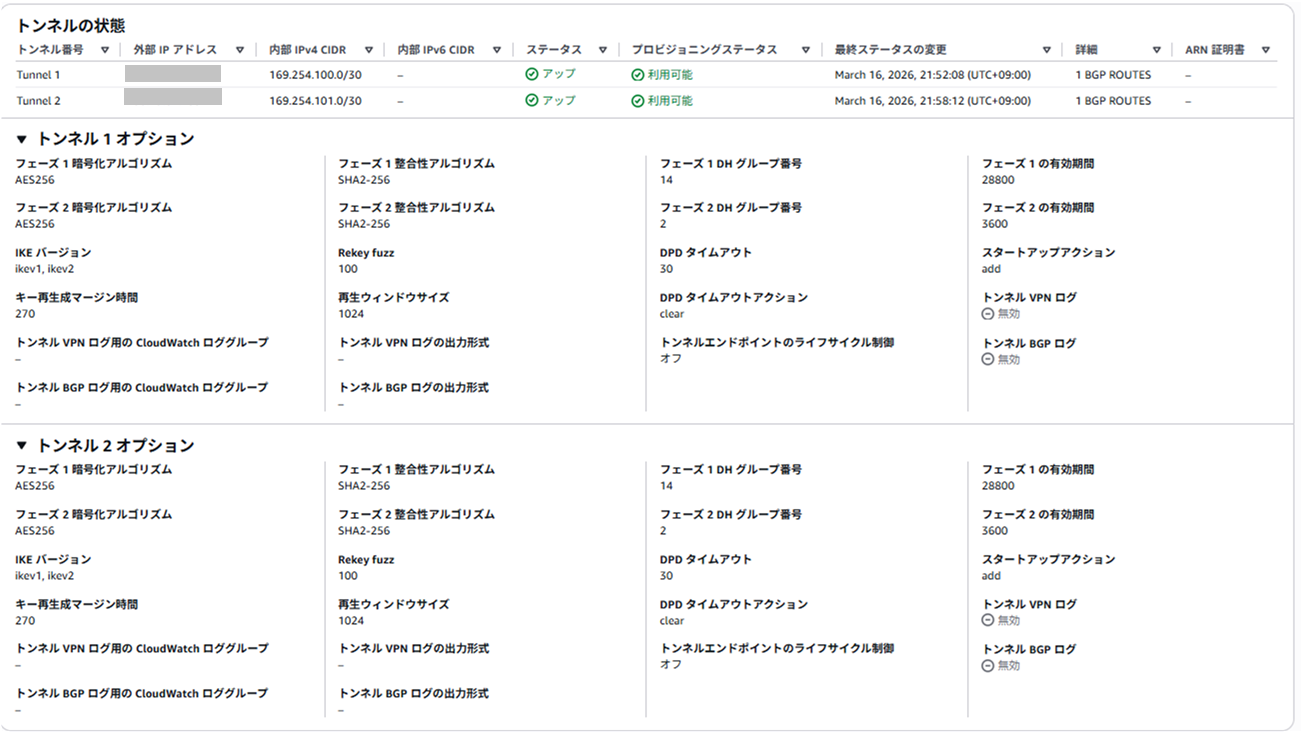
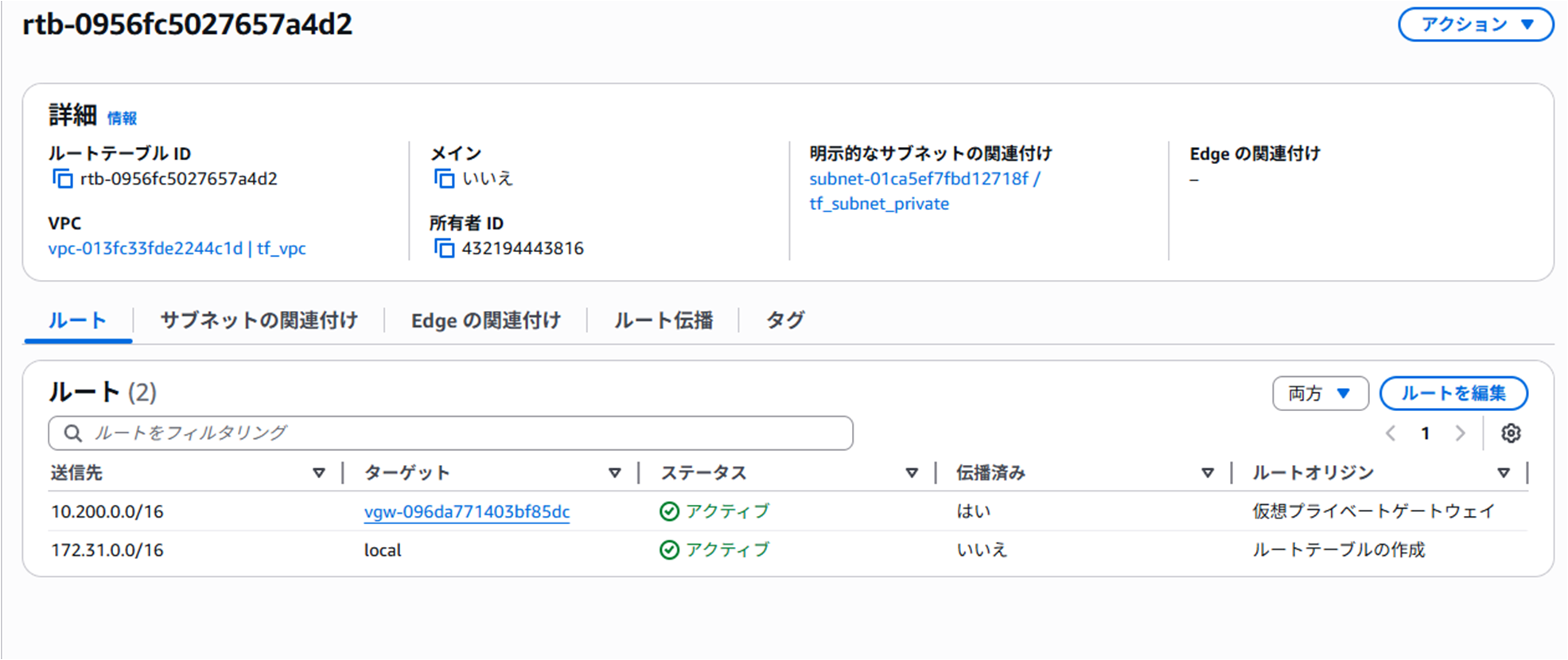
BGP受信ルート
BGPピアの接続状況を確認する項目が見当たりませんでした。
VGWに伝搬設定を入れているため、VPCに経路が流れてくることを確認しました。
VGW上でいろいろ確認できるのかな?オンプレおじさんには見当がつきませんでした。
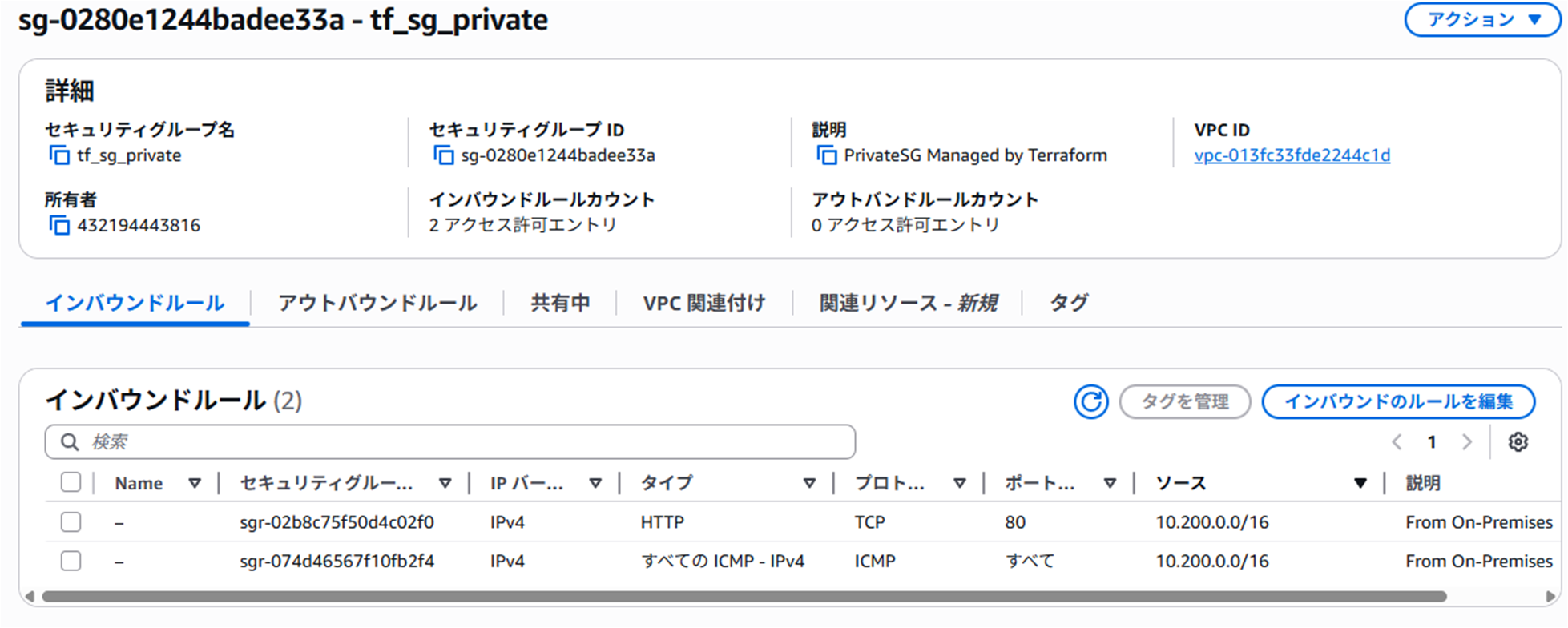
SG
インバウンドルールのみ追加されているのを確認します。
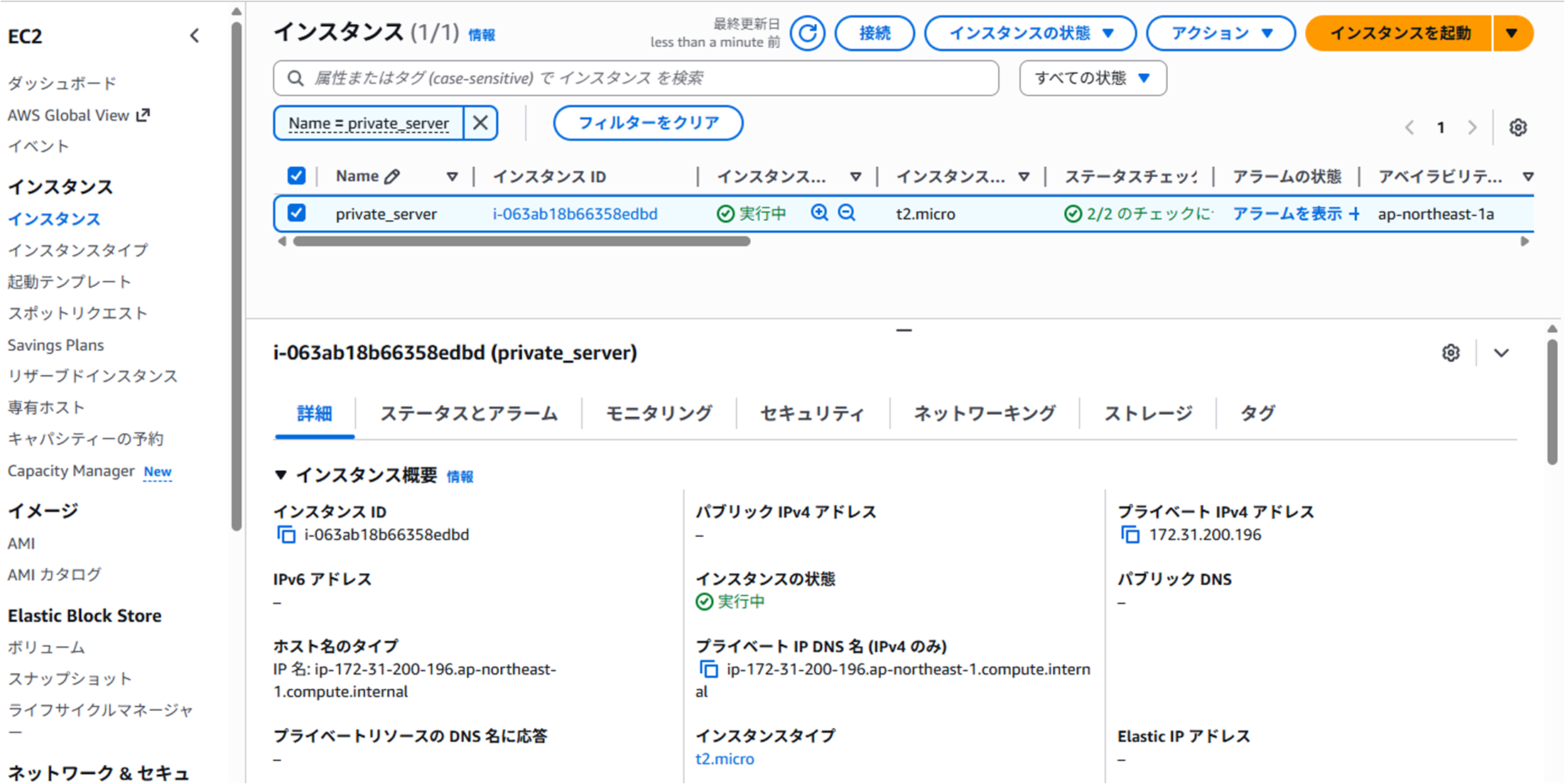
EC2インスタンス
いまさらながらプライベートIPは固定IPを振るべきでした。
疎通確認だけなので問題ないですが、
オンプレから接続確認
今回Webサーバ機能はインストールしていないため、ICMPで疎通確認します。
オンプレセグメントに配置しているPCからAWSのプライベートVPCのEC2インスタンス宛に確認します。
>tracert -d 172.31.200.196

172.31.200.196 へのルートをトレースしています。経由するホップ数は最大 30 です

  1     1 ms     1 ms     1 ms  10.200.0.254
  2    11 ms    11 ms    11 ms  172.31.200.196

トレースを完了しました。最後に
ECMPをする場合、Fortigate側でメトリックを無視する設定をしなければいけないため今回はやめておきました。
柔軟なネットワークを考えた場合、Directconnectで接続しないとECMPやルート制限、接続数上限など制約が多そうです。
ただ、Directconnectはロケーションが必要になるので個人で検証することはできないです。
インターネット接続する場合は、デフォルトルートを配布してオンプレ経由させるか、NAT Gatewayを入れる必要があります。
NAT Gatewayはコストがかかるのでコストを抑える場合は、デフォルトルート配布してオンプレ経由がいいと思います。
サーバ機能のインストールはTerraformで完結できますが、IPSecやBGPの通信確立した後にインストール処理を実行し、処理順番や処理遅延など考える必要があり、面倒なので省略しました。
本番環境で実行する場合は、ネットワークの疎通確認が完了してから、EC2インスタンスを再作成してCloud-initでインストールするのが確実かなと思いました。