AzureにVirtual Nertwork Gatewayを作成し、オンプレミス環境と接続をしてみました。
Azureの構築は以前Terraformで作成した環境に追加します。

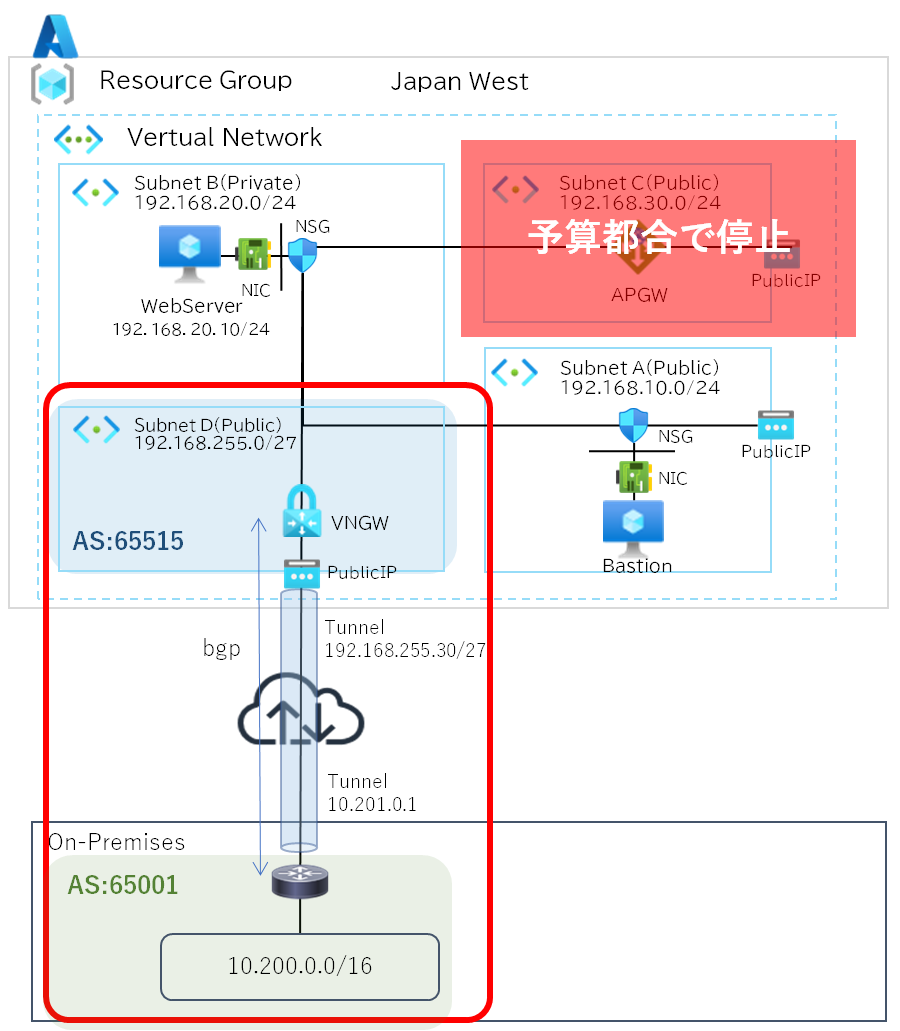
NW構成図
動的IPではVPN接続が安定しないため、自宅検証用に固定IPを取得しました。
オンプレ側でVPN接続する機器は家で眠っていたFortigate 50EをVPN接続専用機として利用しました。
Azure側はVPN専用サブネットを作成し、ついでにBGPで経路交換します。
AzureのAS番号はプライベートASで「65515」がデフォルトで、グローバルIPとトンネル内IPは自動で割り当てられます。
通常であればAzureのメンテナンスなどでトンネルがダウンするのを回避するため、トンネルを2本張りますが古いFortigateのためVPNは1本しか張れませんでした。(最新機種はできるのかな?)
今回Application Gatewayについては予算都合で停止してます。
ファイル追加
TFファイル
既存のネットワークにVPN専用サブネット、PublicIPを追加します。
サブネット名はAzureで予約されているため変更はできないようです。
~~~省略~~~

# VPN用サブネット追加
resource "azurerm_subnet" "gateway" {
  name                 = "GatewaySubnet" #予約サブネット名(変更不可)
  resource_group_name  = azurerm_resource_group.rg.name
  virtual_network_name = azurerm_virtual_network.vnet.name
  address_prefixes     = ["192.168.255.0/27"]
}
# public IP作成
resource "azurerm_public_ip" "vpn_pip" {
  name                = "vpn-gateway-ip"
  location            = azurerm_resource_group.rg.location
  resource_group_name = azurerm_resource_group.rg.name
  allocation_method   = "Static"
  sku                 = "Standard"

  tags = {
    environment = "vpn_pip"
  }
}

# IPアドレス出力
output "vpn_info" {
  value = {
    public_bastion_ip      = azurerm_public_ip.bastion_pip.ip_address
    vpn_gateway_public_ip  = azurerm_public_ip.vpn_pip.ip_address
    azure_bgp_peer_ip      = azurerm_virtual_network_gateway.vpn_gateway.bgp_settings[0].peering_addresses[0].default_addresses[0]
    gateway_subnet         = "192.168.255.0/27"
    onprem_bgp_peer_ip     = "10.201.0.1"
  }
}BGPを動かすため「VpnGW1」を使い、「RouteBased」で作成します。
古いFortigateのため弱い暗号化アルゴリズム、ハッシュ関数、鍵長になるため実際に使う場合は注意が必要です。
またトンネル1本のため、Active-Activeは無効にします。
############################
# VN Gateway
############################
resource "azurerm_virtual_network_gateway" "vpn_gateway" {
  name                = "vnet-gateway"
  location            = azurerm_resource_group.rg.location
  resource_group_name = azurerm_resource_group.rg.name

  type     = "Vpn"
  vpn_type = "RouteBased"

  sku = "VpnGw1"

  active_active = false
  enable_bgp = true

  bgp_settings {
    asn = 65515
  }

  ip_configuration {
    name                          = "vpngatewayconfig"
    public_ip_address_id          = azurerm_public_ip.vpn_pip.id
    private_ip_address_allocation = "Dynamic"
    subnet_id                     = azurerm_subnet.gateway.id
  }
}

resource "azurerm_local_network_gateway" "fortigate" {
  name                = "fortigate-site"
  location            = azurerm_resource_group.rg.location
  resource_group_name = azurerm_resource_group.rg.name

  #オンプレ側グローバルIP
  gateway_address = "固定グローバルIPアドレス"

  #オンプレ側BGP設定
  bgp_settings {
    asn                 = 65001
    bgp_peering_address = "10.201.0.1"
  }
}

resource "azurerm_virtual_network_gateway_connection" "vpn_conn" {
  name                = "fortigate-vpn"
  location            = azurerm_resource_group.rg.location
  resource_group_name = azurerm_resource_group.rg.name

  type                       = "IPsec"
  connection_protocol        = "IKEv2"
  virtual_network_gateway_id = azurerm_virtual_network_gateway.vpn_gateway.id
  local_network_gateway_id   = azurerm_local_network_gateway.fortigate.id

  ipsec_policy {
    ike_encryption          = "AES256"
    ike_integrity           = "SHA256"
    dh_group                = "DHGroup14"
    ipsec_encryption        = "AES256"
    ipsec_integrity         = "SHA256"
    pfs_group               = "PFS2"
  }

  shared_key = "AzureToFortigate!VPN" #事前共通鍵
  enable_bgp = true
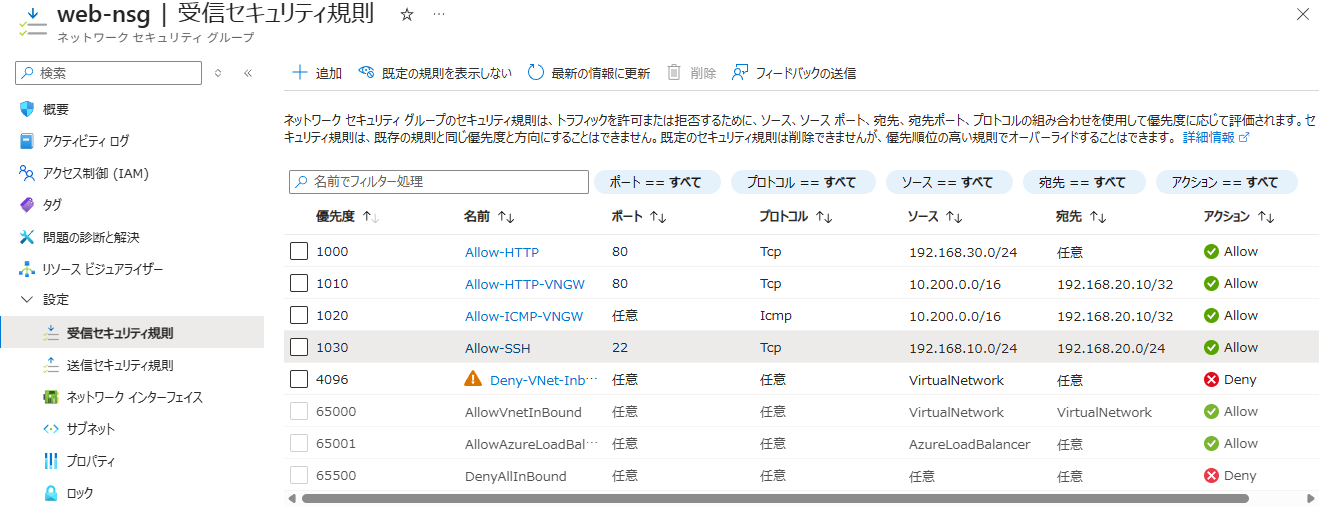
}NSGにオンプレとWebserver間の通信を許可します。
web_ingress_rules = {

~~~省略~~~
  Allow-HTTP-VNGW = {
    access                     = "Allow"
    protocol                   = "Tcp"
    source_port_range          = "*"
    destination_port_range     = "80"
    source_address_prefix      = "10.200.0.0/16"
    destination_address_prefix = "192.168.20.10/32"
  }

  Allow-ICMP-VNGW = {
    access                     = "Allow"
    protocol                   = "Icmp"
    source_port_range          = "*"
    destination_port_range     = "*"
    source_address_prefix      = "10.200.0.0/16"
    destination_address_prefix = "192.168.20.10/32"
  }
}Fortigate
トンネル、IPSec、BGP、ポリシーを追加します。
ポリシーで通信を許可してあげることでBGPネイバーが確立します。
# トンネルインターフェスを作成
config system interface
    edit "azure-vpn"
        set vdom "root"
        set ip 10.201.0.1 255.255.255.255
        set type tunnel
        set remote-ip 192.168.255.30 255.255.255.252
        set snmp-index 8
        set interface "wan"
    next
end
# IKEv2フェーズ1
config vpn ipsec phase1-interface
    edit "azure-vpn"
        set interface "wan"
        set ike-version 2
        set peertype any
        set net-device enable
        set proposal aes256-sha256 aes256-sha1
        set dhgrp 14 2
        set remote-gw Azure側グローバルIP
        set psksecret 事前共有鍵
    next
end
# IKEv2フェーズ2
config vpn ipsec phase2-interface
    edit "azure-vpn-p2"
        set phase1name "azure-vpn"
        set proposal aes256-sha256
        set dhgrp 2
    next
end
# BGP
config router bgp
    set as 65001
    set router-id 10.201.0.1
    set keepalive-timer 10
    set holdtime-timer 30
    config neighbor
        edit "192.168.255.30"
            set remote-as 65515
            set update-source "azure-vpn"
        next
    end
    config network
        edit 1
            set prefix 10.200.0.0 255.255.0.0
        next
    end
end
# ポリシー用のアドレスオブジェクト
config firewall address
  edit "onprem-real"
    set subnet 10.200.0.0 255.255.255.0
  next
  edit "azure-vnet"
   set subnet 192.168.0.0 255.255.0.0
  next
end
# ポリシー
config firewall policy
    edit 1
        set name "onprem-to-azure"
        set srcintf "lan"
        set dstintf "azure-vpn"
        set srcaddr "onprem-real"
        set dstaddr "azure-vnet"
        set action accept
        set schedule "always"
        set service "PING" "HTTP"
    next
end接続確認
Fortigate確認
IKE SA確認
SAが作成されていれば良いです。
# diagnose vpn ike gateway list

vd: root/0
name: azure-vpn
version: 2
interface: ppp1 42
addr: x.x.x.x:500 -> y.y.y.y:500
virtual-interface-addr: 10.201.0.1 -> 192.168.255.30
created: 1319s ago
PPK: no
IKE SA: created 1/1  established 1/1  time 270/335/400 ms
IPsec SA: created 1/1  established 1/1  time 0/200/400 ms

  id/spi: 12391 ooooooooooooooooooooooooooooooooo
  direction: responder
  status: established 1318-1318s ago = 270ms
  proposal: aes256-sha256
  child: no
  SK_ei: xxxxxxxxxxxxxxxx-xxxxxxxxxxxxxxxx-xxxxxxxxxxxxxxxx-xxxxxxxxxxxxxxxx
  SK_er: xxxxxxxxxxxxxxxx-xxxxxxxxxxxxxxxx-xxxxxxxxxxxxxxxx-xxxxxxxxxxxxxxxx
  SK_ai: xxxxxxxxxxxxxxxx-xxxxxxxxxxxxxxxx-xxxxxxxxxxxxxxxx-xxxxxxxxxxxxxxxx
  SK_ar: xxxxxxxxxxxxxxxx-xxxxxxxxxxxxxxxx-xxxxxxxxxxxxxxxx-xxxxxxxxxxxxxxxx
  PPK: no
  message-id sent/recv: 0/2
  lifetime/rekey: 86400/84811
  DPD sent/recv: 00000000/00000000
IPSec SA確認
SAが作成されていれば良いです。
# diagnose vpn tunnel list
list all ipsec tunnel in vd 0
------------------------------------------------------
name=azure-vpn ver=2 serial=4 x.x.x.x:0->y.y.y.y:0 dst_mtu=1454
bound_if=42 lgwy=static/1 tun=intf/0 mode=auto/1 encap=none/528 options[0210]=create_dev frag-rfc  accept_traffic=1 overlay_id=0

proxyid_num=1 child_num=0 refcnt=15 ilast=0 olast=0 ad=/0
stat: rxp=511 txp=521 rxb=60068 txb=26874
dpd: mode=on-demand on=1 idle=20000ms retry=3 count=0 seqno=598
natt: mode=none draft=0 interval=0 remote_port=0
proxyid=azure-vpn-p2 proto=0 sa=1 ref=2 serial=15
  src: 0:0.0.0.0/0.0.0.0:0
  dst: 0:0.0.0.0/0.0.0.0:0
  SA:  ref=3 options=10202 type=00 soft=0 mtu=1390 expire=42273/0B replaywin=1024
       seqno=99 esn=0 replaywin_lastseq=00000098 itn=0 qat=0 hash_search_len=1
  life: type=01 bytes=0/0 timeout=42929/43200
  dec: spi=1f945936 esp=aes key=32 xxxxxxxxxxxxxxxxxxxxxxxxxxxxxxxxxxxxxxxxxxxxxxxxxxxxxx
       ah=sha256 key=32 yyyyyyyyyyyyyyyyyyyyyyyyyyyyyyyyyyyyyyyyyyyyyyyyyyyyyyyyyyyy
  enc: spi=b217f526 esp=aes key=32 xxxxxxxxxxxxxxxxxxxxxxxxxxxxxxxxxxxxxxxxxxxxxxxxxxxxxx
       ah=sha256 key=32 yyyyyyyyyyyyyyyyyyyyyyyyyyyyyyyyyyyyyyyyyyyyyyyyyyyyyyyyyyyy
dec:pkts/bytes=152/7524, enc:pkts/bytes=152/17632BGPピア確認
State/PfxRcdがカウントアップしていれば問題ありません。
# get router info bgp summary
BGP router identifier 10.201.0.1, local AS number 65001
BGP table version is 7
2 BGP AS-PATH entries
0 BGP community entries

Neighbor        V         AS MsgRcvd MsgSent   TblVer  InQ OutQ Up/Down  State/PfxRcd
192.168.255.30  4      65515   10072   10053        6    0    0 00:40:56        1

Total number of neighbors 1BGP受信ルート確認
Azureのルートが表示されていれば問題ありません。
# get router info routing-table bgp

Routing table for VRF=0
B 192.168.0.0/16 [20/0] via 192.168.255.30, azure-vpn, 00:42:15Azure確認
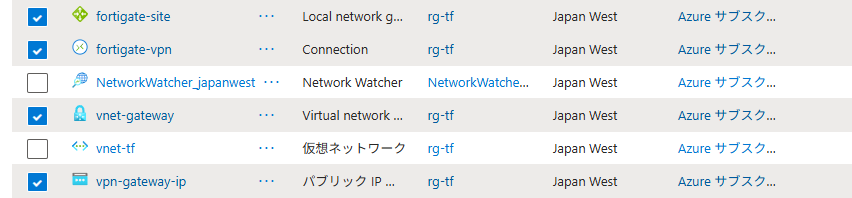
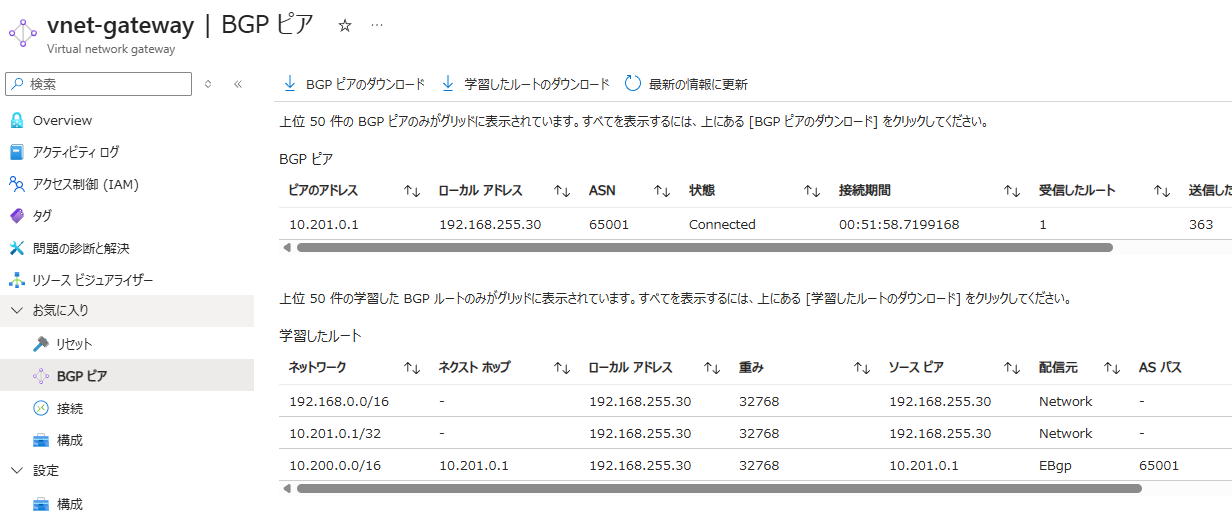
オンプレ側から確認できていれば問題ありませんが一応確認します。
リソース
BGPピア、受信ルート
NSG
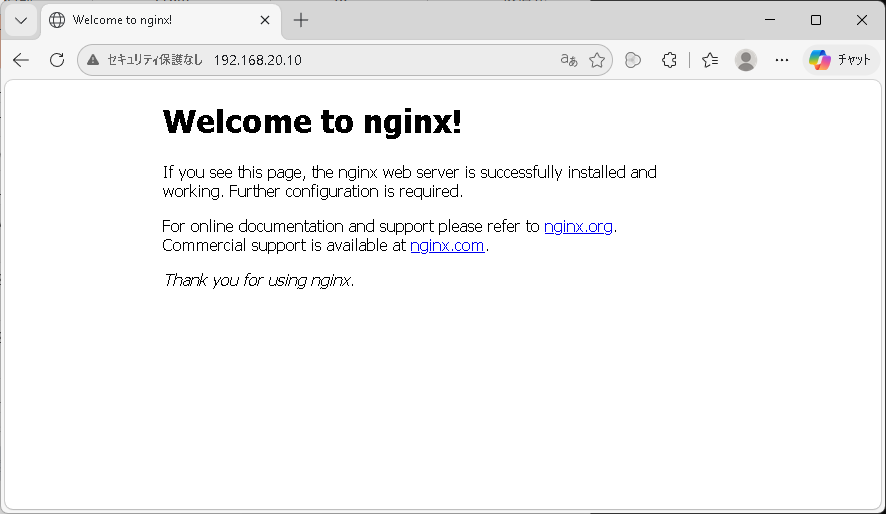
オンプレから接続確認
LAN側の接続端末からブラウザで接続できることを確認します。
ICMPを許可していますので、Ping/Tracerouteでも疎通確認することができます。
最後に
オンプレ側は検証用に古いFortigateを引っ張り出し、弱い暗号スイートを利用したためLAN環境に接続したくなかったので、完全に別環境を用意して構築しました。
今回はFortigate仕様に合わせて、暗号スイートのレベルを下げ、トンネルは1本にしていますが、実際に使う場合はAzure側の仕様に合わせた暗号スイートでトンネル2本接続する方がいいです。