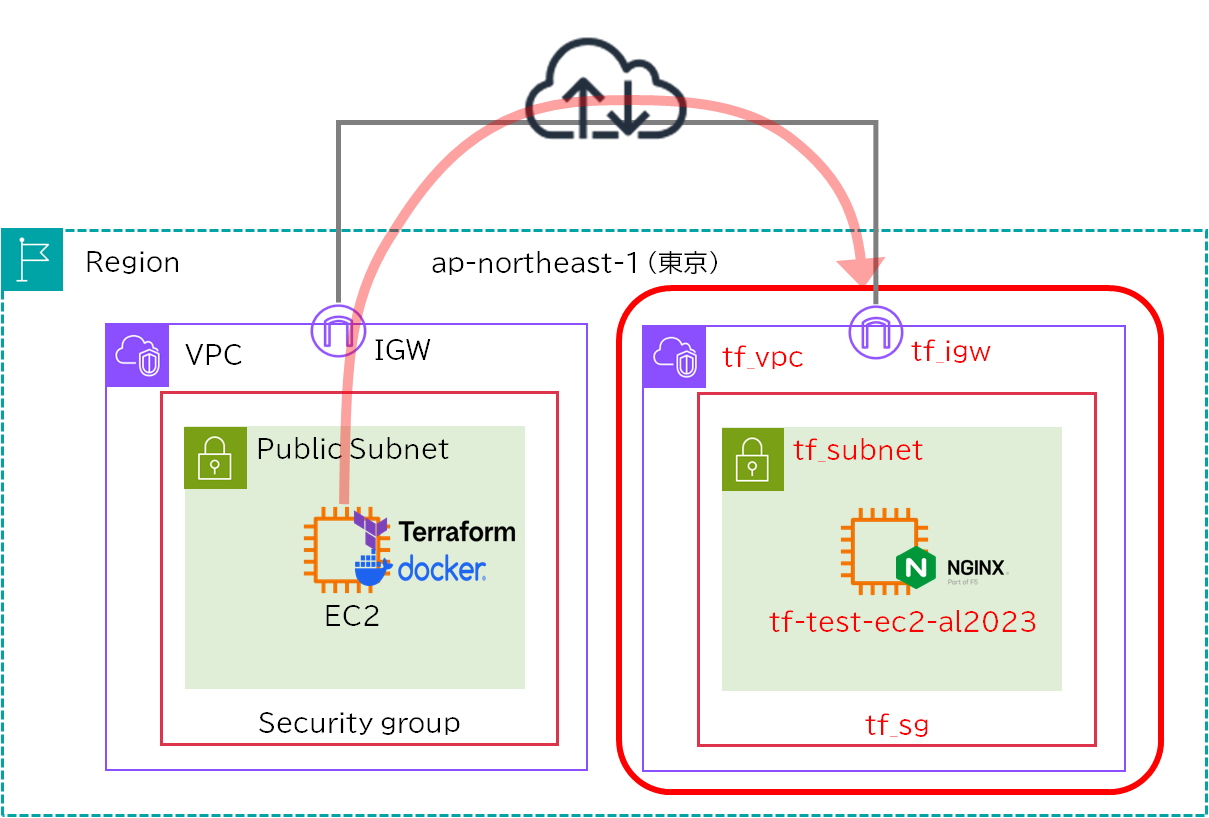
これまでAWS上のTerrafrom実行環境を利用して、AWSとOCIにVMをプロビジョニングしました。
AWSはPublicサブネットだけの簡素な検証、OCIはPublic Subnet、Private Subnet、Object Storageまで作成しました。
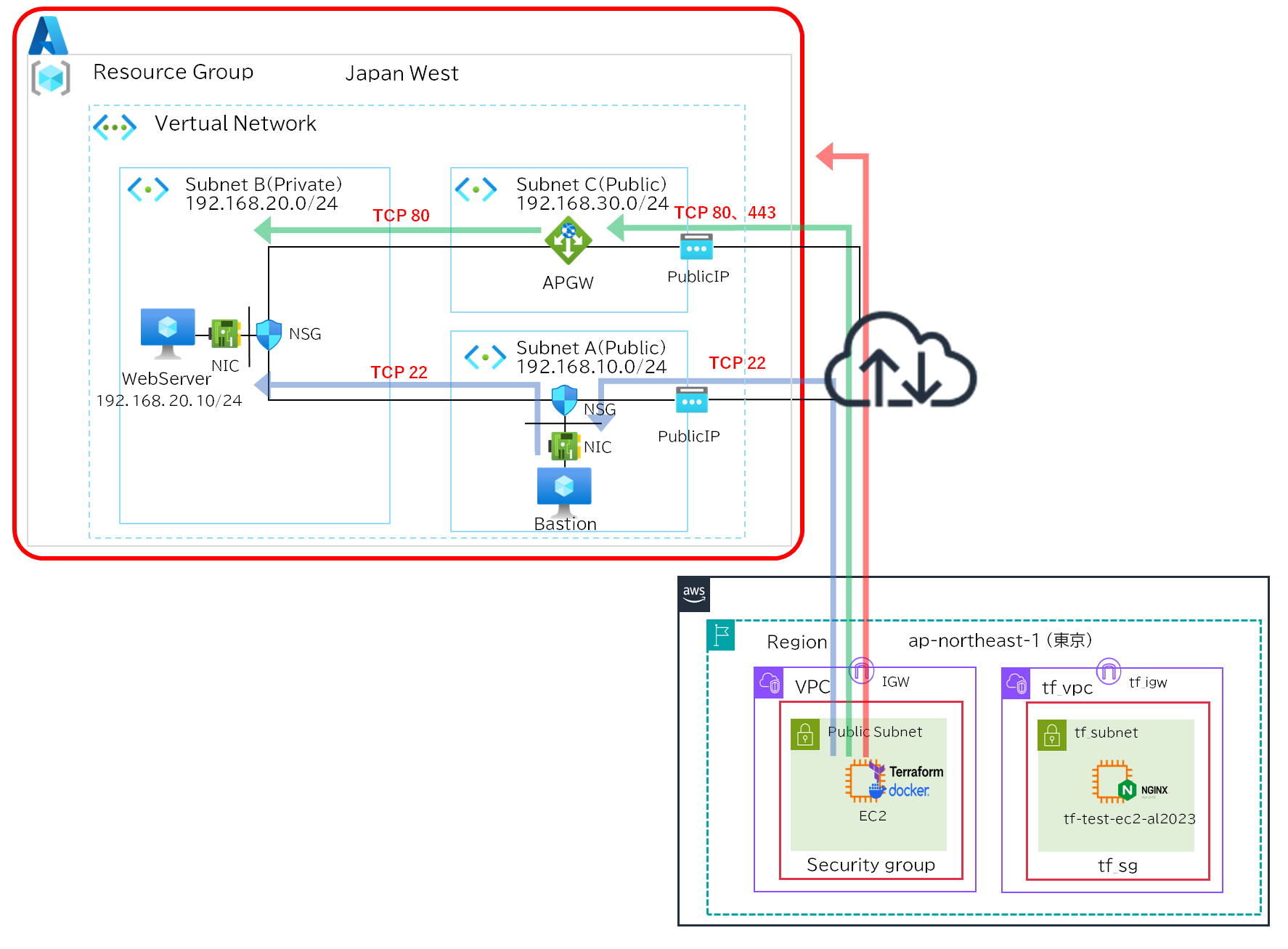
Azureでは趣向を変えてPublic Subnet、Private Subnet、Application Gatewayを作成していきます。


NW構成
Azure設計の留意点
NSGの留意点
Azureでは他のパブリッククラウドと違い、NSGのデフォルトルールにAllowVnetInBoundがあるためVnet内通信が暗黙的に許可されます。
Subnet間通信を制御したい場合は明示的に拒否ルールを追加する必要があり、AWSやOCIと同じような設計を想定していると設計思想がずれる可能性があるので注意が必要です。
また、NSGのデフォルトルールのOutboundにAllowInternetOutBoudがあるためインターネット通信は暗黙的に許可されていますのでこちらも設計上で注意が必要です。
NSGはNICとSubnet各々にアタッチすることができるので、柔軟に対応することは可能になっています。
インターネットアクセスの留意点
Azureにはでデフォルトアウトバウンドアクセス機能があり、PublicIPがなくてもアウトバウンド方向に暗黙的にインターネット通信が可能です。
つまりPrivate Subnetを作成し、PublicIPを作成しなくてもインターネットアクセスができます。
| Azureサービス | デフォルトアウトバウンドアクセス |
|---|---|
| PublicIP なし | 有効化 |
| PublicIP あり | 無効化 |
| Nat Gateway あり | 無効化 |
| Azure Load Balancer あり | 無効化 |
フォルダ構成
├── .env
├── .gitignore
├── .ssh
│   ├── id_rsa
│   └── id_rsa.pub
├── application_gateway.tf
├── cert
│   ├── cert.pem
│   ├── cert.pfx
│   └── key.pem
├── compute.tf
├── docker-compose.yml
├── network.tf
├── nsg.tf
├── provider.tf
├── terraform.tfvars
└── variables.tfサービスプリンシパル作成(アプリ登録、クライアントシークレット作成、ロール割り当て)
・Microsoft Entra ID > アプリの登録>新規でアプリケーションを追加
terraform-dep-test
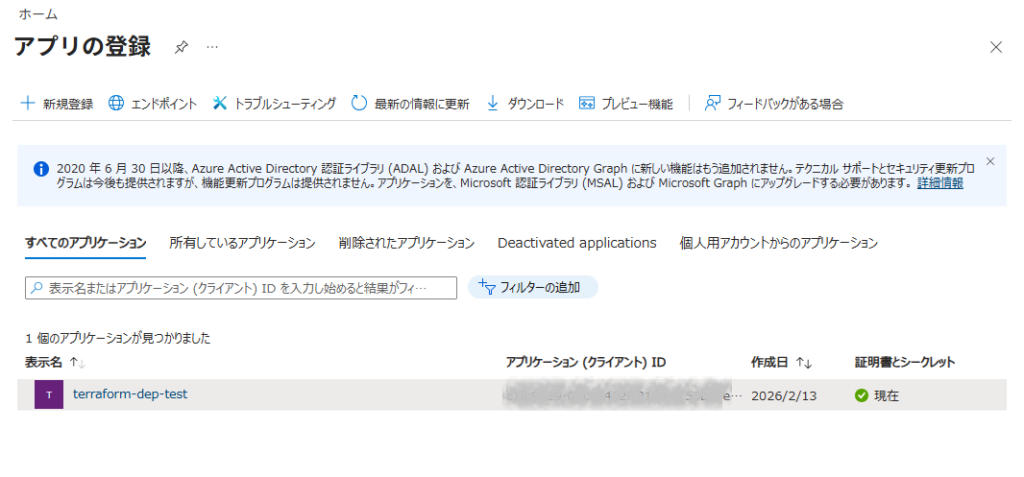
・管理>証明書とシークレット>クライアントシークレット>新規でクライアントシークレットを作成
terraform-dep-test-secret
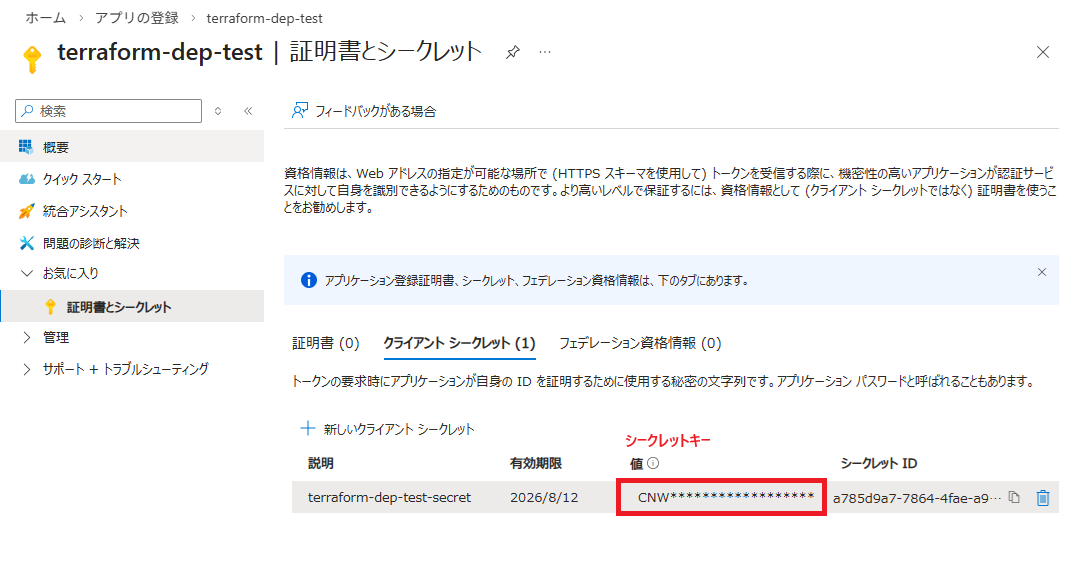
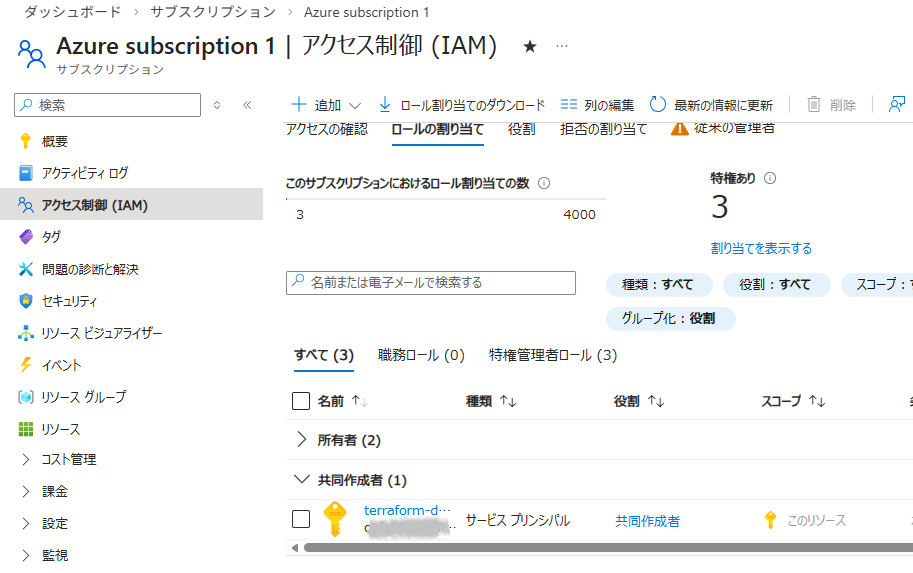
・サブスクリプション>Azure subcription 1>アクセス制御>ロール割り当て>ロールの割り当ての追加>特権管理者ロール
・「共同作業者」を選択し次へ
・メンバーを選択し、「レビューと割り当て」を実行
SSH認証鍵作成
RSA(3000bit)とED25519(128bit)が同等のセキュリティレベルらしいので、RSA/ED25519どちらでもよさそうです。今回はRSA(4096bit)を利用します。
sh-5.2$ mkdir .ssh
sh-5.2$ sudo ssh-keygen -t rsa -b 4096 -m PEM -f ./.ssh/id_rsaHTTPS用の証明書作成
検証環境でSSL/TLSサーバ証明書を作成するのは手間がかかるので自己証明書を作成します。
OpenSSLで鍵と証明書を作成し、PFXに統合します。
sh-5.2$ mkdir cert
sh-5.2$ openssl req -x509 -nodes -days 365 -newkey rsa:2048 -keyout ./cert/key.pem -out ./cert/cert.pem
sh-5.2$ openssl pkcs12 -export -out ./cert/cert.pfx -inkey ./cert/key.pem -in ./cert/cert.pemファイル作成
環境変数ファイル
ARM_CLIENT_ID=xxxxxx-xxxx-xxxx-xxxx-xxxxxxxx
ARM_CLIENT_SECRET=yyyyyyyyyyyyyyyyyyyyyyyyyyyyyyyyy #ここにシークレットキーを記載
ARM_TENANT_ID=zzzzzzz-zzzz-zzzz-zzzz-zzzzzzzzzz
ARM_SUBSCRIPTION_ID=vvvvvvv-vvvv-vvvv-vvvv-vvvvvvvvvv間違えてGitにプッシュしないようgitignoreを作成します。
.env
.terraform/
.ssh/
terraform.tfstate*
cert/TFファイル
#----------------------------------
# プロパイダ設定
#----------------------------------
terraform {
  required_providers {
    azurerm = {
      source  = "hashicorp/azurerm"
      version = "~> 3.90"
    }
  }
}
provider "azurerm" {
  features {}
}RG、Vnet、Subnet(public,private,appgw)、PublicIP(bastionPIP、appgwPIP)を定義しています。
############################
# Resource Group
############################
resource "azurerm_resource_group" "rg" {
  name     = "rg-tf"
  location = "Japan West"

  tags = {
    environment = "tf_rg"
  }
}

############################
# VNet
############################
resource "azurerm_virtual_network" "vnet" {
  name                = "vnet-tf"
  address_space       = ["192.168.0.0/16"]
  location            = azurerm_resource_group.rg.location
  resource_group_name = azurerm_resource_group.rg.name

  tags = {
    environment = "tf_vnet"
  }
}

############################
# Subnets
############################
resource "azurerm_subnet" "public" {
  name                 = "public-subnet"
  resource_group_name  = azurerm_resource_group.rg.name
  virtual_network_name = azurerm_virtual_network.vnet.name
  address_prefixes     = ["192.168.10.0/24"]
}

resource "azurerm_subnet" "private" {
  name                 = "private-subnet"
  resource_group_name  = azurerm_resource_group.rg.name
  virtual_network_name = azurerm_virtual_network.vnet.name
  address_prefixes     = ["192.168.20.0/24"]
}

resource "azurerm_subnet" "appgw" {
  name                 = "appgw-subnet"
  resource_group_name  = azurerm_resource_group.rg.name
  virtual_network_name = azurerm_virtual_network.vnet.name
  address_prefixes     = ["192.168.30.0/24"]
}

############################
# Public IP
############################
resource "azurerm_public_ip" "bastion_pip" {
  name                = "bastion-pip"
  location            = azurerm_resource_group.rg.location
  resource_group_name = azurerm_resource_group.rg.name
  allocation_method   = "Static"
  sku                 = "Standard"

  tags = {
    environment = "bastion_pip"
  }
}
resource "azurerm_public_ip" "appgw_pip" {
  name                = "appgw-pip"
  location            = azurerm_resource_group.rg.location
  resource_group_name = azurerm_resource_group.rg.name
  allocation_method   = "Static"
  sku                 = "Standard"

  tags = {
    environment = "appgw_pip"
  }
}

############################
# CLIに表示
############################
output "public_bastion_ip" {
  value = azurerm_public_ip.bastion_pip.ip_address
}
output "public_appgw_ip" {
  value = azurerm_public_ip.appgw_pip.ip_address
}NSGを定義しています。NSGの作成をするにあたり、Bastion/WebserverでそれぞれIngress/Egressを分割し変数(variables.tf)で管理します。
Vnet間の暗黙の許可をさせないように、InboundのPriority4096でVnet間のDenyを明示的に設定しています。
Priorityの管理が面倒なのでInboundは1000、Outboundは2000から開始し10ずつプラスして採番していきます。
今回はNSGをSubnetに適用しています。
############################
# NSG (Bastion)
############################
resource "azurerm_network_security_group" "bastion_nsg" {
  name                = "bastion-nsg"
  location            = azurerm_resource_group.rg.location
  resource_group_name = azurerm_resource_group.rg.name

  tags = {
    environment = "bastion_nsg"
  }
}

########### Ingressルール ###########
locals {
  bastion_ingress_rule_list = [
    for k in sort(keys(var.bastion_ingress_rules)) : {
      name  = k
      value = var.bastion_ingress_rules[k]
    }
  ]
}

resource "azurerm_network_security_rule" "bastion_ingress" {
  for_each = {
    for idx, rule in local.bastion_ingress_rule_list :
    rule.name => merge(rule.value, {
      priority = var.ingress_priority_start + (idx * var.priority_step)
      direction = "Inbound"
    })
  }

  name                        = each.key
  priority                    = each.value.priority
  direction                   = each.value.direction
  access                      = each.value.access
  protocol                    = each.value.protocol
  source_port_range           = each.value.source_port_range
  destination_port_range      = each.value.destination_port_range
  source_address_prefix       = each.value.source_address_prefix
  destination_address_prefix  = each.value.destination_address_prefix

  resource_group_name         = azurerm_resource_group.rg.name
  network_security_group_name = azurerm_network_security_group.bastion_nsg.name
}

########### VNet内通信の暗黙Allowがあるためその前にDenyを行う ###########
resource "azurerm_network_security_rule" "bastion_deny_vnet_inbound" {
  name                        = "Deny-VNet-Inbound"
  priority                    = 4096
  direction                   = "Inbound"
  access                      = "Deny"
  protocol                    = "*"
  source_address_prefix       = "VirtualNetwork"
  destination_address_prefix  = "*"
  source_port_range           = "*"
  destination_port_range      = "*"
  resource_group_name         = azurerm_resource_group.rg.name
  network_security_group_name = azurerm_network_security_group.bastion_nsg.name
}

########### Egressルール ###########
locals {
  bastion_egress_rule_list = [
    for k in sort(keys(var.bastion_egress_rules)) : {
      name  = k
      value = var.bastion_egress_rules[k]
    }
  ]
}

resource "azurerm_network_security_rule" "bastion_egress" {
  for_each = {
    for idx, rule in local.bastion_egress_rule_list :
    rule.name => merge(rule.value, {
      priority = var.egress_priority_start + (idx * var.priority_step)
      direction = "Outbound"
    })
  }

  name                        = each.key
  priority                    = each.value.priority
  direction                   = each.value.direction
  access                      = each.value.access
  protocol                    = each.value.protocol
  source_port_range           = each.value.source_port_range
  destination_port_range      = each.value.destination_port_range
  source_address_prefix       = each.value.source_address_prefix
  destination_address_prefix  = each.value.destination_address_prefix

  resource_group_name         = azurerm_resource_group.rg.name
  network_security_group_name = azurerm_network_security_group.bastion_nsg.name
}

########### Association (Bastion) ###########
resource "azurerm_subnet_network_security_group_association" "bastion_assoc" {
  subnet_id                 = azurerm_subnet.public.id
  network_security_group_id = azurerm_network_security_group.bastion_nsg.id
}

############################
# NSG (Web)
############################
resource "azurerm_network_security_group" "web_nsg" {
  name                = "web-nsg"
  location            = azurerm_resource_group.rg.location
  resource_group_name = azurerm_resource_group.rg.name

  tags = {
    environment = "web_nsg"
  }
}

########### Ingressルール ###########
locals {
  web_ingress_rule_list = [
    for k in sort(keys(var.web_ingress_rules)) : {
      name  = k
      value = var.web_ingress_rules[k]
    }
  ]
}

resource "azurerm_network_security_rule" "web_ingress" {
  for_each = {
    for idx, rule in local.web_ingress_rule_list :
    rule.name => merge(rule.value, {
      priority = var.ingress_priority_start + (idx * var.priority_step)
      direction = "Inbound"
    })
  }

  name                        = each.key
  priority                    = each.value.priority
  direction                   = each.value.direction
  access                      = each.value.access
  protocol                    = each.value.protocol
  source_port_range           = each.value.source_port_range
  destination_port_range      = each.value.destination_port_range
  source_address_prefix       = each.value.source_address_prefix
  destination_address_prefix  = each.value.destination_address_prefix

  resource_group_name         = azurerm_resource_group.rg.name
  network_security_group_name = azurerm_network_security_group.web_nsg.name
}
########### VNet内通信の暗黙Allowがあるためその前にDenyを行う ###########
resource "azurerm_network_security_rule" "web_deny_vnet_inbound" {
  name                        = "Deny-VNet-Inbound"
  priority                    = 4096
  direction                   = "Inbound"
  access                      = "Deny"
  protocol                    = "*"
  source_address_prefix       = "VirtualNetwork"
  destination_address_prefix  = "*"
  source_port_range           = "*"
  destination_port_range      = "*"
  resource_group_name         = azurerm_resource_group.rg.name
  network_security_group_name = azurerm_network_security_group.web_nsg.name
}

########### Egressルール ###########
locals {
  web_egress_rule_list = [
    for k in sort(keys(var.web_egress_rules)) : {
      name  = k
      value = var.web_egress_rules[k]
    }
  ]
}

resource "azurerm_network_security_rule" "web_egress" {
  for_each = {
    for idx, rule in local.web_egress_rule_list :
    rule.name => merge(rule.value, {
      priority = var.egress_priority_start + (idx * var.priority_step)
      direction = "Outbound"
    })
  }

  name                        = each.key
  priority                    = each.value.priority
  direction                   = each.value.direction
  access                      = each.value.access
  protocol                    = each.value.protocol
  source_port_range           = each.value.source_port_range
  destination_port_range      = each.value.destination_port_range
  source_address_prefix       = each.value.source_address_prefix
  destination_address_prefix  = each.value.destination_address_prefix

  resource_group_name         = azurerm_resource_group.rg.name
  network_security_group_name = azurerm_network_security_group.web_nsg.name
}

########### Association (Web) ###########
resource "azurerm_subnet_network_security_group_association" "web_assoc" {
  subnet_id                 = azurerm_subnet.private.id
  network_security_group_id = azurerm_network_security_group.web_nsg.id
}VMを定義しています。
APPGWとの接続を安定させるため、WebServerのIPアドレスを「192.168.20.10」に固定しています。
############################
# Bastion VM
############################
resource "azurerm_network_interface" "bastion_nic" {
  name                = "bastion-nic"
  location            = azurerm_resource_group.rg.location
  resource_group_name = azurerm_resource_group.rg.name

  ip_configuration {
    name                          = "internal"
    subnet_id                     = azurerm_subnet.public.id
    private_ip_address_allocation = "Dynamic"
    public_ip_address_id          = azurerm_public_ip.bastion_pip.id
  }
  tags = {
    environment = "bastion_nic"
  }
}

resource "azurerm_linux_virtual_machine" "bastion_vm" {
  name                = "bastion-vm"
  location            = azurerm_resource_group.rg.location
  resource_group_name = azurerm_resource_group.rg.name
  #size                = "Standard_B1s"
  size                = "Standard_B2ats_v2"
  admin_username      = "azureuser"
  network_interface_ids = [azurerm_network_interface.bastion_nic.id]

  admin_ssh_key {
    username   = "azureuser"
    public_key = file("/workspace/.ssh/id_rsa.pub")
  }

  os_disk {
    caching              = "ReadWrite"
    storage_account_type = "Standard_LRS"
  }

  source_image_reference {
    publisher = "Canonical"
    offer     = "0001-com-ubuntu-server-jammy"
    sku       = "22_04-lts"
    version   = "latest"
  }
}

############################
# Web VM
############################
resource "azurerm_network_interface" "web_nic" {
  name                = "web-nic"
  location            = azurerm_resource_group.rg.location
  resource_group_name = azurerm_resource_group.rg.name

  ip_configuration {
    name                          = "internal"
    subnet_id                     = azurerm_subnet.private.id
    #private_ip_address_allocation = "Dynamic"
    private_ip_address_allocation = "Static"
    private_ip_address            = "192.168.20.10" #APPGWとの接続を安定させるため固定
  }
}

resource "azurerm_linux_virtual_machine" "web_vm" {
  name                = "web-vm"
  location            = azurerm_resource_group.rg.location
  resource_group_name = azurerm_resource_group.rg.name
  #size                = "Standard_B1s"
  size                = "Standard_B2ats_v2"
  admin_username      = "azureuser"
  network_interface_ids = [azurerm_network_interface.web_nic.id]

  admin_ssh_key {
    username   = "azureuser"
    public_key = file("/workspace/.ssh/id_rsa.pub")
  }

  os_disk {
    caching              = "ReadWrite"
    storage_account_type = "Standard_LRS"
  }

  source_image_reference {
    publisher = "Canonical"
    offer     = "0001-com-ubuntu-server-jammy"
    sku       = "22_04-lts"
    version   = "latest"
  }
  custom_data = base64encode(<<-EOF
    #!/bin/bash
    apt update -y
    apt install -y nginx
    systemctl enable nginx
    systemctl start nginx
  EOF
  )
}APPGWを定義しています。
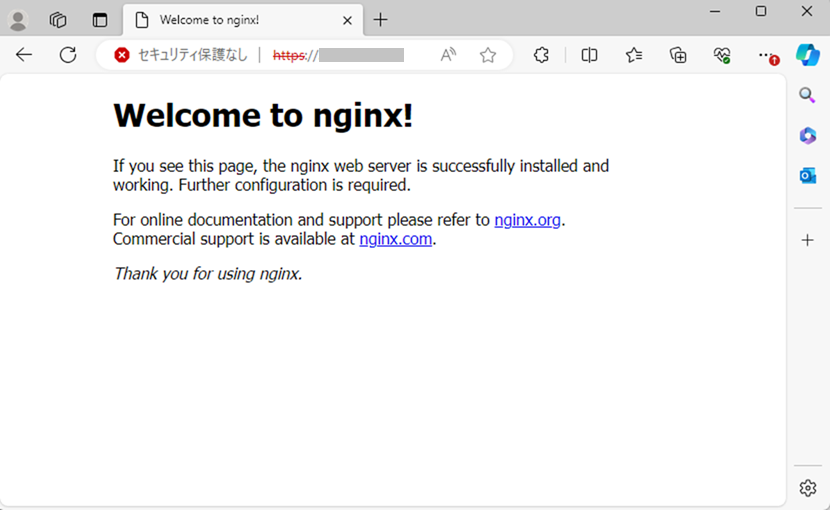
検証用のため自己証明書を取り込み、HTTP通信の場合HTTPSにリダイレクトさせます。
############################
# Application Gateway
############################
resource "azurerm_application_gateway" "appgw" {
  name                = "appgw-tf"
  location            = azurerm_resource_group.rg.location
  resource_group_name = azurerm_resource_group.rg.name

  sku {
    name     = "Standard_v2"
    tier     = "Standard_v2"
    capacity = 1
  }

  gateway_ip_configuration {
    name      = "appgw-ip-config"
    subnet_id = azurerm_subnet.appgw.id
  }

  ssl_policy {
    policy_type = "Predefined"
    policy_name = "AppGwSslPolicy20170401S" # TLS 1.2対応
  }
  ssl_certificate {
    name     = "selfcert"
    data     = filebase64("/workspace/cert/cert.pfx")
    password = var.pfx_password
  }

  frontend_port {
    name = "http-port"
    port = 80
  }

  frontend_port {
    name = "https-port"
    port = 443
  }

  frontend_ip_configuration {
    name                 = "frontend-ip"
    public_ip_address_id = azurerm_public_ip.appgw_pip.id
  }
  backend_address_pool {
    name = "backend-pool"
  }
  backend_http_settings {
    name                  = "http-settings"
    port                  = 80
    protocol              = "Http"
    cookie_based_affinity = "Disabled"
  }

  http_listener {
    name                           = "http-listener"
    frontend_ip_configuration_name = "frontend-ip"
    frontend_port_name             = "http-port"
    protocol                       = "Http"
  }

  http_listener {
    name                           = "https-listener"
    frontend_ip_configuration_name = "frontend-ip"
    frontend_port_name             = "https-port"
    protocol                       = "Https"
    ssl_certificate_name           = "selfcert"
  }

  redirect_configuration {
    name                 = "http-to-https"
    redirect_type        = "Permanent"
    target_listener_name = "https-listener"
    include_path         = true
    include_query_string = true
  }

  request_routing_rule {
    name                        = "http-redirect-rule"
    rule_type                   = "Basic"
    http_listener_name          = "http-listener"
    redirect_configuration_name = "http-to-https"
    priority                    = 100
  }

  request_routing_rule {
    name                       = "https-rule"
    rule_type                  = "Basic"
    http_listener_name         = "https-listener"
    backend_address_pool_name  = "backend-pool"
    backend_http_settings_name = "http-settings"
    priority                   = 200
  }
}
resource "azurerm_network_interface_application_gateway_backend_address_pool_association" "web_assoc" {
  network_interface_id  = azurerm_network_interface.web_nic.id
  ip_configuration_name = "internal"

  backend_address_pool_id = one([
    for pool in azurerm_application_gateway.appgw.backend_address_pool :
    pool.id if pool.name == "backend-pool"
  ])
}変数を宣言します。
############################
# 変数定義
############################
variable "pfx_password" {
  type      = string
  sensitive = true
}

variable "bastion_ingress_rules" {
  description = "Inbound rules Bastion"
  type = map(object({
    access                     = string
    protocol                   = string
    source_port_range          = string
    destination_port_range     = string
    source_address_prefix      = string
    destination_address_prefix = string
  }))
  default = {}
}

variable "bastion_egress_rules" {
  description = "Outbound rules Bastion"
  type = map(object({
    access                     = string
    protocol                   = string
    source_port_range          = string
    destination_port_range     = string
    source_address_prefix      = string
    destination_address_prefix = string
  }))
  default = {}
}
variable "web_ingress_rules" {
  description = "Inbound rules Web"
  type = map(object({
    access                     = string
    protocol                   = string
    source_port_range          = string
    destination_port_range     = string
    source_address_prefix      = string
    destination_address_prefix = string
  }))
  default = {}
}

variable "web_egress_rules" {
  description = "Outbound rules Web"
  type = map(object({
    access                     = string
    protocol                   = string
    source_port_range          = string
    destination_port_range     = string
    source_address_prefix      = string
    destination_address_prefix = string
  }))
  default = {}
}

# 自動採番の開始番号(ingress)
variable "ingress_priority_start" {
  type    = number
  default = 1000
}

# 自動採番の開始番号(egress)
variable "egress_priority_start" {
  type    = number
  default = 2000
}

variable "priority_step" {
  type    = number
  default = 10
}変数の実値を定義します。
PFX証明書で設定したパスワードを記載してください。
############################
# 変数設定
############################
pfx_password   = "xxxxxxxxxxxx" #適当なパスワード。pfx作成時のパスワード

bastion_ingress_rules = {
  Allow-SSH = {
    access                     = "Allow"
    protocol                   = "Tcp"
    source_port_range          = "*"
    destination_port_range     = "22"
    source_address_prefix      = "*"
    destination_address_prefix = "*"
  }
}

bastion_egress_rules = {
  Allow-All = {
    access                     = "Allow"
    protocol                   = "*"
    source_port_range          = "*"
    destination_port_range     = "*"
    source_address_prefix      = "*"
    destination_address_prefix = "*"
  }
}
web_ingress_rules = {
  Allow-SSH = {
    access                     = "Allow"
    protocol                   = "Tcp"
    source_port_range          = "*"
    destination_port_range     = "22"
    source_address_prefix      = "192.168.10.0/24"
    destination_address_prefix = "192.168.20.0/24"
  }

  Allow-HTTP = {
    access                     = "Allow"
    protocol                   = "Tcp"
    source_port_range          = "*"
    destination_port_range     = "80"
    source_address_prefix      = "192.168.30.0/24"
    destination_address_prefix = "*"
  }
}

web_egress_rules = {
  Allow-All = {
    access                     = "Allow"
    protocol                   = "*"
    source_port_range          = "*"
    destination_port_range     = "*"
    source_address_prefix      = "*"
    destination_address_prefix = "*"
  }
}Terraform実行
Terraformの実行コマンドはaws-vaultを挟まないので、AWSの時とは少し違いますがdocker composeで動作するため出力結果や確認方法は同じになります。
sh-5.2$ # Terraform初期化
sh-5.2$ docker compose run --rm terraform init
sh-5.2$ # 現在の管理状態と実際のクラウド環境の差分比較
sh-5.2$ docker compose run --rm terraform plan
sh-5.2$ # 設定差分を反映
sh-5.2$ docker compose run --rm terraform apply -auto-approve
sh-5.2$ # 管理しているリソース一覧を表示
sh-5.2$ docker compose run --rm terraform state listリソースの再作成や削除をする場合は下記コマンドになります。
sh-5.2$ # compute instanceの一部再作成
sh-5.2$ docker compose run --rm terraform apply -auto-approve -replace=oci_core_instance.[instance名]
sh-5.2$ # 管理しているリソースの一部削除
sh-5.2$ docker compose run --rm terraform destroy -auto-approve -target=oci_core_instance.[instance名]
sh-5.2$ # 管理しているリソースを全削除
sh-5.2$ docker compose run --rm terraform destroy -auto-approve接続確認
GUI確認
・リソースグループ
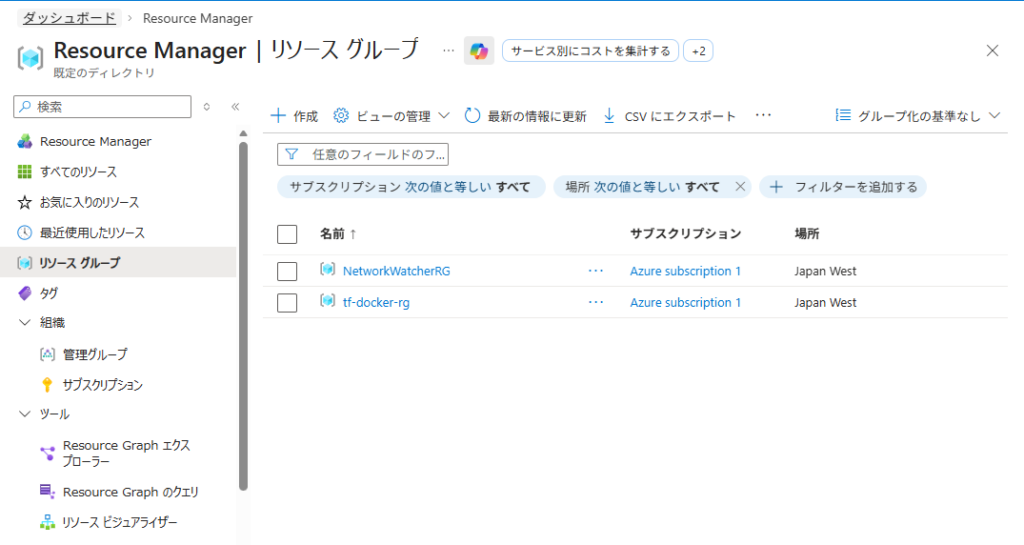
・リソース
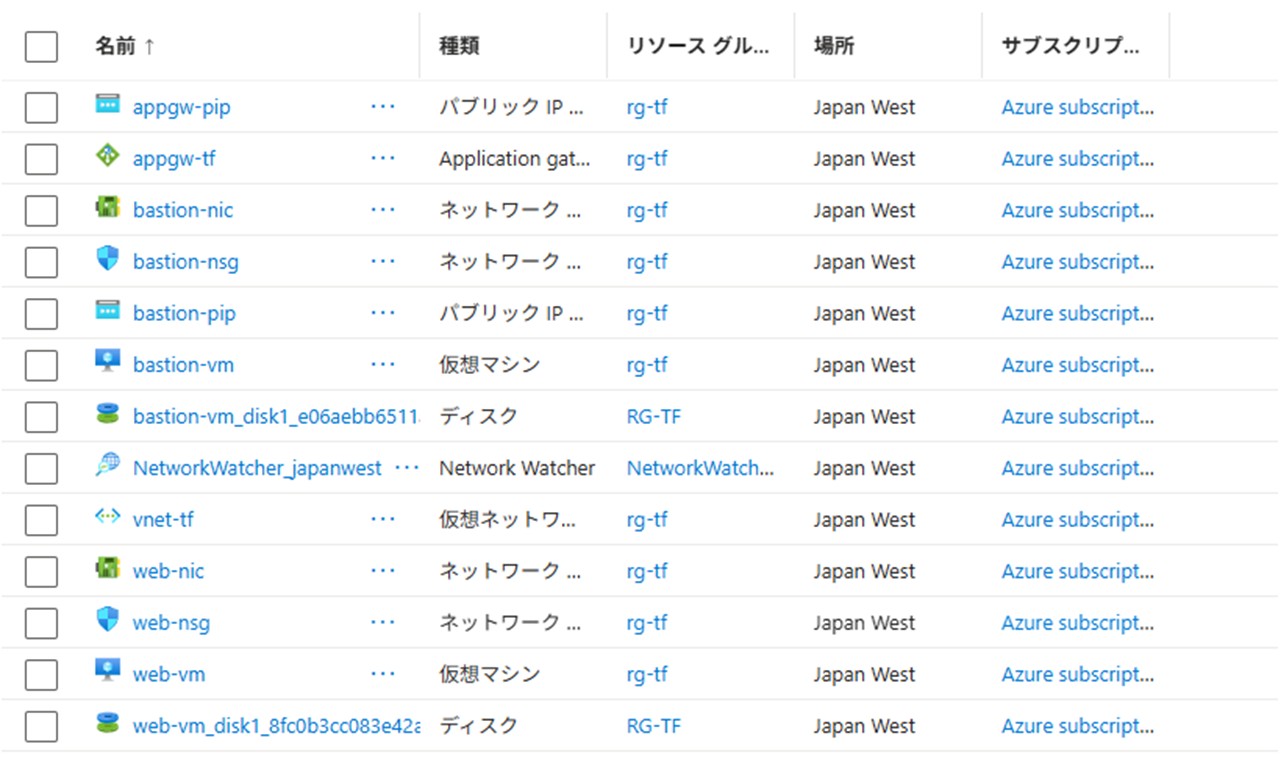
・Application Gateway
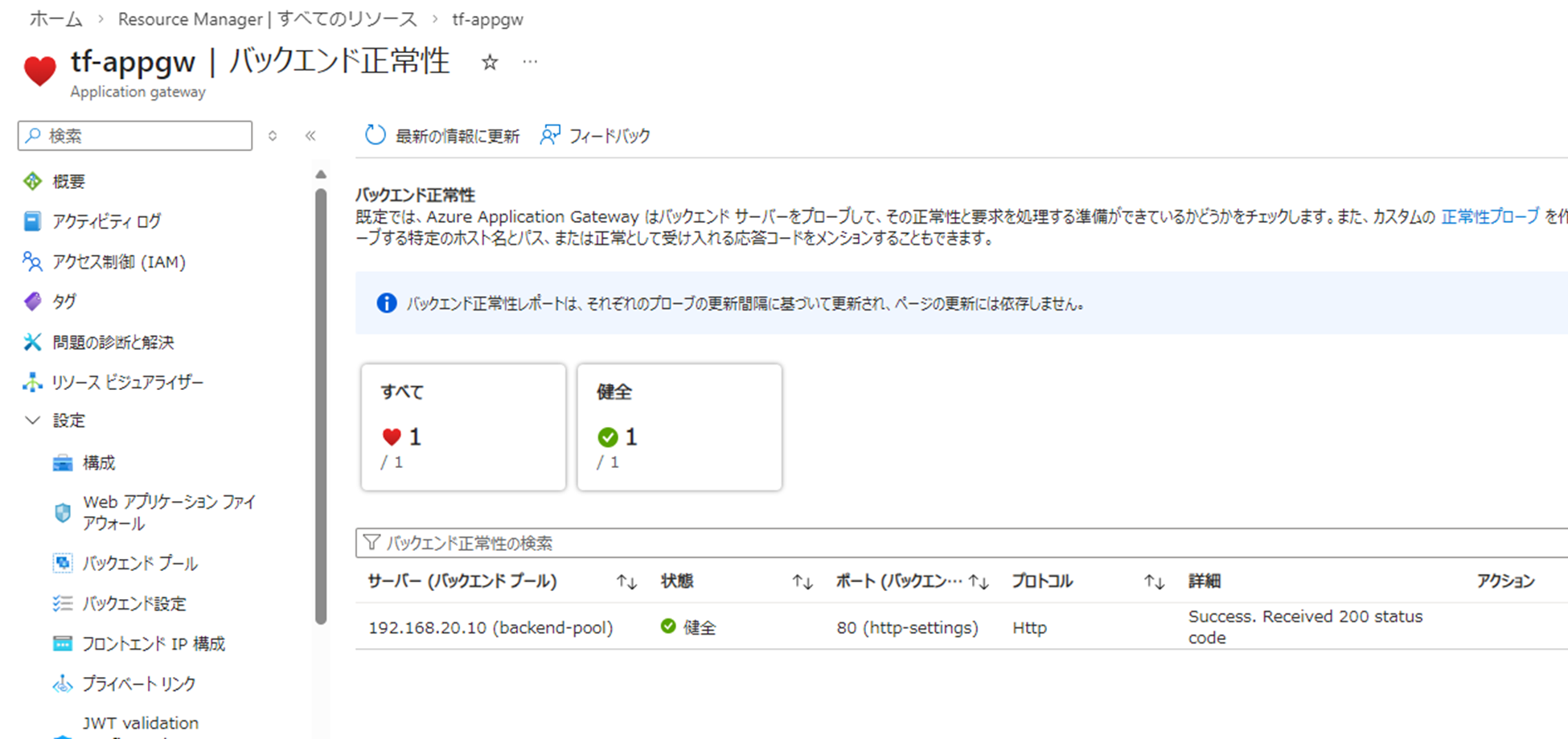
通信確認
HTTP+HTTPS接続確認
SSH接続(AWS → Bastion → Webserver)
sh-5.2$ sudo ssh -i ./.ssh/id_rsa azureuser@xxx.xxx.xxx.xxx
The authenticity of host '20.63.218.174 (xxx.xxx.xxx.xxx)' can't be established.
...
To run a command as administrator (user "root"), use "sudo <command>".
See "man sudo_root" for details.

azureuser@bastion-vm:~$
azureuser@bastion-vm:~$ #秘密鍵を貼り付け、権限変更
azureuser@bastion-vm:~$ sudo vi id_rsa
azureuser@bastion-vm:~$ sudo chmod 600 id_rsa
azureuser@bastion-vm:~$ sudo ssh -i id_rsa azureuser@192.168.20.10
The authenticity of host '192.168.20.10 (192.168.20.10)' can't be established.
...
To run a command as administrator (user "root"), use "sudo <command>".
See "man sudo_root" for details.

azureuser@web-vm:~$Vnet内通信拒否確認 (Bastion→Webserver)
azureuser@bastion-vm:~$ curl -XGET http://192.168.20.10
^C
azureuser@bastion-vm:~$最後に
Private Subnet内のVMからPublicIPもNAT Gatewayも作成してないのにパッケージのインストールができたのには少し驚きました。
Azureの基本的な機能しか検証できていませんが、NSGの暗黙Vnet内通信許可やデフォルトアウトバウンドアクセス等Azureの癖がちらちらと見えた気がします。
今後の検証環境の拡張としてはExpressRouteやPublicDNSに手を出してみたいけど財布が爆発しそうなので、IPSecVPNまでを目標にしていきたいですね。